3. Camera Alignment
Proper camera alignment assures finish line accuracy. The goal is to square the camera both
horizontally and vertically. This is accomplished with the help of the calibration tool within the
Finish Line tab.
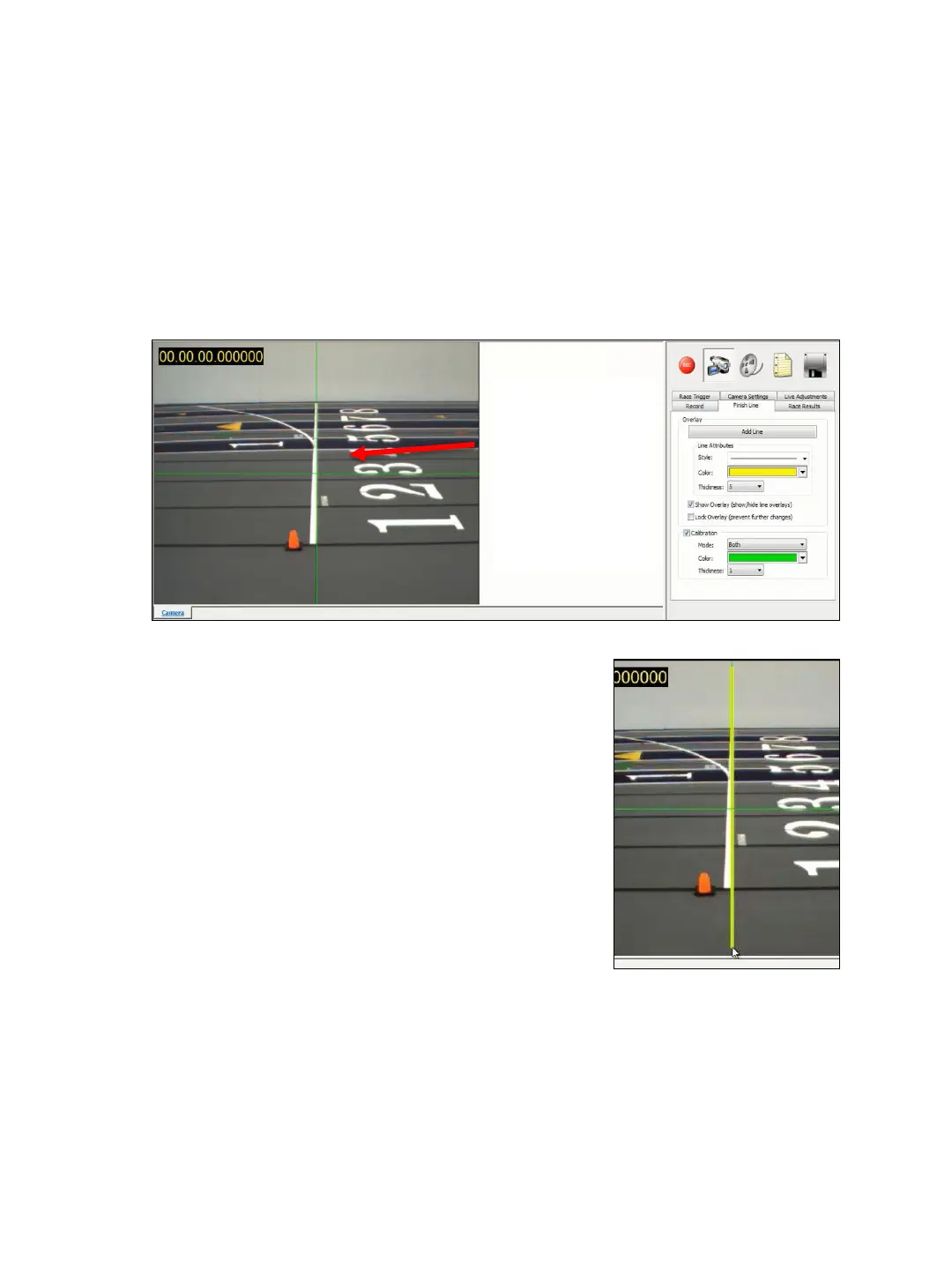
1. ➔ PLACE the timing computer in a stable location near the camera aligned on the finish-line
2. ➔ CONNECT the camera to the computer and obtain a live image within the software.
3. ➔ CHOOSE the Finish Line tab and check the Calibrate box and Both from the Mode drop
down list.
4. ➔ While standing on a ladder or reaching to
adjust the camera, align the camera so
that the vertical line is on the leading edge
of the finish line and the horizontal line is
perpendicular to a lane line
5. ➔ SELECT the ADD LINE button and draw a
vertical line directly on top of the
calibrated center line (positioned over the
finish line). Adjust the line width and color as
preferred and SELECT the Lock Overlay check
box and Uncheck the Calibration box
Calibration
Lines appear
both
horizontally
and vertically
TIP: To delete the finish line: Click on the finish line and RIGHT-CLICK on the line
and select delete.
TIP: To Straighten line: With the curser on the bottom of the line, CLICK and
HOLD and move in the direction the line needs to straighten.
16


 To Next Page