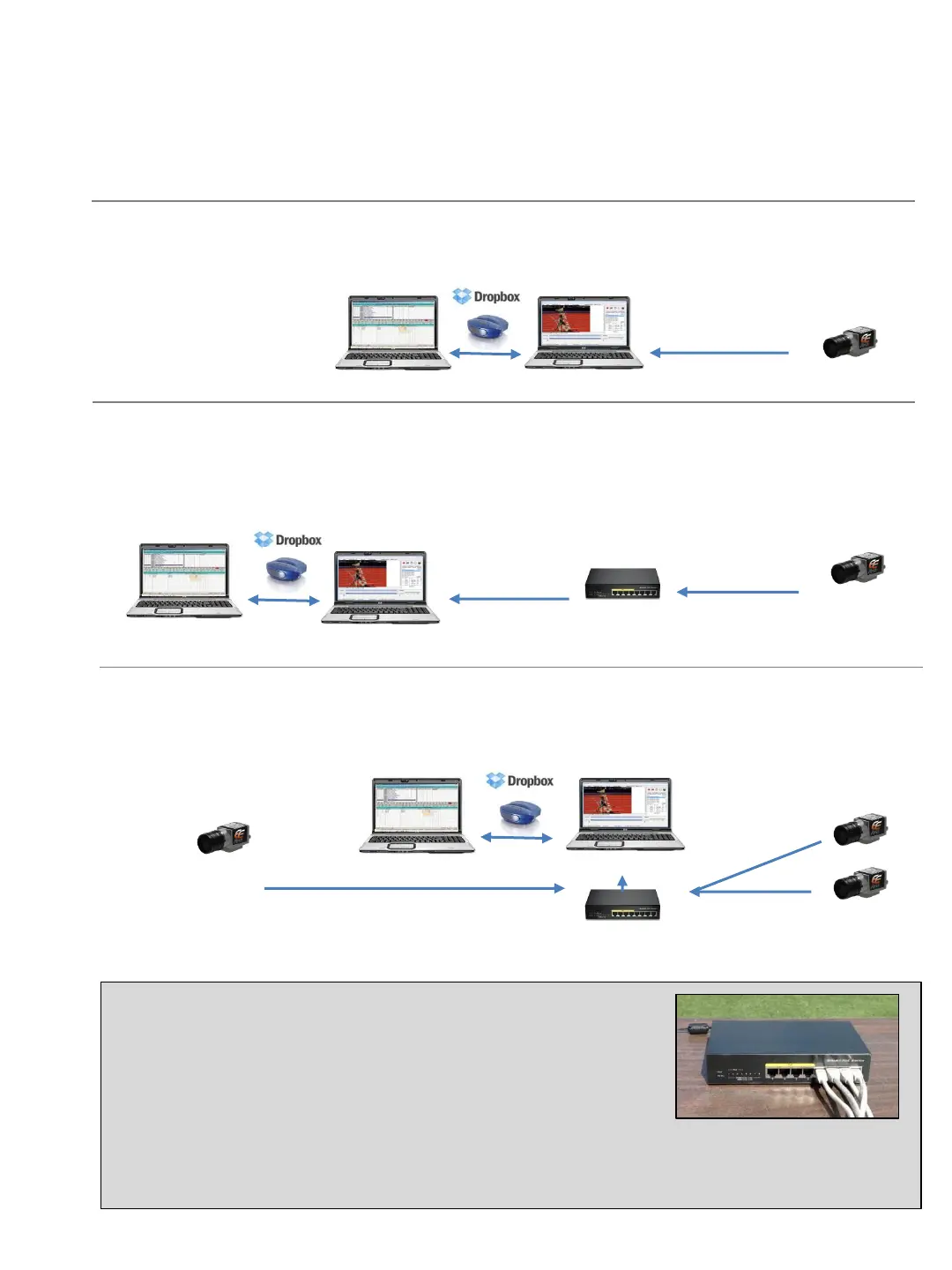
1. Standard
The camera is positioned up to 300 feet away with the included Ethernet data cable.
2. Extended Distance
The use of an optional PoE Gigibit Ethernet switch (must support 9k jumbo frames) can double
the distance from your camera to your timing computer. * Also used when no power source is
available for the camera.
3. Multiple Camera
Connect two or more cameras to the Ethernet Switch and easily switch from either camera
within the Pro software. Ideal for running dash events with the wind.
G. SET UP OPTIONS
Below are hardware set up options for you to consider based on your facility and objectives. All options
show the Eagle Eye Pro timing computer networked to share files with the meet management computer
(via your choice of included USB switch or wireless options such as Dropbox).
Gigibit Enabled PoE Ethernet Switch
The use of a Switch can significantly increase the distance from the timing
computer to the camera. Multiple cameras can be connected to the same
switch and viewable within Eagle Eye Pro software.
* No Camera Power Needed
Your Eagle Eye Pro timing camera is PoE enabled, allowing it to draw power from a powered PoE Ethernet
switch without the need for its own power source. The examples above using a PoE Ethernet Switch does not
require the camera to have its own power source.
300 foot data cable
Up to 300
foot data cable
Up to 600 feet total distance with one switch, 1200 feet with two switches, etc.
Up to 300
foot data cable
Up to 300 foot data cable
Up to 300 foot data cable
18
The Ethernet Switch to be located
in press box or on the infield. If on the infield, a third 300 foot cable would be required from the Switch to the timing computer
Eagle Eye Timing Computer
Meet Management Computer
Meet Management Computer
Eagle Eye Timing Computer
Eagle Eye Timing Computer
Meet Management Computer


 To Next Page