2. Integrating with an Excel .xls File (Option 2)
Used when not using Meet Management Software
Your Eagle Eye Pro system has the ability to integrate with an .xls file. This file
can be imported into Eagle Eye Pro as a blank template (without names, schools, etc.) in order
to print results or as a customized template containing athlete names, teams, heats, lanes, etc.
that you have added manually.
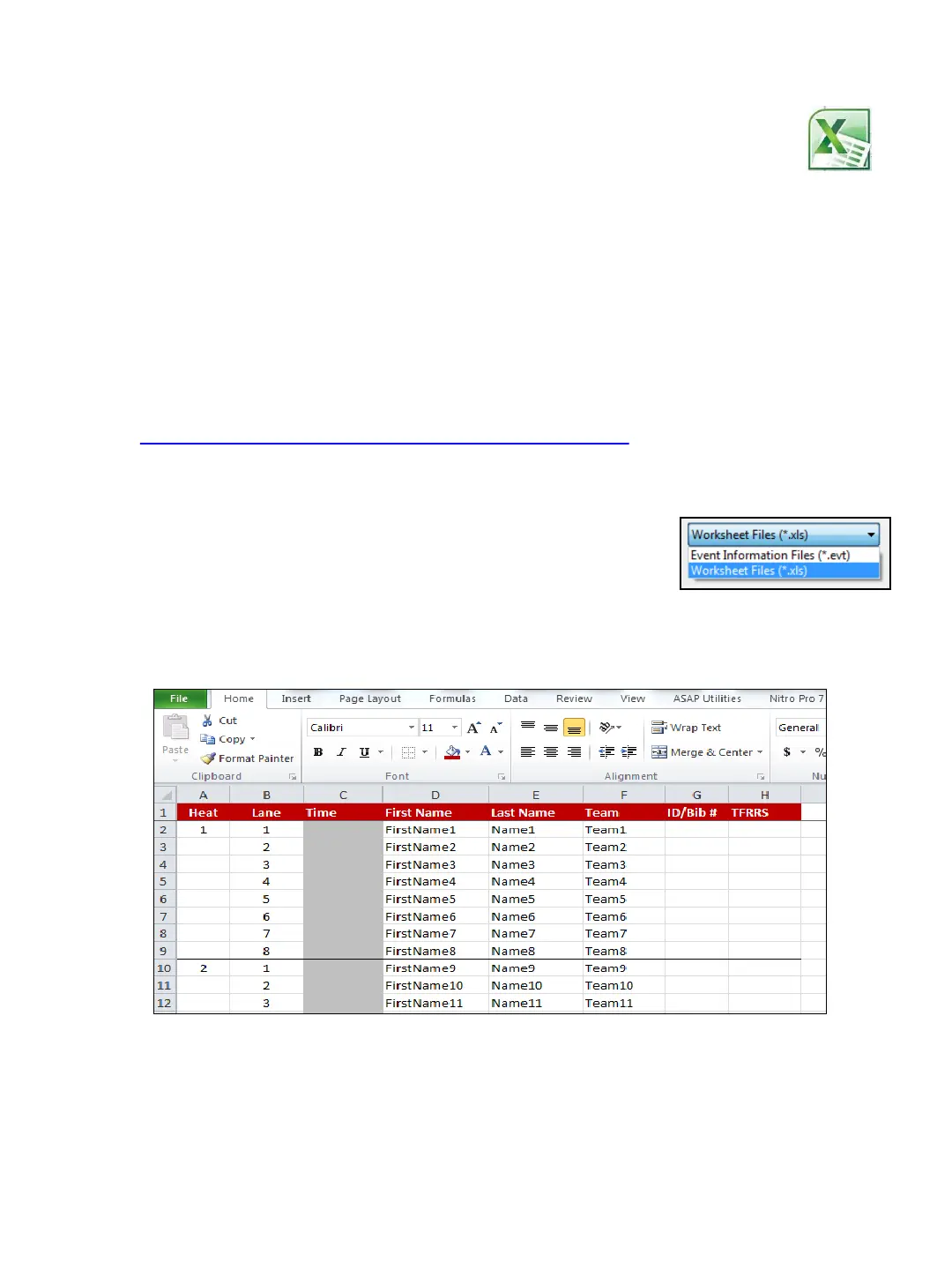
To use the Excel feature you must use the provided .xls template or create an .xls file with the
correct format (Row 1/ Columns A-H) as shown in the image below.
1. ➔ DOWNLOAD the Meet-Template.xls file via the address below and SAVE to the location of
your choice. It’s recommended to copy and paste the address into your web browser.
http://www.eagleeyedv.com/Meet_Template_s/704.htm
2. ➔ Within Eagle Eye Pro Software, SELECT the Results tab and CLICK Import and navigate
to the location of the file.
3. ➔ CHANGE the Worksheet File to .xls (lower right corner)
and SELECT the Meet-Template.xls file.
4. ➔ RECORD a race and ASSIGN times as usual.
5. ➔ CLICK the Save Times button to save times to the Meet-Template.xls document.
6. ➔ PRINT results by opening the .xls file at its source and choosing to print entire document
or individual sheet (event).
Customizing template
Enter names, teams, ID/Bib # and TFRRS numbers for each participant if you choose.
These cells can be left blank, however DO DOT delete unused columns. The labeled
columns are necessary for the proper file structure. If you wish to delete columns, do so
only after you are done using the .xls file within Eagle Eye Pro software. Additionally you
can delete and add heats, lanes and events to fit your needs. Please use caution not to
change the fundamental format of the file. Always keep a copy of the original .xls file
on hand.
13



 To Next Page