9.1.4 Specification of the numbering of menus and entry screens
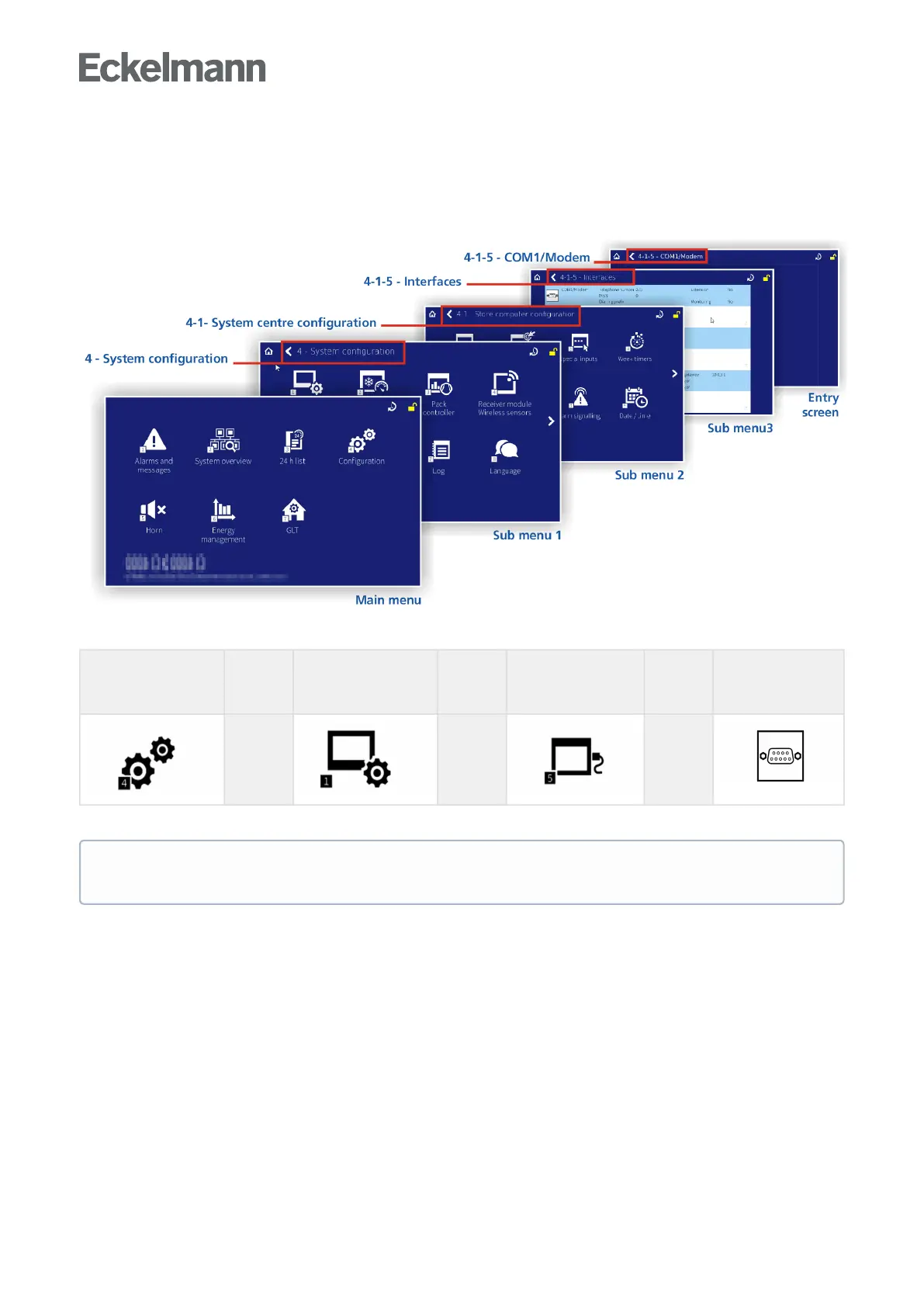
Every submenu or entry screen has a title at the top left and is identified by prepended unique numbering.
Furthermore, all buttons of the main menu and the submenus each have an individual number of 1, 2, ..x at the
bottom right to be able to reference the corresponding menus or entry screens in the operating manual.
Explanation of the numbering - For example, if the menu "4-1-5 - Interface - COM1/Modem" is referenced in
the operating manual, the entry screen for configuration of the COM1/Modem port is called as follows:
Main menu
Tap icon 4 -
Configuration *
Submenu 1
Tap icon 1 - System
centre
Submenu 2
Tap icon 5 - Interfaces
Submenu 3
Tap COM1/Modem
list
→
→ →
* Login to the system centre is required, see chapter Login to the system centre (unlocking).
In this operating manual, all references to menus or entry screens and their functionalities and/or the
parameters to be set there use the type of numbering presented here.



 To Next Page