Need help?
Do you have a question about the Eickemeyer INFUSOVET CONNECT and is the answer not in the manual?
Defines the intended use and applicability of the user manual.
Guides safe and effective product usage, emphasizing thorough manual reading.
Explains abbreviations, symbols, and key terms used throughout the manual for clarity.
Critical safety alerts detailing potential hazards and severe consequences of non-compliance.
Important safety notes highlighting potential risks of injury or property damage if not followed.
Explanation of various marks and symbols used on the equipment and in the manual.
Details the intended purpose and target users for the infusion pump.
Describes the fundamental mechanism by which the infusion pump operates.
Lists technical specifications, safety classifications, and performance parameters of the device.
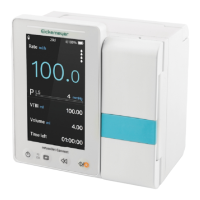
Illustrates and labels the components visible on the front of the infusion pump.
Identifies and describes the buttons, indicators, and touch screen on the pump's interface.
Details the layout and icons presented on the infusion pump's main display.
Steps for safely unpacking and verifying the contents of the equipment package.
Instructions on how to properly mount or position the infusion pump unit.
Guidance on correctly connecting and positioning the optional drop sensor.
Checklist for ensuring the equipment is ready and in good working condition before operation.
Important safety considerations and environmental factors to observe during pump operation.
Step-by-step guide outlining the sequence of actions for typical infusion procedures.
Detailed procedures for starting, managing, and completing infusion tasks on the pump.
Instructions for powering on the device and initiating the automatic self-testing sequence.
Entry point for configuring various operational parameters and device functions.
Information and configuration for managing pre-programmed drug information.
Setting the pressure thresholds for detecting and responding to line occlusions.
Adjusting the sensitivity for detecting air bubbles in the infusion line.
Configuration options for network, sound, date/time, and screen lock.
Interface for inputting and managing patient-specific data.
Accessing and reviewing historical infusion data, alarms, and events.
Viewing device details such as language, serial number, and software version.
Explains the classification of alarms into high, medium, and low priority levels.
Defines how the system handles simultaneous or sequential alarms.
Guidance on responding to alarms and resolving the underlying causes.
Provides steps for diagnosing and resolving equipment faults and errors.
Procedures for routine cleaning, disinfection, and sterilization of the equipment.
Recommendations for scheduled checks and maintenance to ensure longevity and safety.
Procedure for adding custom infusion apparatus brands and performing calibration.
Information on authorized repair processes and contacting service personnel.
Procedures for testing the battery's capacity and operational duration.
Guidance on the recommended procedure and safety precautions for battery replacement.
Details the product's warranty period, terms, and conditions for service.
Data on how the pump responds to occlusion pressure at various flow rates.
Comprehensive list of alarms, their reasons, and recommended solutions.
Information regarding the equipment's electromagnetic compatibility and installation requirements.
Technical specifications and parameters for the device's wireless communication module.
 General
| Category | Medical Equipment |
|---|---|
| Type | Infusion Pump |
| Manufacturer | Eickemeyer |
| Model | INFUSOVET CONNECT |
| Applicable | Veterinary |
| Modes | Continuous, Intermittent |
| Infusion rate | 0.1 - 999.9 ml/h |
| Volume limit | 1 - 9999 ml |
| VTBI | 1 - 9999 ml |
| Occlusion pressure | Adjustable |
| Alarms | Occlusion, Low battery |
| Battery Life | Up to 8 hours |
| Flow Rate Range | 0.1 - 999.9 ml/h |
| Connectivity | Bluetooth |
| Display | LCD touchscreen |

 To Next Page