13
Chapter1Introduction
●
Functions
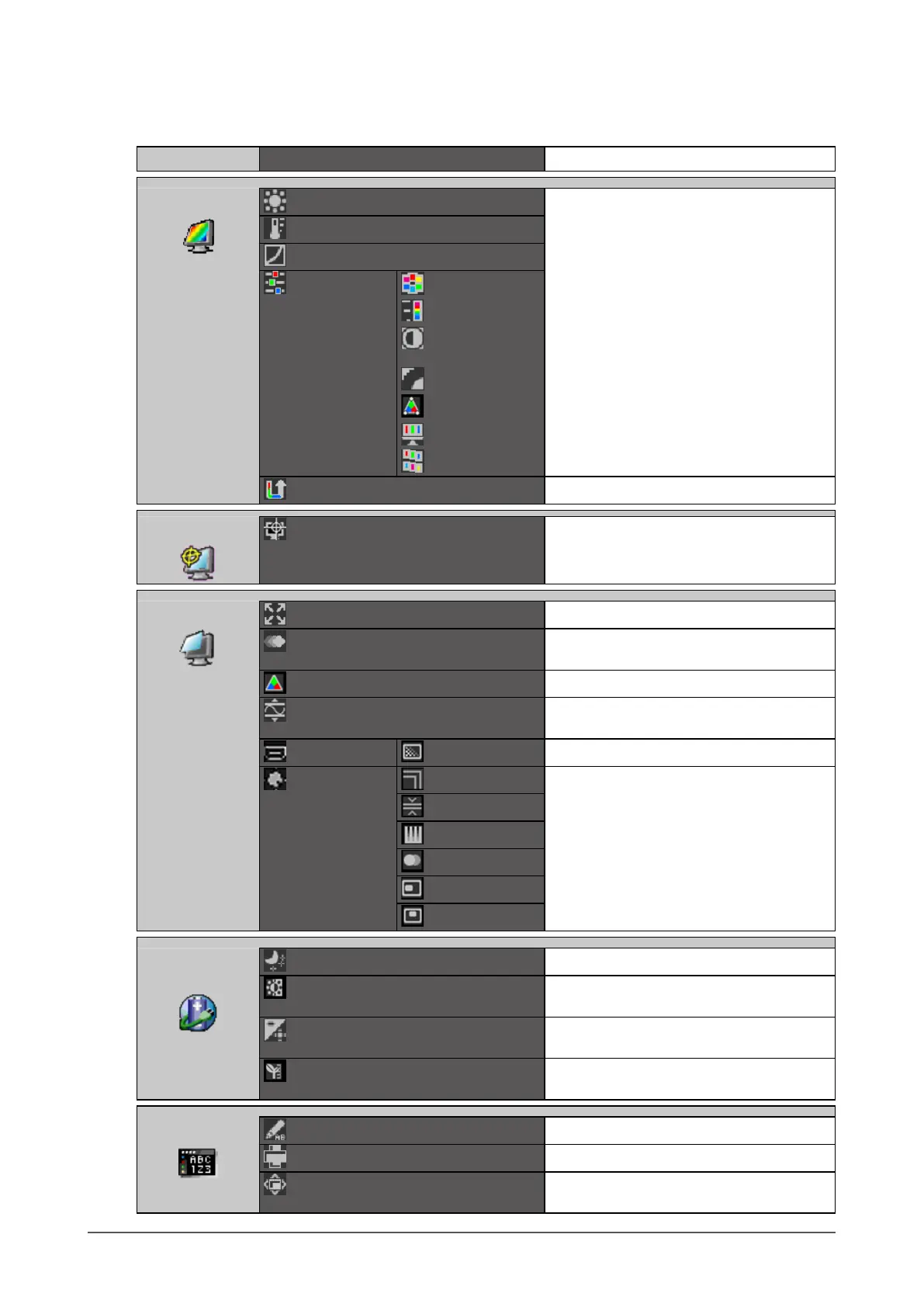
The following table shows all the Adjustment menu’s adjustment and setting menus.
Main Menu Item Reference
Color
*1
Brightness
“2-3.AdjustingColor”(page17)
Temperature
Gamma
Advanced
Settings
Hue
Saturation
Contrast
Enhancer
OutlineEnhancer
Clipping
Gain
6Colors
ColorReset
“3-10.Resettodefault”(page35)
SelfCorrection
Execute
“4-1.ExecutingSelfCorrection”(page37)
Screen
ScreenSize
“2-6.SelectingScreenSize”(page28)
Overdrive
“2-7.ConguringMovingImage
Performance”(page30)
ColorSpace
“2-8.SpecifyingColorSpace”(page31)
RangeExtension
“2-5.ExpandingSignalOutputRange”(page
27)
HDMISettings
*2
NoiseReduction
“2-9.SettingHDMI”(page31)
Analog
Adjustment
*3
AutoAdjustment
“2-4.AdjustingScreens”(page24)
RangeAdjustment
Clock
Phase
Hor.Position
Ver.Position
Power
Manager
PowerSave
“5-1.SettingPowerSave”(page38)
AutoEcoView
“5-2.Enabling/DisablingAutomatic
BrightnessAdjustment”(page39)
Indicator
“5-4.AdjustingtheBrightnessofIndicator”
(page39)
EcoViewIndex
“5-3.CheckingthePowerSavingLevel”
(page39)
MenuSettings
Language
“3-2.SelectingtheLanguage”(page32)
Orientation
“3-3.SettingOrientation”(page32)
MenuPosition
“3-4.ChangingAdjustmentMenuDisplay
Position”(page33)










 To Next Page