E L A N H O M E S Y S T E M S
INSTALLATION MANUAL
Page 28 © ELAN Home Systems 2009 • All rights reserved.
S86A
“B” Punchdown Locations-16V
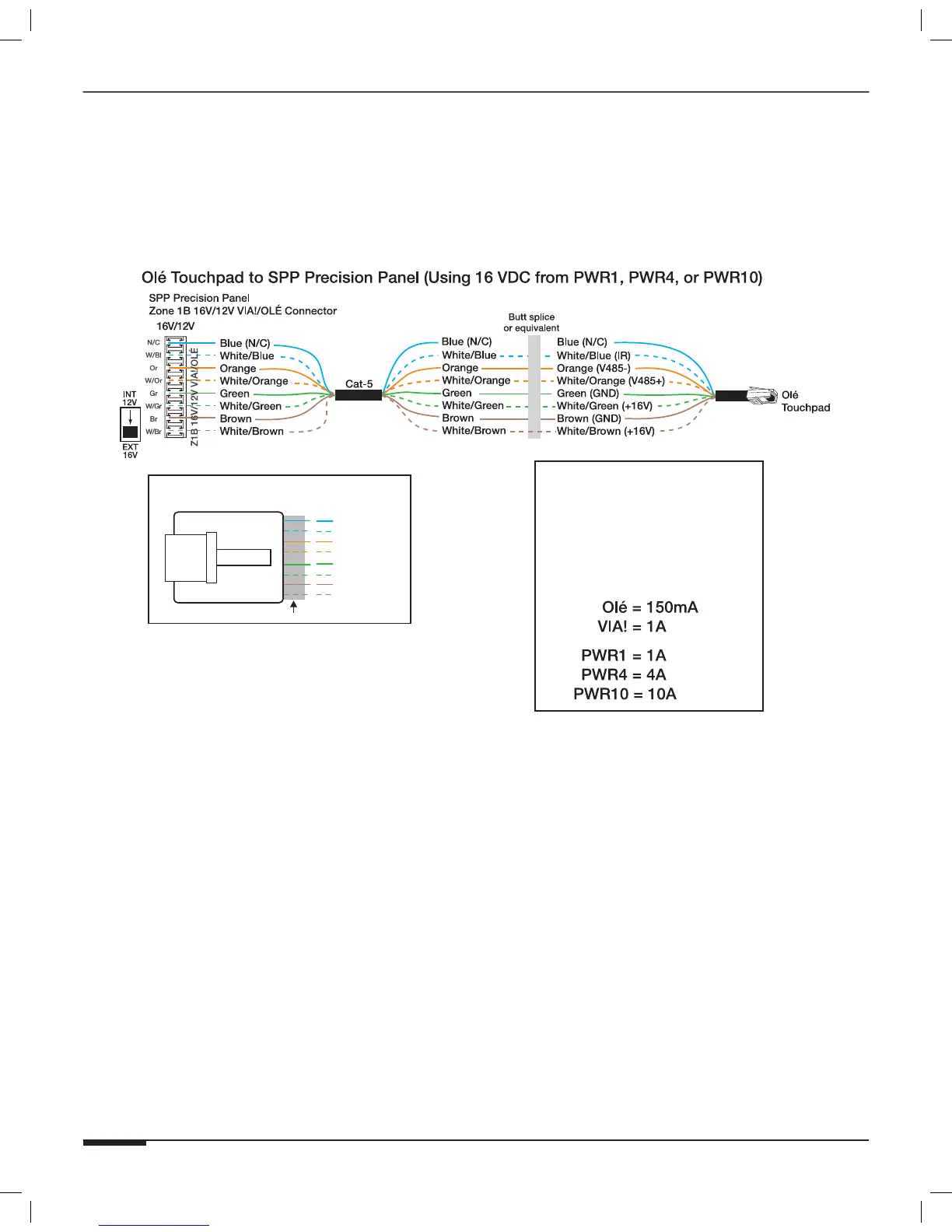
Figure 3-7 shows connectivity to the “B” location and utilizing 16VDC power from a PWR1, PWR4, or PWR10
16VDC power supply connected to the front of the SPP.
Note: Place the “INT 12V/EXT 16V” switch in the DOWN (“EXT
16V”) position for this application.
IMPORTANT NOTE
Olé Touchpads
Use the correct power
supply connected to the front
of the SPP for the number
or Olé Touchpads and VIA!
Touch Panels in the system.
BLUE
WHITE/BLUE
ORANGE
WHITE/ORANGE
GREEN
WHITE/GREEN
BROWN
WHITE/BROWN
1
2
3
4
5
6
7
8
PIN # COLOR CODE
FRONT
CABLE
Standard ELAN RJ-45 Pin-Out
TAB
Figure 3-7: Olé Touchpad “B” External 16VDC Connections



 To Next Page