E L A N H O M E S Y S T E M S
INSTALLATION MANUAL
© ELAN Home Systems 2009 • All rights reserved. Page 31
S86A
IR Receiver Connections
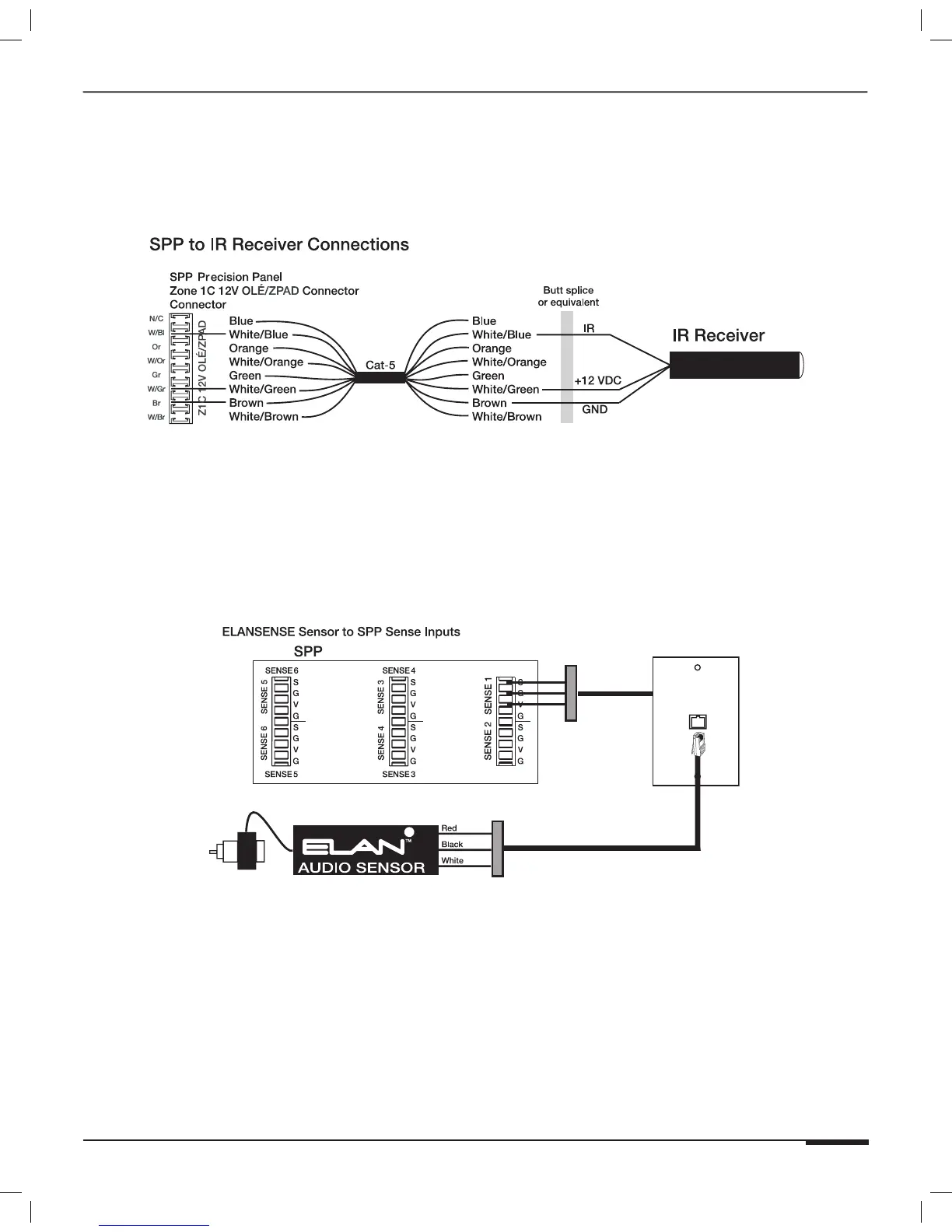
Stand-alone IR receivers for use with hand-held remotes can easily connect to the SPP “C” punchdown locations.
Connect +12V, IR, and GND to the specific zone that is to be controlled.
Figure 3-11: IR Receiver Connections
Sense Input Connections
The Sense Trigger Inputs of the S86A are primarily for use with VIA! Touch Panels and Olé Touchpads. An
ELAN™SENSE Sensor can be connected that will cause VIA! Touch Panels and Olé Touchpads to execute IR or
serial commands. Use VIA!TOOLS or ELANTOOLS setup software to program Trigger Input functionality. Wiring the
Sense Inputs consists of punching down Voltage (V), Sense (S), and Ground (G) as shown in Figure 3-12.
Cat-5
Head End
RJ-45
Wall Plate
Butt splice
or equivalent
Butt splice
or equivalent
Cat-5
Figure 3-12: Sense Input to SPP Connections
ELANSENSE Sensors provide for a multitude of automation requirements:
• Audio Sensor: Detects line-level audio utilizing an RCA adaptor.
• Video Sensor: Detects Composite video utilizing an RCA adaptor.
• Light/LED Sensor: Detects ambient light or multi-color LEDs.
• Contact Closure Sensor: Detects closed-contact ON/OFF status.
• Current/Magnetic Sensor: Detects electrical current through power cords or
magnetic flyback.
• Voltage Sensor: Detects 3-24 Volts AC or DC. Doorbell Sensor: Detects multiple
doorbell signals for advanced switching functionality.



 To Next Page