E L A N H O M E S Y S T E M S
INSTALLATION MANUAL
© ELAN Home Systems 2009 • All rights reserved. Page 41
S86A
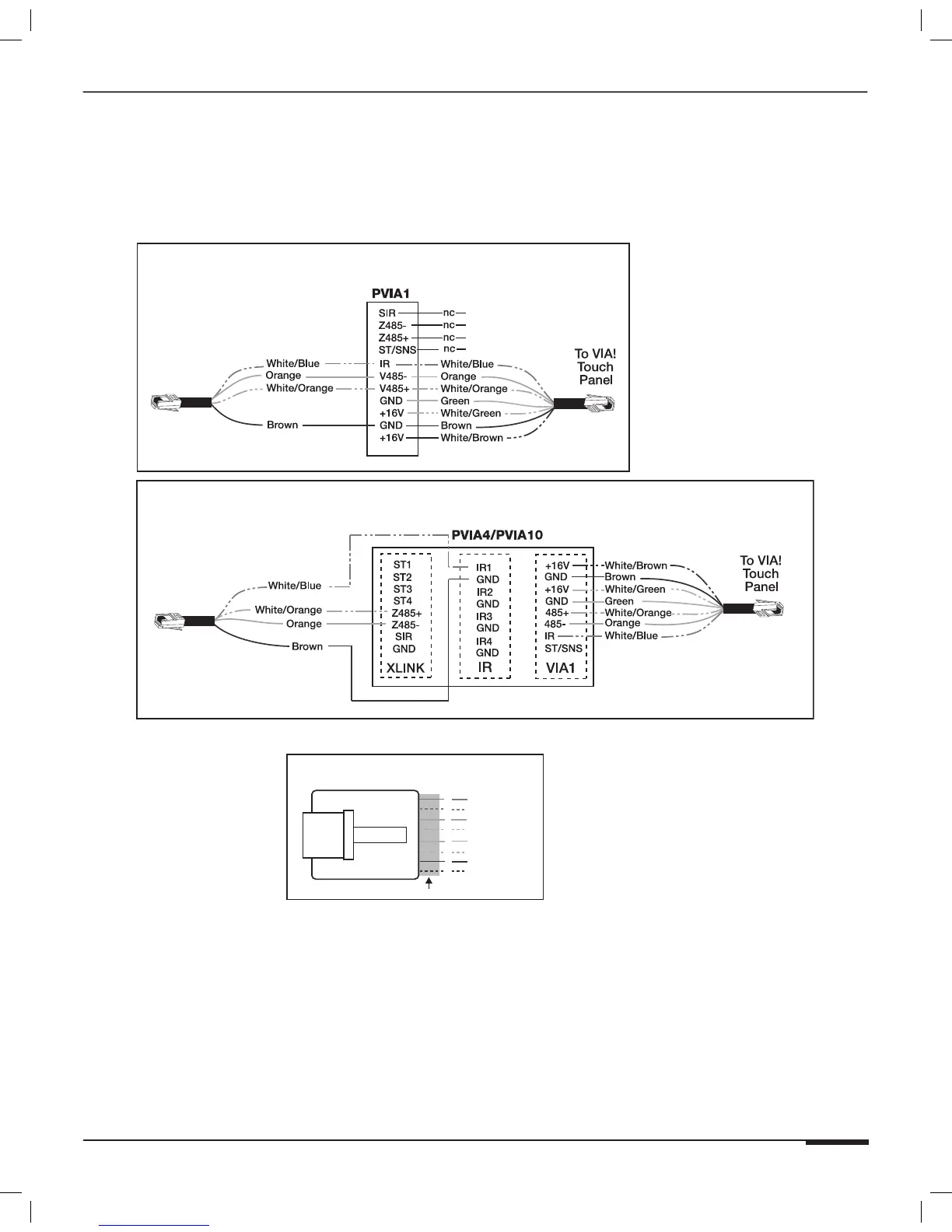
VIA! Touch Panel Connections
If not using the SPP Precision Panel, it is necessary to use a PVIA1, PVIA4, or PVIA10 Wall Plate when connecting
VIA! Touch Panels to the S86A. VIA! Touch Panels require the 16V power supplies that are included with each PVIA
wall plate (PVIA1, PVIA4, and PVIA10).
BLUE
WHITE/BLUE
ORANGE
WHITE/ORANGE
GREEN
WHITE/GREEN
BROWN
WHITE/BROWN
1
2
3
4
5
6
7
8
PIN # COLOR CODE
FRONT
CABLE
Standard ELAN RJ-45 Pin-Out
TAB
S86A to PVIA1 (No SPP)
S86A to PVIA4/PVIA10 (No SPP)
To S86A
To S86A
Zone 1
(Shown Connected to Zone 1)
Figure 3-28: VIA! Touch Panel Connections (No SPP)



 To Next Page