E L A N H O M E S Y S T E M S
INSTALLATION MANUAL
© ELAN Home Systems 2009 • All rights reserved. Page 37
S86A
SS/SC4 Connection
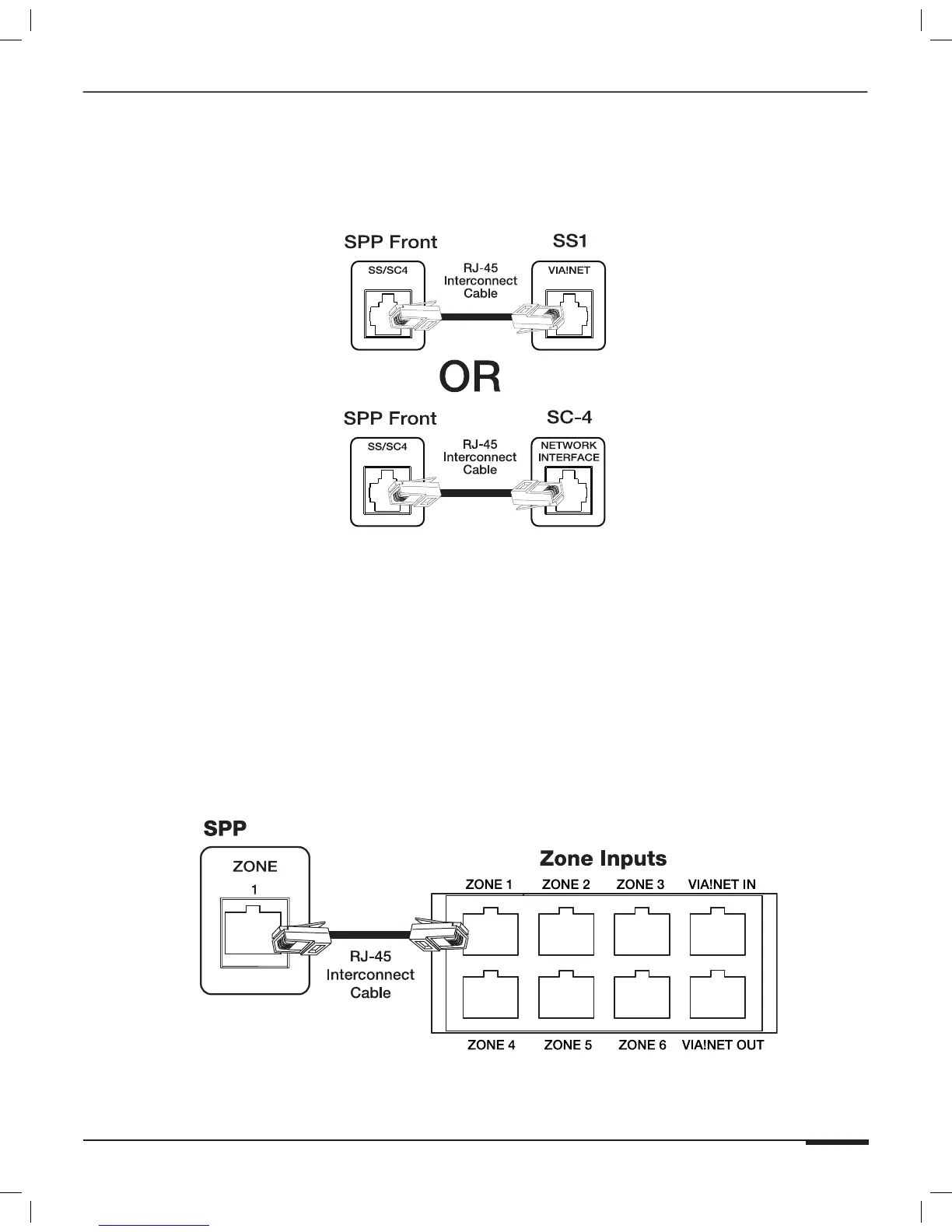
Use the SS/SC4* RJ-45 connector to integrate an ELAN SS1 System Station or SC-4 System Controller to the S86A
Multi-Room Controller in order to facilitate integration of RS-232 controlled systems such as security, lighting or
HVAC. Use an RJ-45 Interconnect Cable for this purpose.
Figure 3-23: SS/SC4
*Note: The SC-4 is a discontinued product.
ZONE 1-8 Connections
Connect a straight-through RJ-45 interconnect cable (1 or 2 meter Interconnect Cable) between the S86A’s 1-6
Zone Inputs and the SPP Zone 1-8 RJ-45 jacks. This routes all keypads, touch panels, touchpads and IR receivers
punched-down on the back of the SPP directly to the S86A. Zones 7-8 are not connected in S86A systems.
Note: In order to facilitate RS-485 communication, Zone 1 must
ALWAYS be connected between the S86A Controller and the
SPP Precision Panel.
SPP to S86A Zone Connections (Zone 1 shown)
S86A
Figure 3-24: Zone Keypad Input Connections



 To Next Page