E L A N H O M E S Y S T E M S
INSTALLATION MANUAL
© ELAN Home Systems 2009 • All rights reserved. Page 27
S86A
Olé Film Interactive Touchpads
Olé Film Interactive Touchpads punch-down to the rear of the SPP at three locations, depending on system configu-
ration. These locations are labelled “ZXA 16V VIA!/OLÉ”, “ZXB 16V/12V VIA!/OLÉ” and “ZXC 12V OLÉ/ZPAD” where
“X” corresponds to the zone that the touchpad(s) will control. Two touchpads can connect to each punch-down
location for eachzone. If using more than 2 touchpads per location, make connections off of the SPP and use
jumper wires to punch-down to the correct location.
Note: Whenever Olé Touchpads are used with the S86A Controller, set
the switch on the rear of the touchpad to the “VIA!NET”
position.
“A” Punchdown Locations
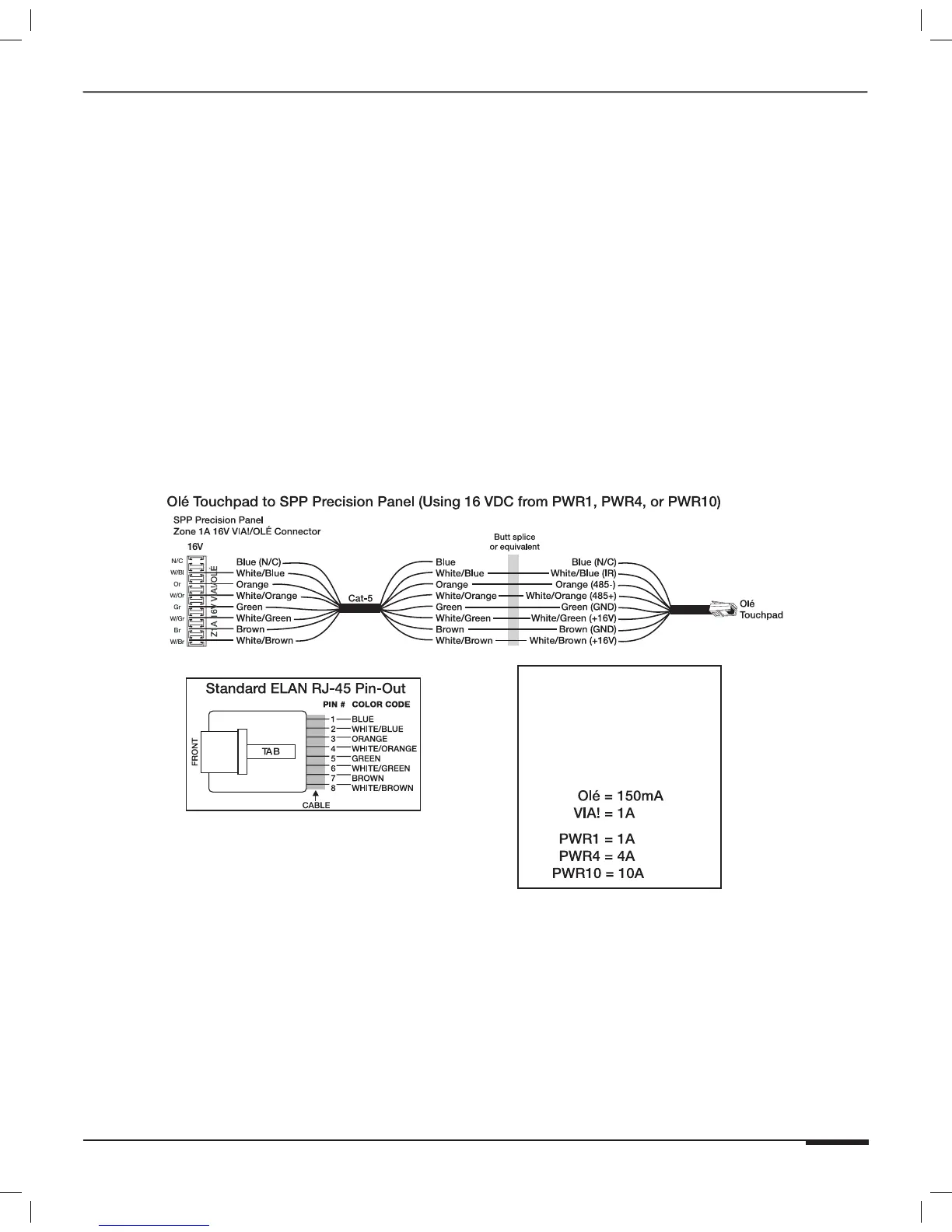
Figure 3-6 shows connectivity to the “A” location and utilizing 16VDC power from a PWR1, PWR4, or PWR10
16VDC power supply connected to the front of the SPP.
Note: The “A” punchdown location is always connected to the
external 16VDC power from a PWR1, PWR4, or PWR10 16VDC
power supply connected to the front of the SPP.
IMPORTANT NOTE
Olé Touchpads
Use the correct power
supply connected to the front
of the SPP for the number
or Olé Touchpads and VIA!
Touch Panels in the system.
Figure 3-6: Olé Touchpad “A” External 16VDC Connections



 To Next Page