E L A N H O M E S Y S T E M S
INSTALLATION MANUAL
Page 42 © ELAN Home Systems 2009 • All rights reserved.
S86A
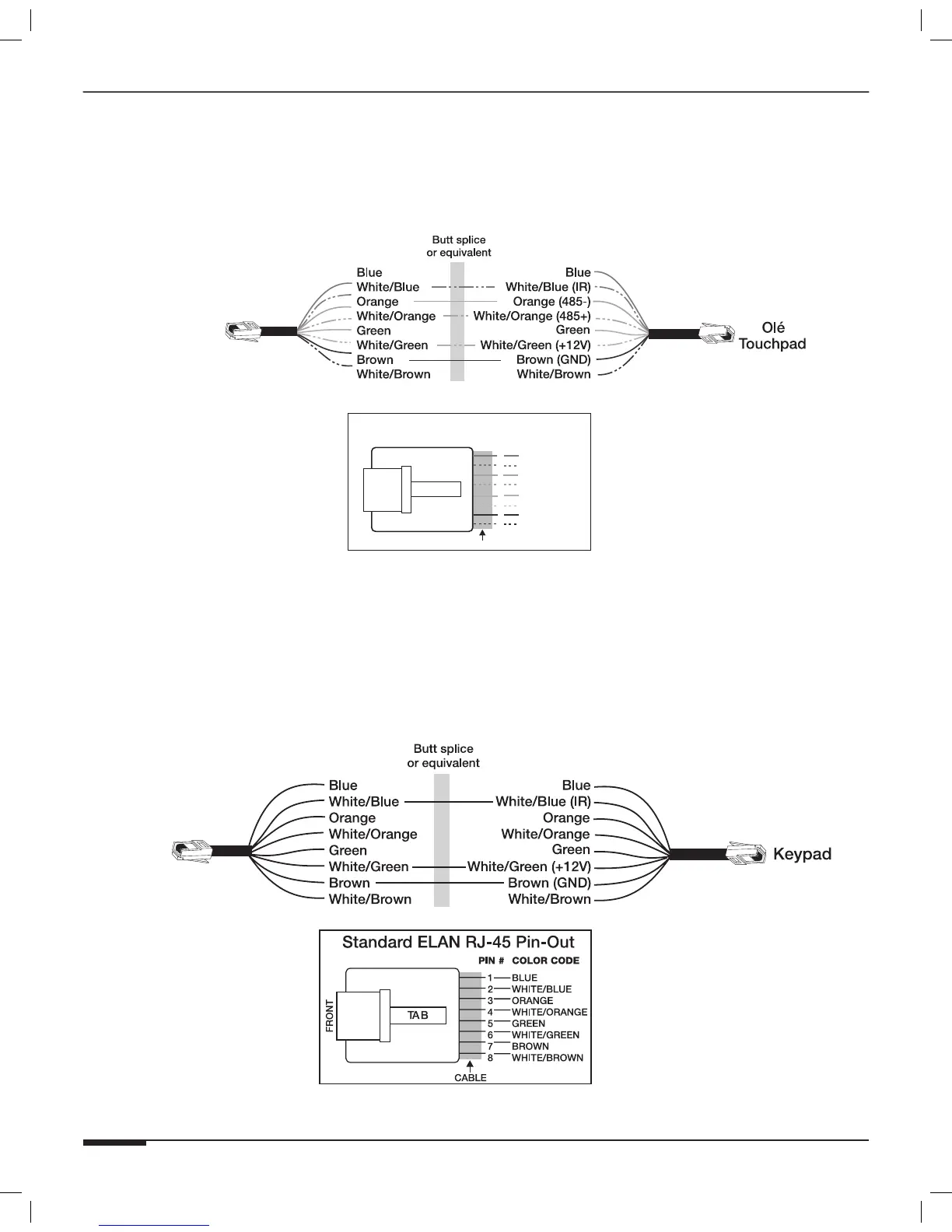
Olé Touchpad Connections
ELAN Olé Touchpads require IR, RS-485+, RS-485-, 12 Volts DC, and Ground to function. Make these connections
as shown below. Multiple keypads in the same zone require parallel connections. For simplicity, all eight wires can
be connected straight through.
BLUE
WHITE/BLUE
ORANGE
WHITE/ORANGE
GREEN
WHITE/GREEN
BROWN
WHITE/BROWN
1
2
3
4
5
6
7
8
PIN # COLOR CODE
FRONT
CABLE
Standard ELAN RJ-45 Pin-Out
TAB
S86A
Figure 3-29: Olé Touchpad Connections (No SPP)
Keypad Connections
ELAN keypads require IR, 12 Volts DC, and Ground to function. Make these connections as shown below. Multiple
keypads in the same zone require parallel connections.
Note: ELAN Z•PAD keypads will NOT receive status feedback when
connected to the S86A.
S86A
Figure 3-30: Keypad Connections (No SPP)



 To Next Page