E L A N H O M E S Y S T E M S
INSTALLATION MANUAL
© ELAN Home Systems 2009 • All rights reserved. Page 47
S86A
Advanced Video Switching-Composite Video
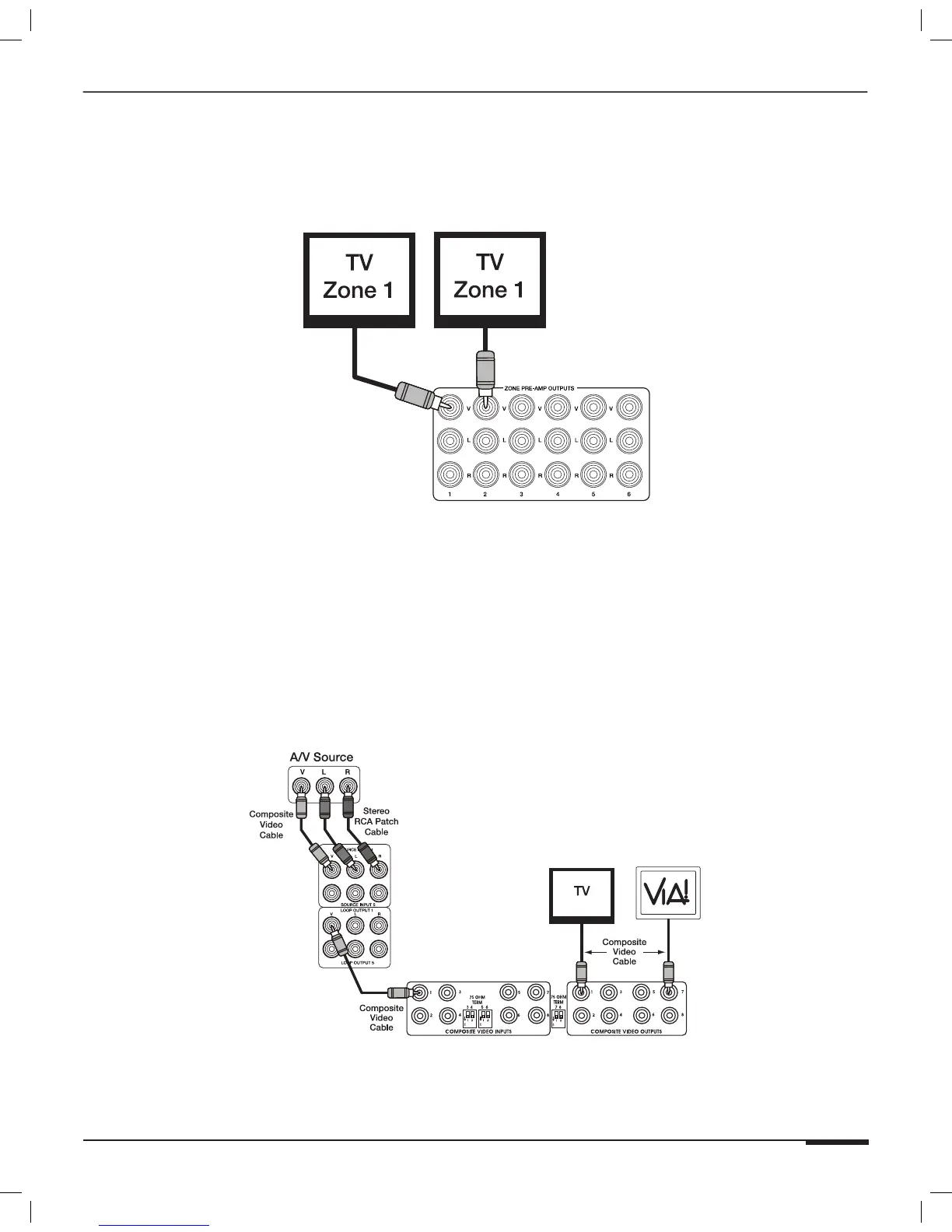
By default, each ZONE PREAMP OUTPUT automatically switches audio and video signals simultaneously. It is
possible to have multiple outputs going to the same zone. Use VIA!TOOLS or ELANTOOLS setup software to con-
figure these outputs. Make connections as shown in Figure 3-38.
S86A
Figure 3-38: Advanced Video Switching-Composite Video Connections
V8 Video Controller
In advanced systems that require more than six composite video outputs (per chassis) to some or all of the S86A’s
zones, use an ELAN V8 Video Controller to switch up to eight sources to up to eight zones (or use up to three V8s
to switch up to eight sources to up to twenty-four zones). Connect a composite video cable from each source’s
Video Loop Output to an input of the V8. Connect each output of the V8 to a TV, VIA! Touch Panel, or moni-
tor located in a zone, (see Figure 3-39). Use the ALL IR port on the S86A to control the V8 (see All IR Out Port
Connections), or control it serially from VIA! Touch Panels or Olé Touchpads using a SS1 System Station connected
to the ELAN RS-232 Port (see RS-232 Connections).
V8
S86A
Figure 3-39: V8 Video Controller



 To Next Page