E L A N H O M E S Y S T E M S
INSTALLATION MANUAL
Page 54 © ELAN Home Systems 2009 • All rights reserved.
S86A
C2 Communications Controller Connections
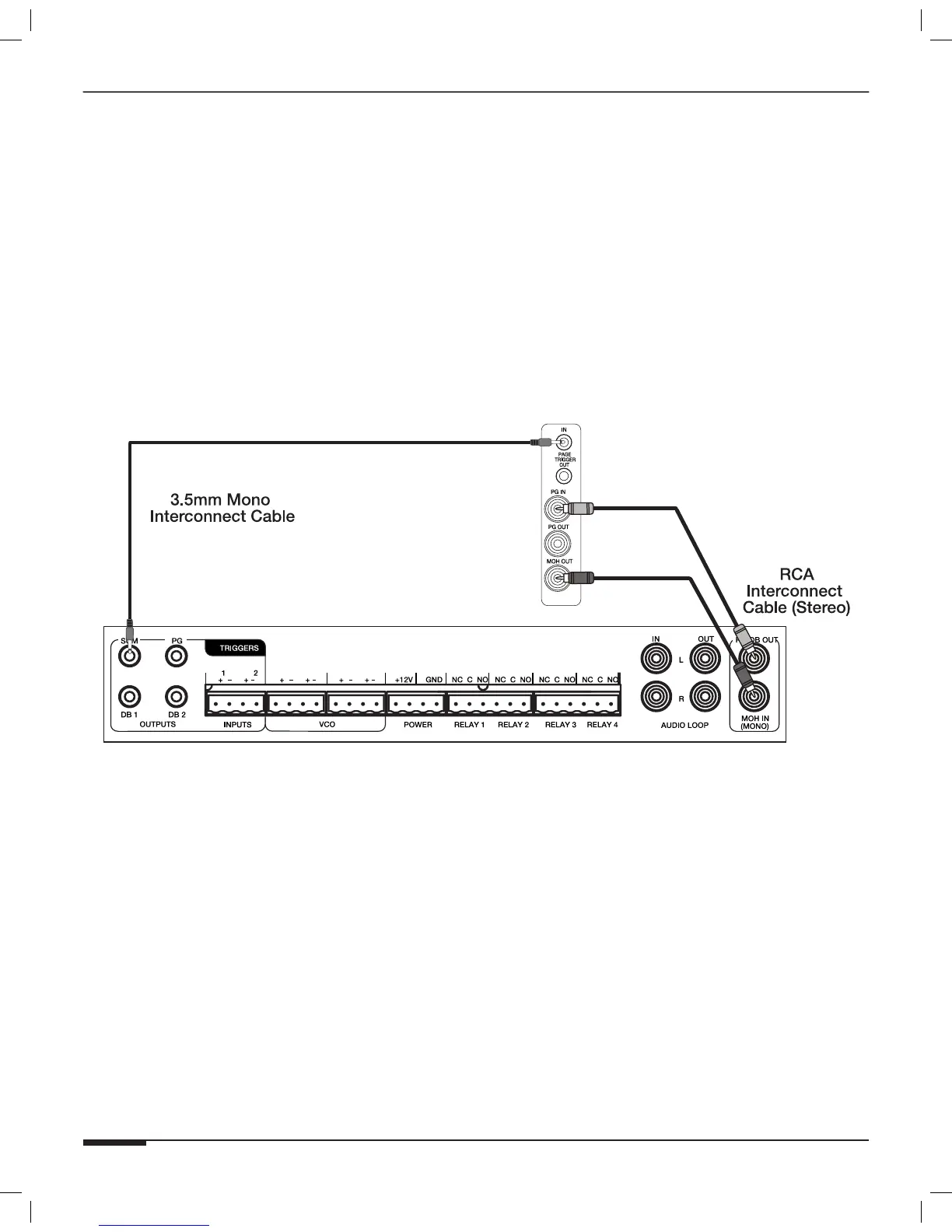
ELAN’s C2 Communications Controller provides whole-house paging when used with the S86A. The S86A’s MOH
OUT port provides Music On Hold to telephones connected to the C2. The audio from Source 1 of the S86A is rout-
ed out of the MOH OUT port and into the C2 as shown in Figure 3-48. The C2 sends a Trigger signal when a page
or Door Chime is initiated that causes the S86A to mute any audio that is playing and pass the Page or Door Chime
signals into speakers within the S86A’s zones at a preset level. Use a mono 3.5mm interconnect cable to connect
the SUM TRIGGER OUT from the C2 Communications Controller to the S86A’s PAGE TRIGGER IN port. Use a stereo
RCA patch cable between the C2’s PG/DB OUT connector and the S86A’s PG IN connector as well as
between the C2’s MOH IN connector and the S86A’s MOH OUT port.
C2 Communications
Controller
S86A
Figure 3-48: PG/DB Out and MOH Connections



 To Next Page