E L A N H O M E S Y S T E M S
INSTALLATION MANUAL
© ELAN Home Systems 2009 • All rights reserved. Page 39
S86A
Power Connections
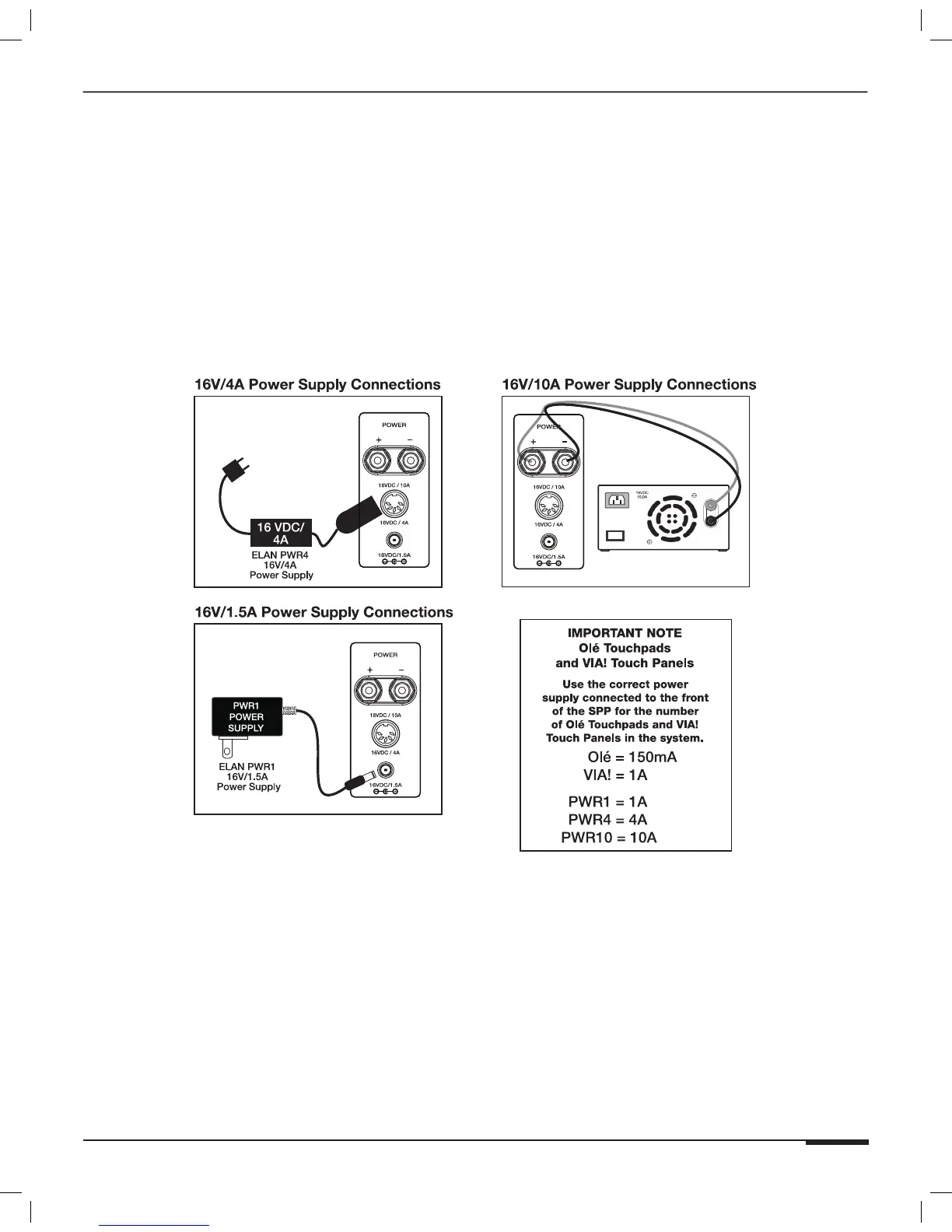
It is possible to connect and power up to ten VIA! Touch Panels using the SPP and a 16VDC power supply. Use
punchdown locations “A” and “B” and place the INT V-EXT V switch in the EXT position for each zone that utilizes
16VDC from the connected power supply. Use an ELAN PWR1 16VDC/1A power supply for one VIA! Touch Panels.
Use an ELAN PWR4 16VDC/ 4A power supply for up to four VIA! Touch Panels. Use an ELAN PWR10 16VDC/10A
power supply for five-to-ten VIA! Touch Panels. It is also possible to connect up to 66 Olé Touchpads using the
same 16VDC power supplies. A PVIA1 will power up to 6 Olé touchpads, a PVIA4 can power up to 26 Olé touchpads
and a PVIA10 Power Supply can support 66 Olé touchpads. A combination of VIA! Touch panels and Olé Touchpads
can be accomodated. Please consult the chart below for maximum current draw of each device.
Note: Only one power supply should be connected to the SPP
Precision Panel at any time!
Figure 3-26: SPP Power Connections



 To Next Page