E L A N H O M E S Y S T E M S
INSTALLATION MANUAL
© ELAN Home Systems 2009 • All rights reserved. Page 53
S86A
ELAN RS-232 Ports
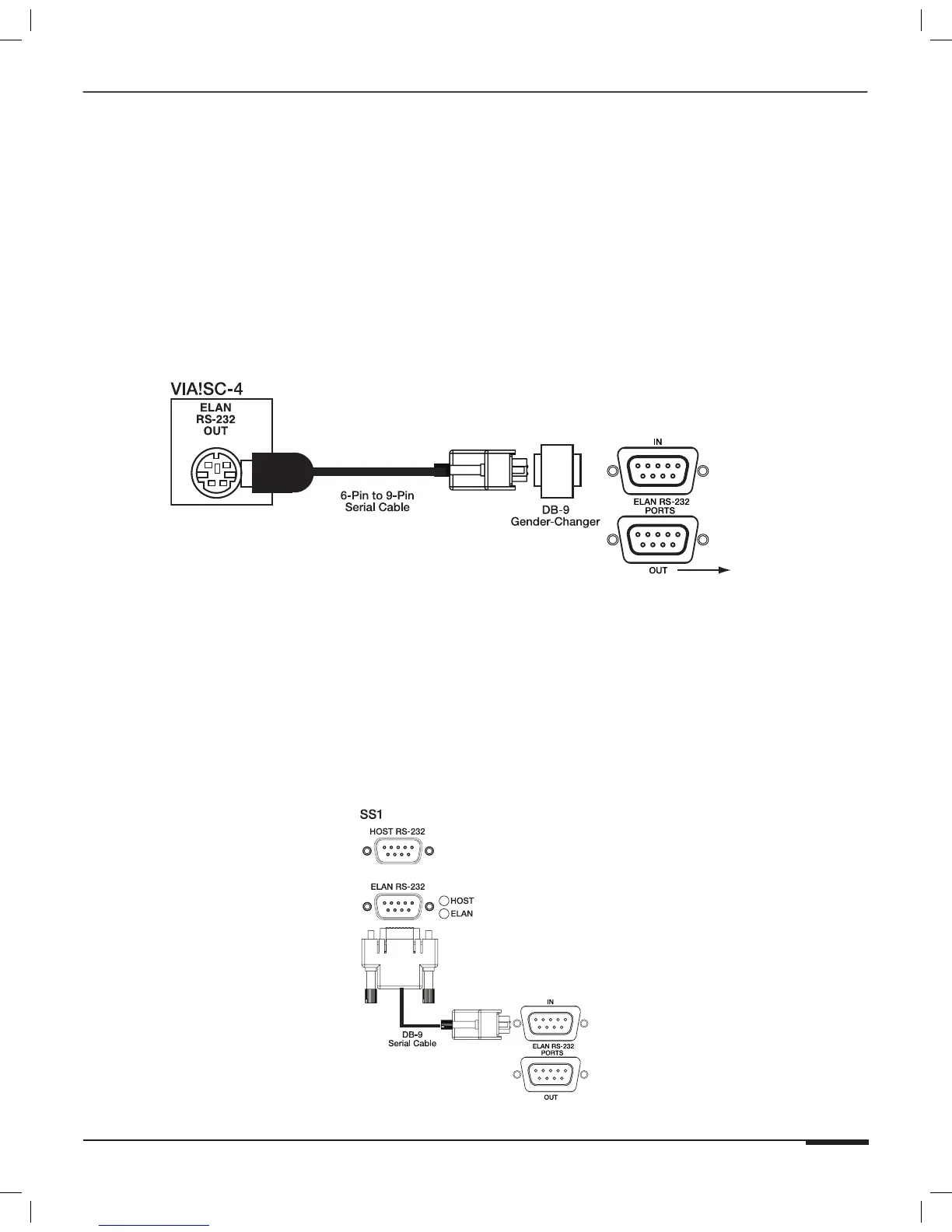
SC-4* RS-232 System Controller
When controlling the S86A with ELAN’s SC-4 System Controller, use the 6-Pin DIN-to-9-Pin serial cable and the
male-to-male DB9 gender-changer that is included with the SC4. Plug the 6-Pin DIN (round) connector into the
SC-4’s ELAN RS-232 OUT port. Using the gender-changer, plug the other end of the serial cable into the ELAN
RS-232 IN port on the S86A. The SC-4 will always be connected to Chassis #1 in a multi-chassis system.
*Note: SC-4 is a discontinued product
To V8,V85, etc.
S86A
Figure 3-46: SC-4 Connections
SS1 System Station
When controlling the S86A with ELAN’s SS1 System Station, use the DB-9 to DB-9 serial cable that is included with
the SS1. Connect the cable from the SS1’s ELAN RS-232 port to the S86A’s ELAN RS-232 IN port. The SS1 will
always be connected to Chassis #1 in a multi-chassis system.
S86A
Figure 3-47: SS1 Connections



 To Next Page