E L A N H O M E S Y S T E M S
INSTALLATION MANUAL
© ELAN Home Systems 2009 • All rights reserved. Page 61
S86A
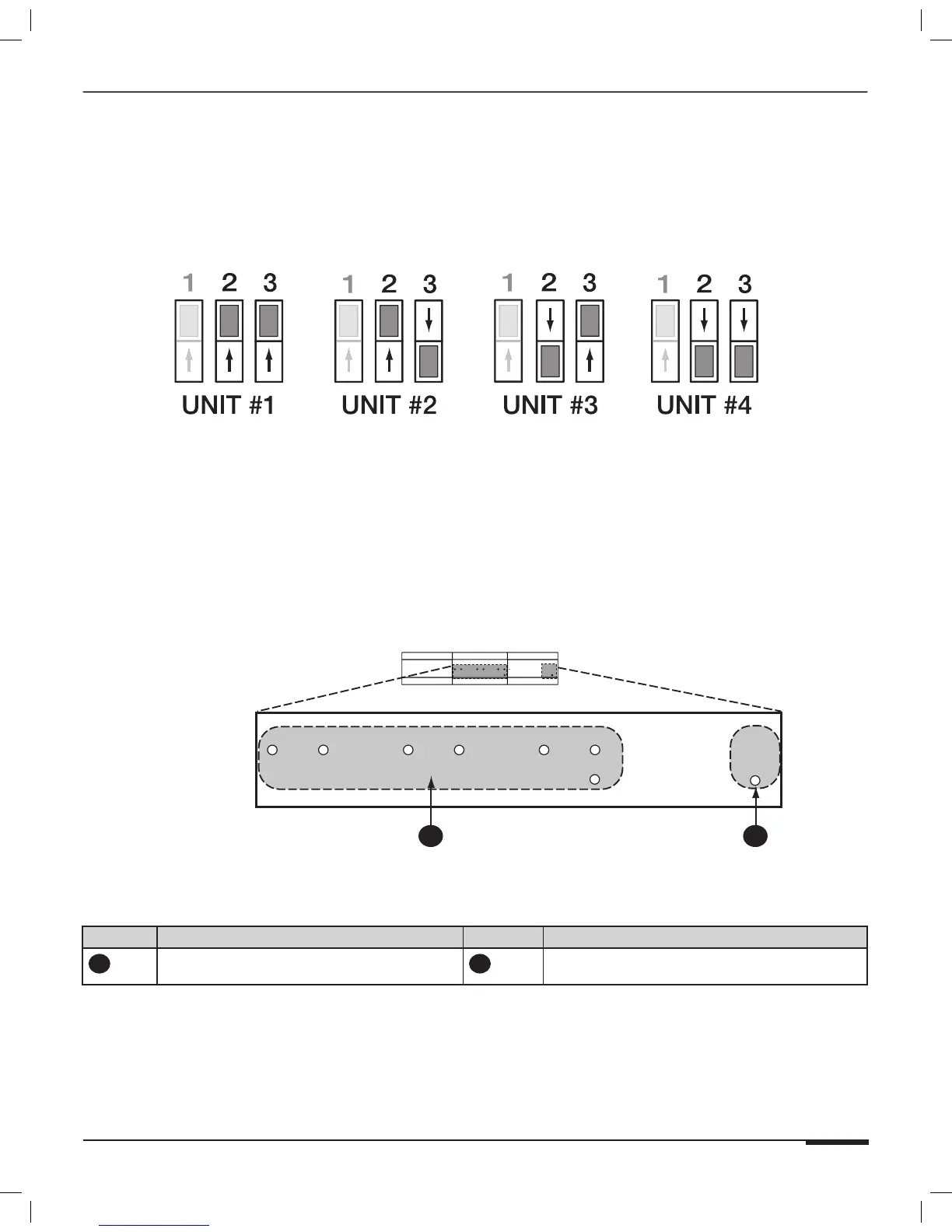
UNIT ID DIP Switches
Figure 4-3 shows the correct UNIT ID DIP Switch seetings for each chassis. Factory Default is Unit ID #1 (UP, UP).
Figure 4-3: UNIT ID DIP Switch Settings
Front Panel LEDs
The S86A has six Zone Activity Status LEDs, an IR Activity LED, and a Power LED indicator (see Figure 4-4). The
Zone Activity Status LEDs are lit when a zone is active and an IR Activity LED will flash when IR signals are sent
from a particular zone.
1
2
Figure 4-4: Front Panel LEDs
Item# Name Item# Name
1
6 Zone ON/OFF Status LEDs (Red)
& IR Activity (Green)
2
Power LED (Blue)
Table 4-1: S86A Front Panel LEDs



 To Next Page