ADL 2010 / 01 14/57 599 72 63-27
4.12 Adjusting conductivity (on certain models only)
The "conductivity" of the water used for washing varies from area to area: the conductivity sensor is set to a
standard value; significant variations in conductivity level may have a negative effect on the final results of
drying (washing that is too dry or still damp).
These variations can be noted particularly in "slightly damp" and "ready-to-iron" cycles; "wardrobe dry"
cycles are practically never influenced by changes in conductivity.
4.12.1 Adjustment procedure
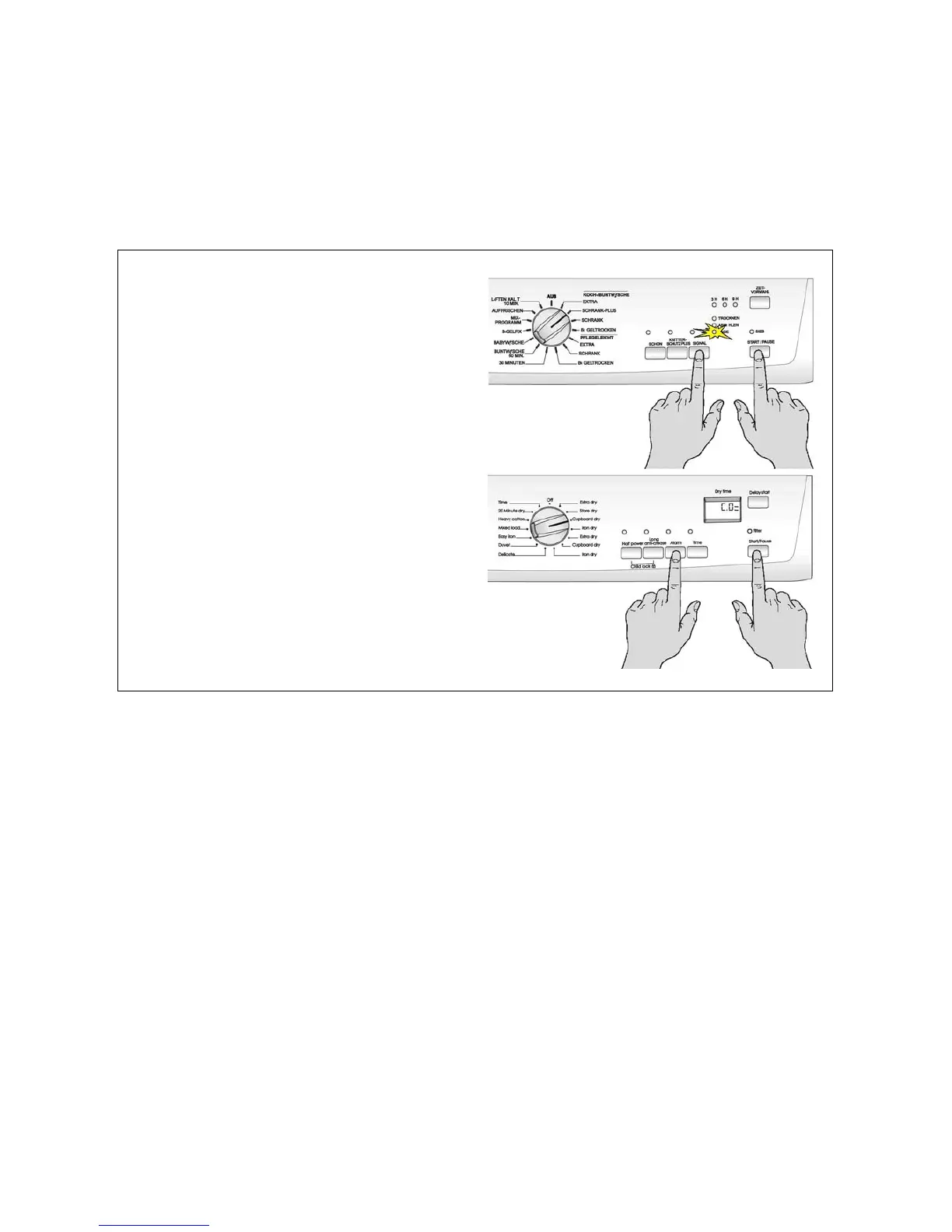
To access adjustment mode:
1. turn the appliance on by turning the programme
selector;
2. press the buttons shown in the figure
simultaneously;
3. keep pressing them until the buzzer sounds
(about 5 seconds).
To change the conductivity value:
press the start/pause button in sequence: the
conductivity level changes and is indicated by light-
up of the LEDs or by light-up of the horizontal
segments in the last digit.
To store the setting:
1. press the buttons you pressed before once
again, simultaneously;
2. keep pressing them until the buzzer sounds
(about 5 seconds).





 To Next Page