74
Opening a Saved File
You can sew any sequence that has been saved in a
file.
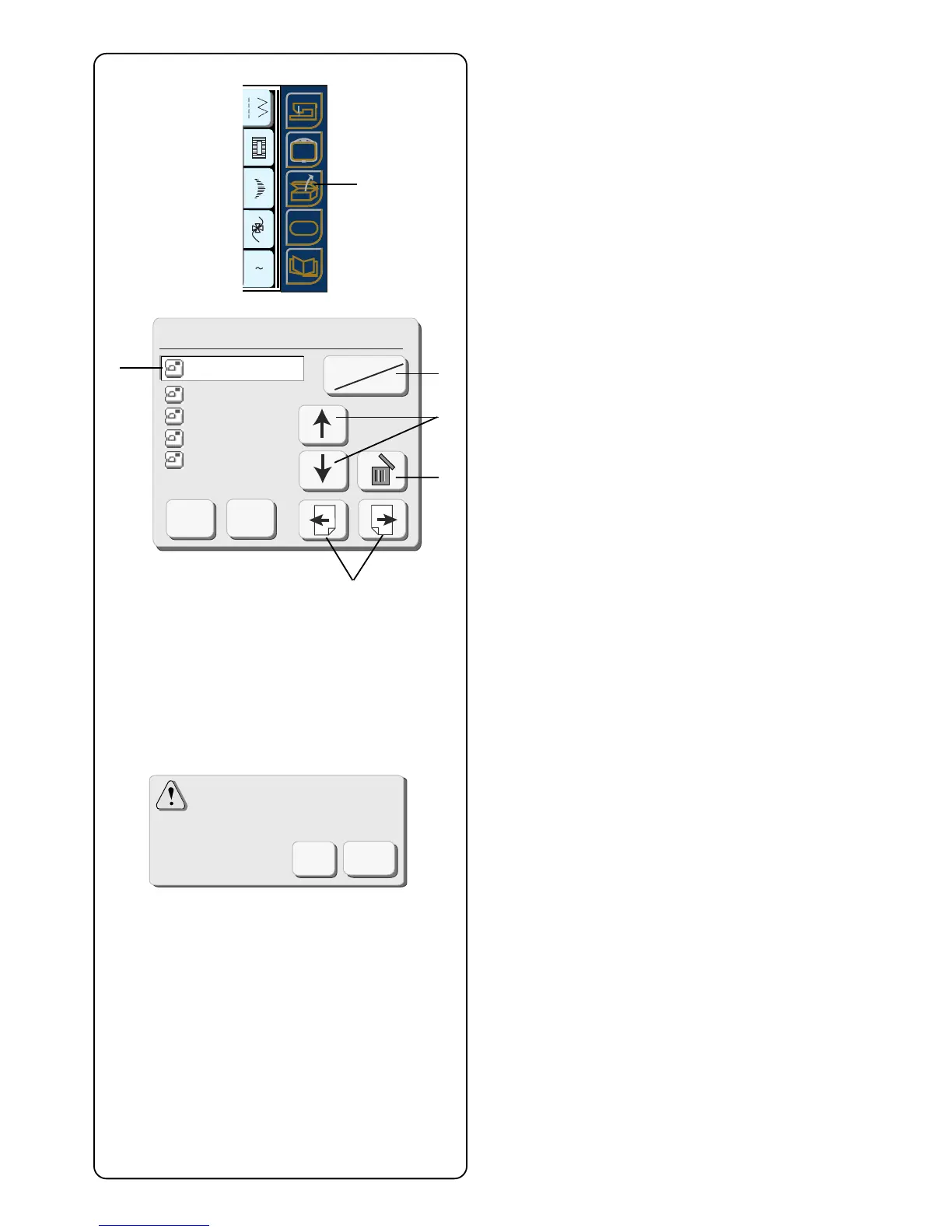
Touch the “Open File” key q.
Open File window will open.
Touch the “Built-in/Card” key w and select the location
of the file directory.
Touch the “File Up/Down” keys e to select the file you
want to open. It will appear in the active name window
r.
The open file window will display 5 saved file names at
a time. Touch the next and previous keys t to view the
other saved file names.
Select the file you want to sew. Touch the “OK” key. The
saved sequence will appear in the window.
Deleting a Saved File
Display the file you want to delete in the active name
window r.
Touch the “Delete” key y.
The confirmation window will open. Touch the “OK” key
to delete. Touch “Cancel” key to close the confirmation
window without deleting the file.
Open File(Built-in)
Cancel
OK
Built-in
Card
M_006
M_007
M_008
SAMPLE
SAMPLE
r
w
e
y
t
Are you sure you want
to delete this file ?
Cancel
OK
A Z
SET
SET
SET
?
q



 To Next Page