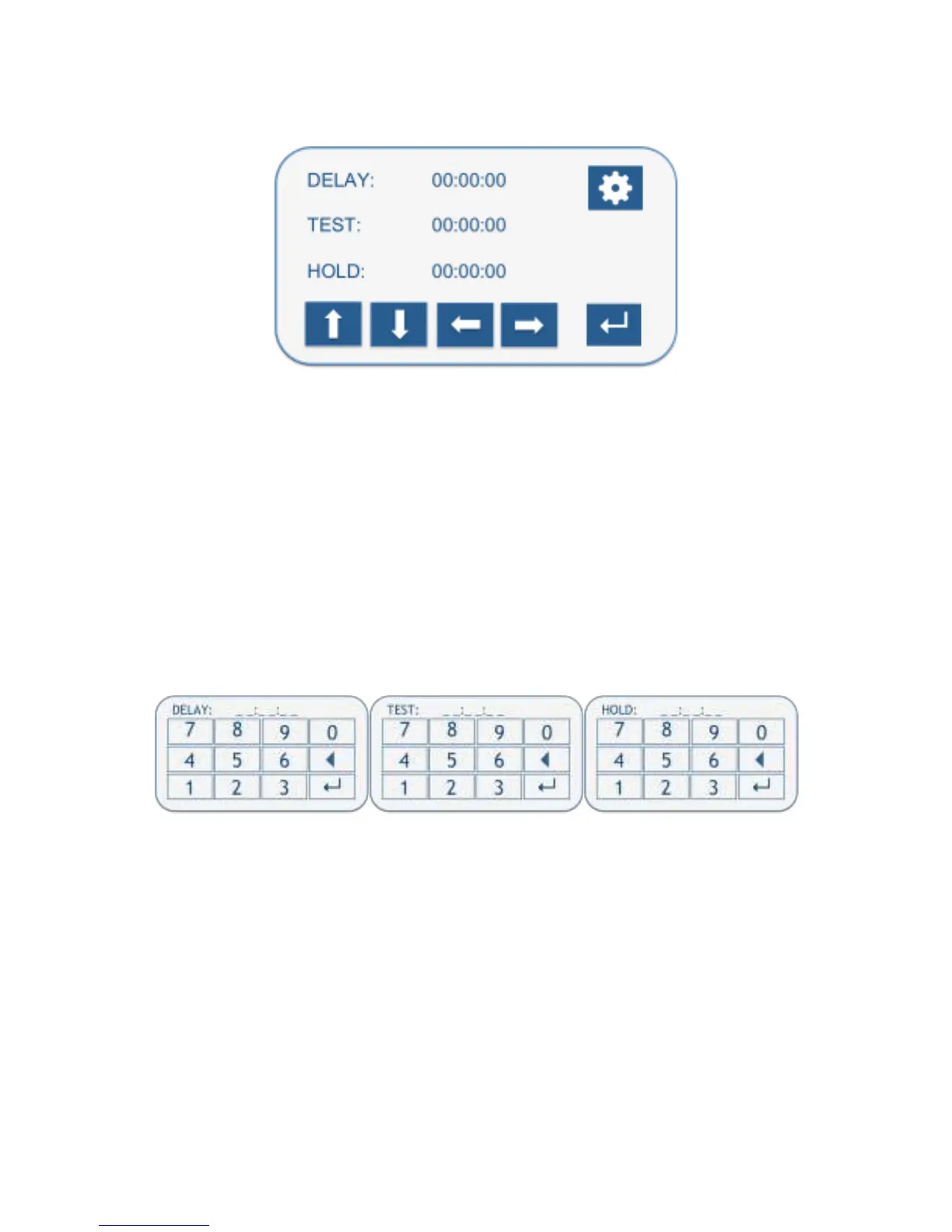
7.1.6 DELAY, TEST, & HOLD (DLY HOLD) Screen View
Delay, Test, & Hold Screen Options
Line 1: DELAY: Numeric Keypad allows use to set a Total Initial Delay to Start up to 23:59:59
Line 2: TEST PERIOD : Numeric Keypad allows user to set a Test Period up to allowed active
sampling time (02:00:00 at 28.3 LPM and 00:30:00 @ 100 LPM)
Line 3: HOLD PERIOD : Numeric keypad allows user to set up to 12:00:00 between Test Periods
DLY HOLD Keypad Views/Entry
DELAY TEST HOLD
ALL: Times shall be entered as HH:MM:SS, with all fields requiring completion.
Example: For a 15 minute hold time, enter: 00:15:00
NOTE: To quickly ZERO out the time (00:00:00) for each parameter, simply select a single numeric
character in the first entry field and hit return. This will ZERO out the time for that
parameter.


 To Next Page