THIS DOCUMENT CONTAINS CONFIDENTIAL INFORMATION PROPRIETARY TO ENERGATE INC. NO PART OF ITS CONTENTS MAY BE DISCLOSED OR CONVEYED TO,
USED BY, OR COPIED TO A THIRD PARTY WITHOUT PRIOR WRITTEN CONSENT BY ENERGATE INC. PRINTED COPIES WILL BE CONSIDERED UNCONTROLLED.
AW000873-G 13
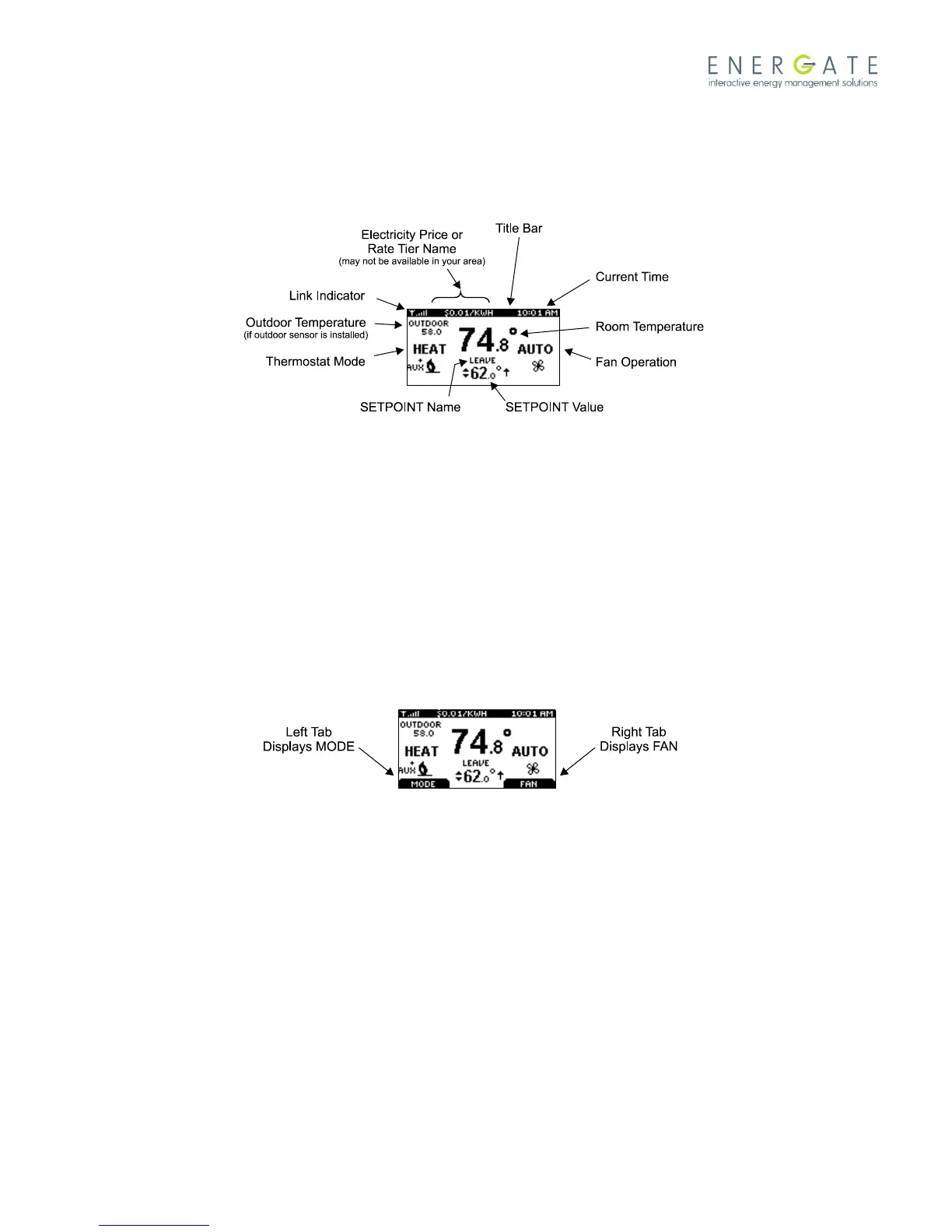
1.2.2 Home Screen
The Home screen displays current temperature and operation data. When the Home screen is in Sleep mode, the
backlight is dimmed (actual brightness level is user-adjustable). Please note that icons such as heat or fan are animated
when the equipment is running.
Note: A SETPOINT (e.g. LEAVE) is identified by a name and specifies both heating and cooling target temperatures. See
the Temperature Settings section for additional information.
When you press any of the buttons, the Home screen becomes active, the backlight brightens, and the MODE and FAN
tabs are shown.
Press the LEFT TAB button to change the thermostat mode (COOL/HEAT/AUTO/EMERG/OFF). The available options for
the thermostat mode depend on the type of heating or cooling equipment at your home. Press the RIGHT TAB button
to change the fan mode (ON/AUTO).
Press the SCROLL (▲ ▼) buttons to adjust the SETPOINT temperatures higher (warmer) or lower (cooler). To accept the
changes, press the LEFT TAB, which displays ACCEPT, or do nothing. They are automatically accepted when the screen
goes to the Sleep mode (that is, the backlight dims).



 To Next Page