THIS DOCUMENT CONTAINS CONFIDENTIAL INFORMATION PROPRIETARY TO ENERGATE INC. NO PART OF ITS CONTENTS MAY BE DISCLOSED OR CONVEYED TO,
USED BY, OR COPIED TO A THIRD PARTY WITHOUT PRIOR WRITTEN CONSENT BY ENERGATE INC. PRINTED COPIES WILL BE CONSIDERED UNCONTROLLED.
AW000873-G 47
9.7 Pager Module (Foundation Models FZ100 and FZ100C Only)
The optional pager module allows electricity providers to communicate remotely with the Foundation thermostat,
using a FLEX pager radio network.
The pager module ships with a cover that replaces the filler plate in Foundation’s casing after the module is installed.
9.7.1 Installation
4. To begin the module installation, remove Foundation from the mounting bracket, even if it is not mounted on a
wall. See 3.7 Removing the Foundation Thermostat from the Mounting Bracket.
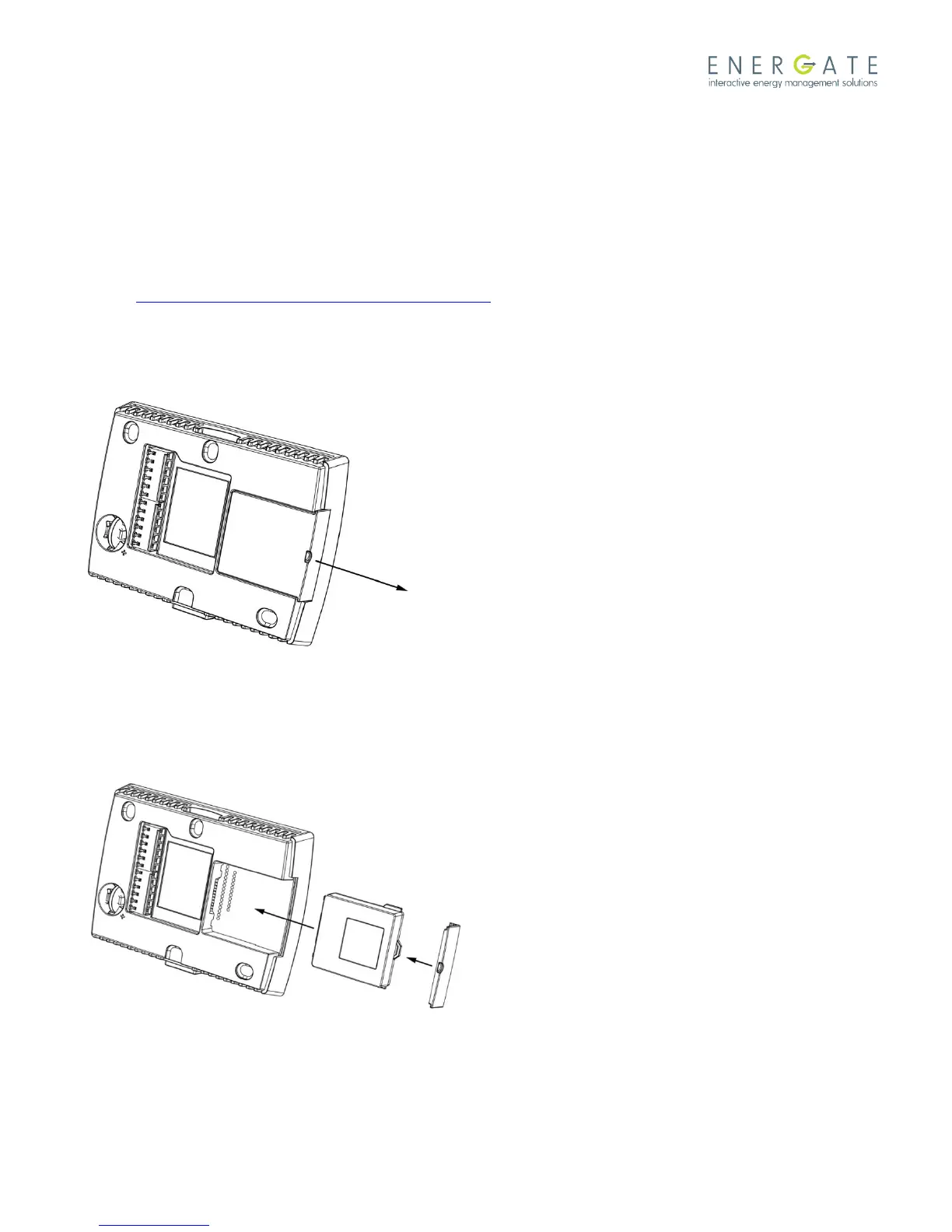
5. Locate the covered module slot on the back of Foundation. Use a small, flathead screwdriver to remove the filler
plate.
6. Slide the module into the slot, ensuring that the tabs that position it are at the bottom, against the circuit board.
Ensure that the module’s pin connector is completely inserted.



 To Next Page