12
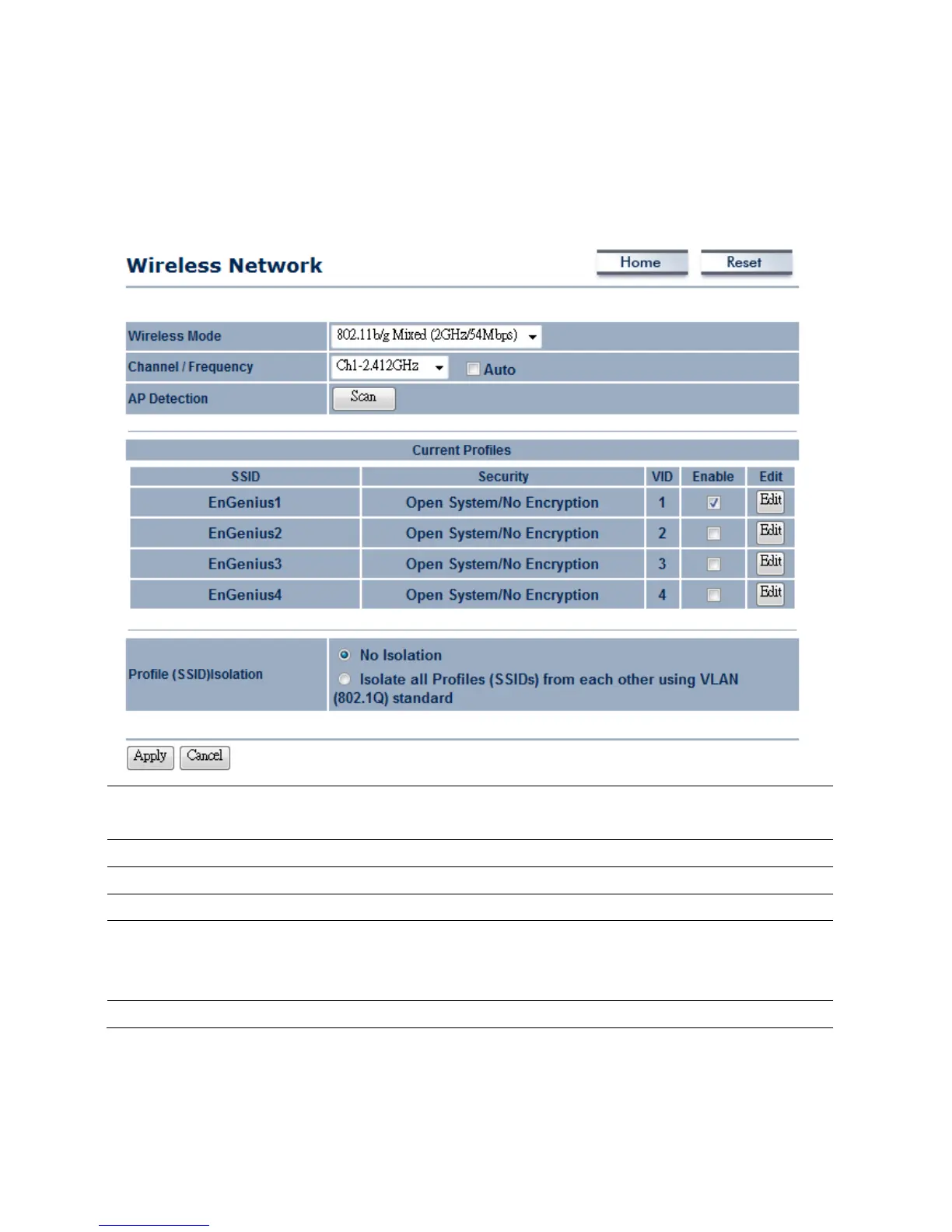
4.2WirelessSettings
4.2.1AccessPointMode
WirelessMode
Selectthedesired802.11standardmodesorSuperGmode.Therearefourdifferent
modesandtheyare802.11b,802.11gOnly,802.11b/gmixedandSuperG.
Channel/Frequency
Thechannelavailabilityisbasedonthecountry’sregulation.
Auto
PlaceaChecktoenableAutochannelselection.
APDetection
APDetectioncanhelptoselectabestchannelbyscannearbyarea.
CurrentProfile
ConfigureuptofourdifferentSSIDs,itcanhelptodividegroupofclientstoaccess
thenetwork.PressEdittoconfiguretheprofileandplaceaChecktoenableextra
SSID.
ProfileIsolation
RestrictedClienttocommunicat ewithdifferentVIDbySelectingtheRadiobutton.
Auction:SuperGisaspecialfeatureinM36.IftheclientdoesnotsupportSuperG,itcannotestablish
awirelessconnectionsuccessfully.













 To Next Page