14
4.2.2RepeaterMode
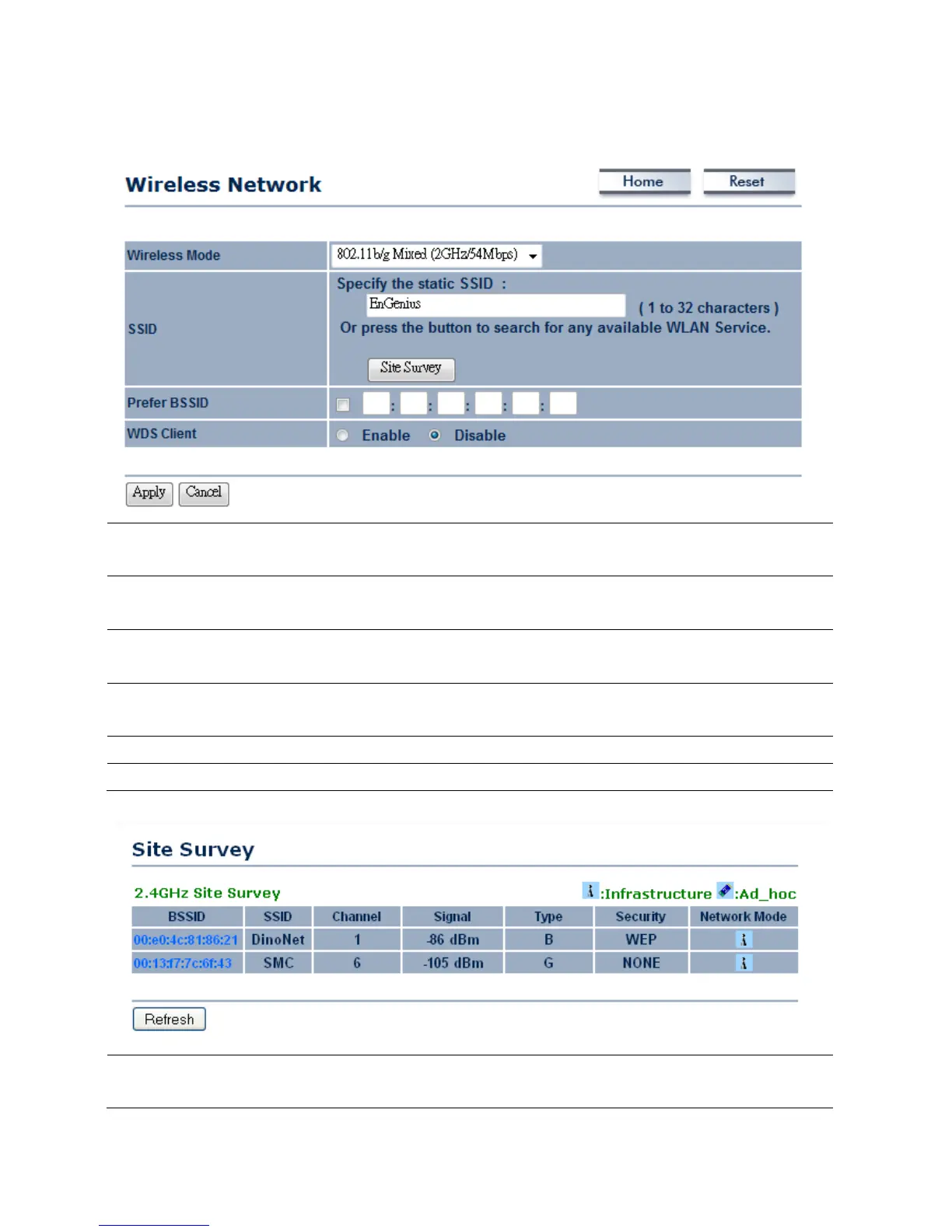
WirelessMode
Selectthedesired802.11standardmodesorSuperGmode.Therearefourdifferent
modesandtheyare802.11gOnly ,802.11b/gmixedandSuperG.
SSID
SpecifytheSSIDifknown.SSIDtextboxwillbeautomaticallyfillinwhenselectanAP
intheSiteSurvey.
SiteSurvey
UsingSiteSurveytoscannearbyAPsandthenselecttheAPtoestablishthe
connection.
PreferBSSID
SpecifytheMA Caddressifknown.PreferBSSIDtextboxwillbeautomaticallyfillin
whenselectanAPintheSiteSurvey.
WDSClient
PlaceaRadiobuttontoEnable/DisableWDSClient.
Apply/Cancel
PressApplytoapplythechangesorCanceltoreturnprevioussettings.
Profile
AfterSiteSurvey,webpagewilldisplayallnearbyarea’sAccessPoint.ClicktheBSSID
ifyouwouldliketoconnectwithit.













 To Next Page