36
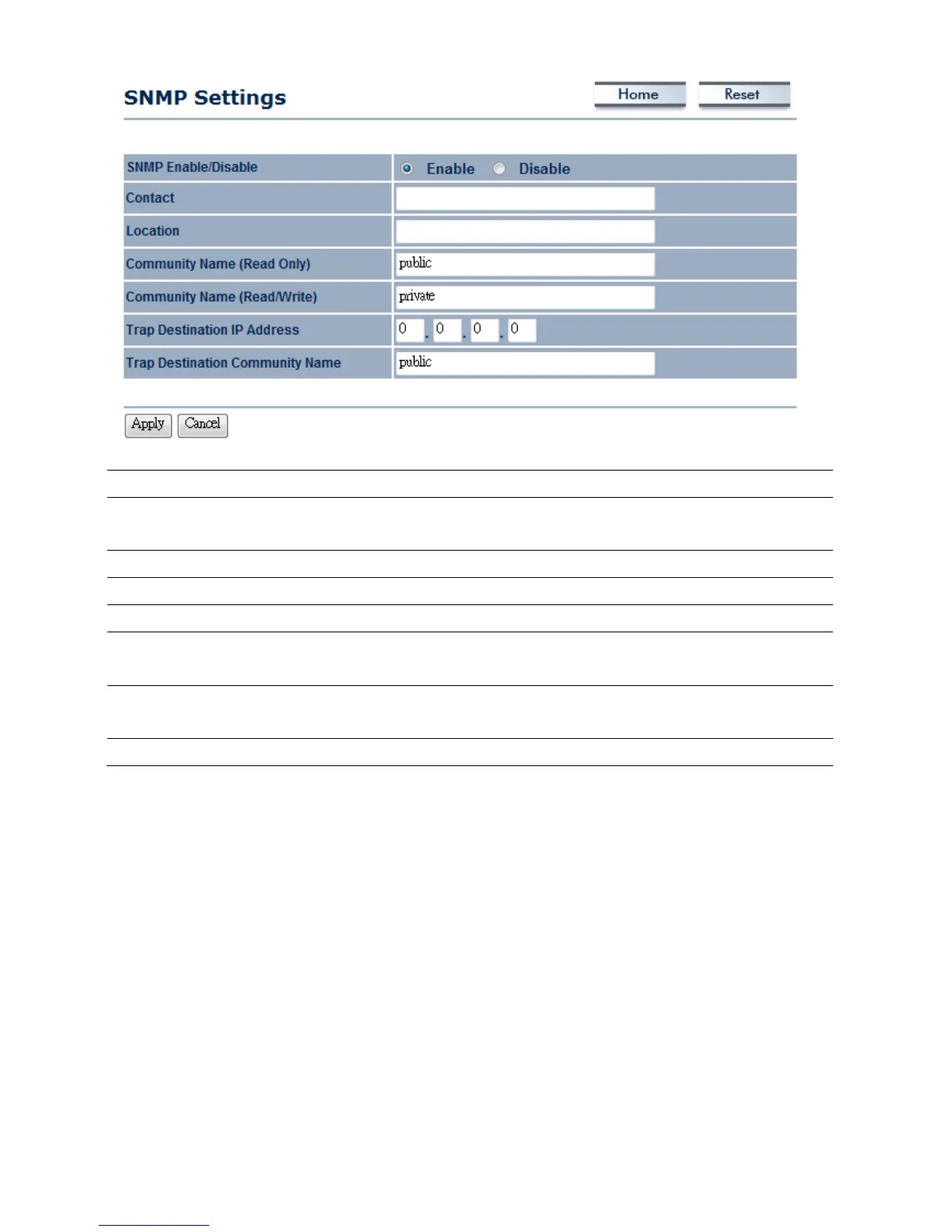
SNMPEnable/Disable
SelecttheRadiobuttontoEnableorDisableSNMPfunction.
Contact
Specifythecontactdetailsofthedevice.Thisoptionisonlyseenonthe
managementtools.
Location
Specifythelocationofthedevice.Thisoptionisonlyseenonthemanagementtools.
CommunityName
SpecifythepasswordforaccesstheSNMPcommunityforreadonlyaccess.
CommunityName
Specifythepassw ordforaccesstheSNMPcommunityforreadandwriteaccess.
TrapDestinationIP
Address
SpecifytheIPaddressthatwillreceivetheSNMPtrap.
TrapDestination
CommunityName
Specifythepassw ordoftheSNMPtrapcommunity.
Apply/Cancel
PressApplytoapplythechangesorCanceltoreturnprevioussettings.
7.4Backup/RestoreSettings
ClickontheBackup/RestoreSettinglinkundertheManagementmenu.Thisoptionisusedtosave
thecurrentsettingsofthedeviceinafileonyourlocaldiskorloadsettingsontothedevicefroma
localdisk.Thisfeatureisveryhandyforadministratorswhohaveseveraldevicesthatneedtobe
configuredwiththesamesettings.













 To Next Page