22
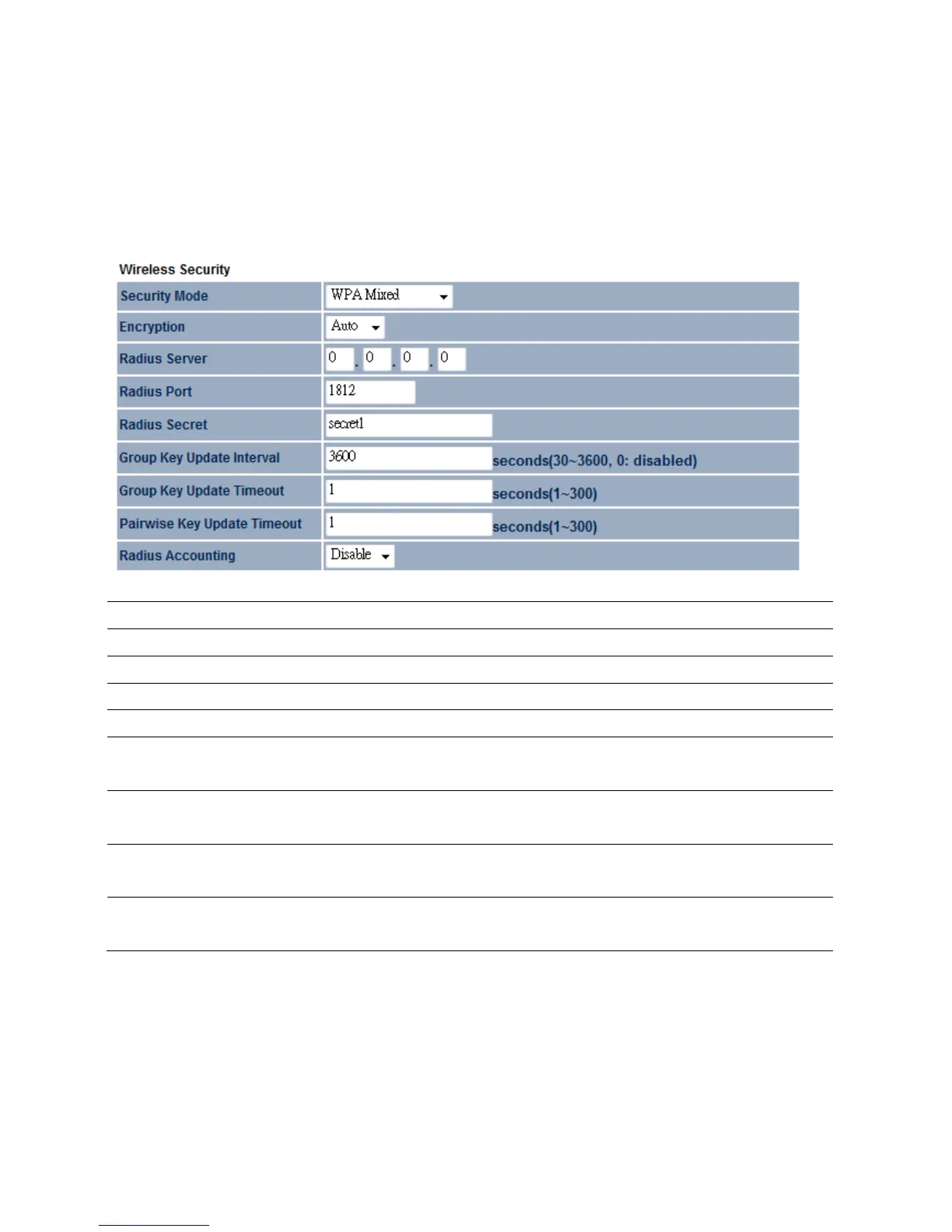
4.3.7WPAMixed
WPAMixedsecuritytypeprovidesflexiblewayforclienttoconnecttotheAccessPoint.Clientcan
eitheruseWPAorWPA2forthesecuritymode.
SecurityMode
SelectWPAMixedfromthedropdownlisttobegintheconfiguration.
Encryption
SelectAuto,TKIPorAESforEncryptiontype.
RadiusServer
SpecifyRadiusServerIPAddress.
RadiusPort
SpecifyRadiusPortnumber,thedefaultportis1812.
RadiusSecret
SpecifyRadiusSecretthatisgivenbytheRadiusServer.
GroupKeyUpdate
Interval
SpecifyGroupKeyUpdateIntervaltime.
GroupKeyUpdate
Timeout
SpecifyGroupKeyUpdateTimeouttime.
PairwiseKeyUpdate
Interval
SpecifyPairwiseKeyUpdateTimeouttime.
RadiusAccounting
SelectEnableorDisableRadiusAccounting.ThedetailofRadiusAccountingisat
nextsection.
Auction:WPAMixedmeansitallowbothWPAandWPA2securitytypestoestablishwireless
connection.













 To Next Page