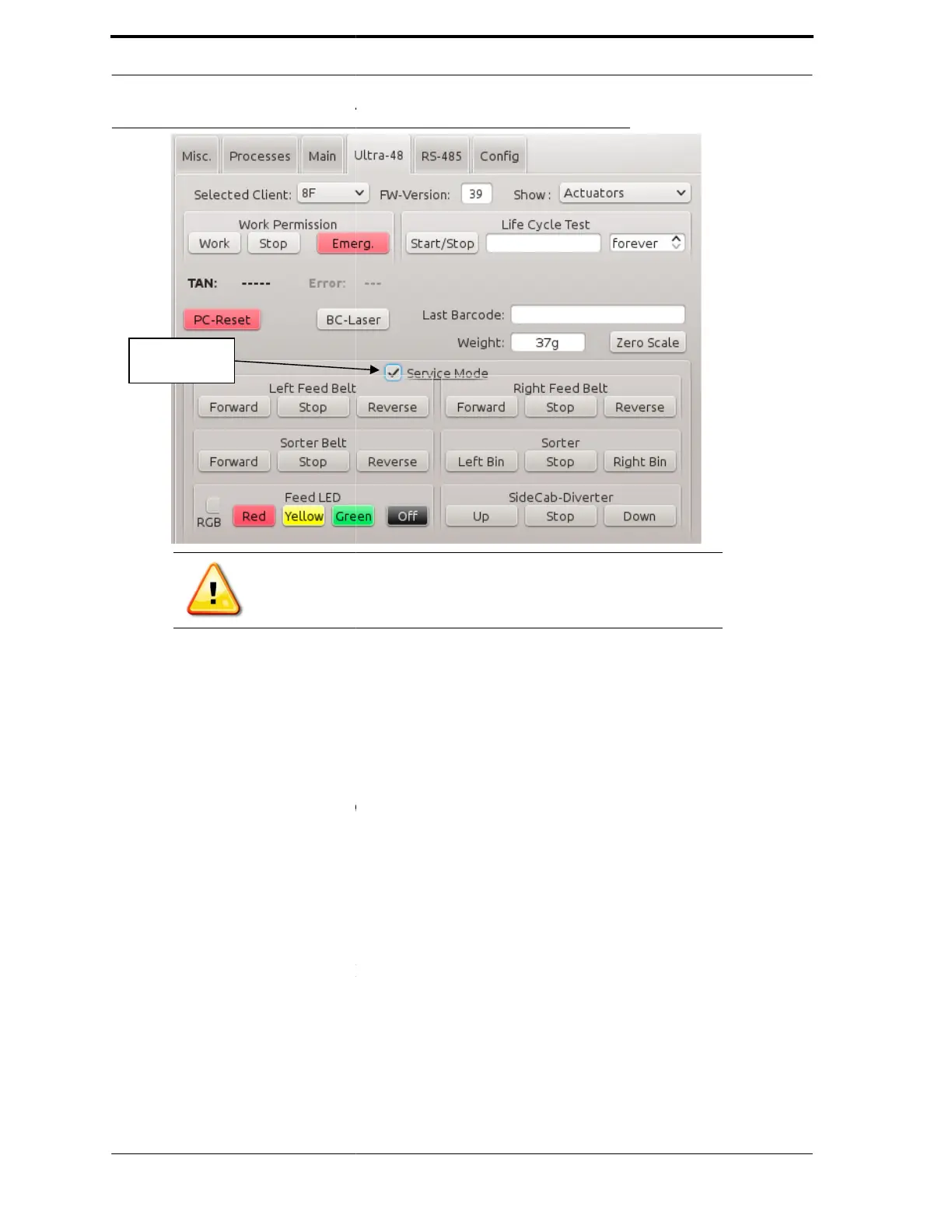
FIGURE 4-10. Diagnostics - Ultra-48
Note:
Check in the
The following is a list of the Ultra-
•
••
• BC-Laser - Turns on to
turns off the barcode scanners when the button is pressed again
inserted while the scanners are on, the barcode will be displayed in Last
•
••
• Weight - Refers to the
to
zero the weight with theconveyorempty.
operation.
•
••
• Left and Right Feed
buttons to advance the
•
••
• Sorter - Turns the
Sorting Cylinder in the
it in the counter-
•
••
• SideCab-Diverter -
button to move the
diverter up to accept cans
move
the diverter down to accept glass
FLEX TRI machine.
Service Mode
Check Box
Mode box to use the actuator buttons.
actuators:
the
barcode scanners when the button is pressed and
turns off the barcode scanners when the button is pressed again
.
inserted while the scanners are on, the barcode will be displayed in Last
conveyor belts. Use the Zero Scale
zero theweightwith the conveyor empty.
Refer to section 6 for detailed
- Refers to the conveyor feed belts. Use the
s forward, stop it, or reverse them.
Cylinder. Use the Left Bin button to move the
direction. Use the Right Bin button to
direction.
the side glass soft drop diverter. Use the Up
diverter up to accept cans
and use the Down button to
the diverter down to accept glass
. This diverter is only used with the
barcode scanners when the button is pressed and



 To Next Page