Chapter 6 Troubleshooting & Repairs
6.5.2.
Chain Replacement
If you need to replace a chain on a compactor or the Sorting Cylinder, follow these steps:
1.
Remove the chain cover, and position the chain so that the master link is in
position on the upper chain sprocket.
2.
Remove the master link from the chain.
3.
Remove the chain from the sprocket.
4.
Place the replacement chain on a sprocket in the same position.
5.
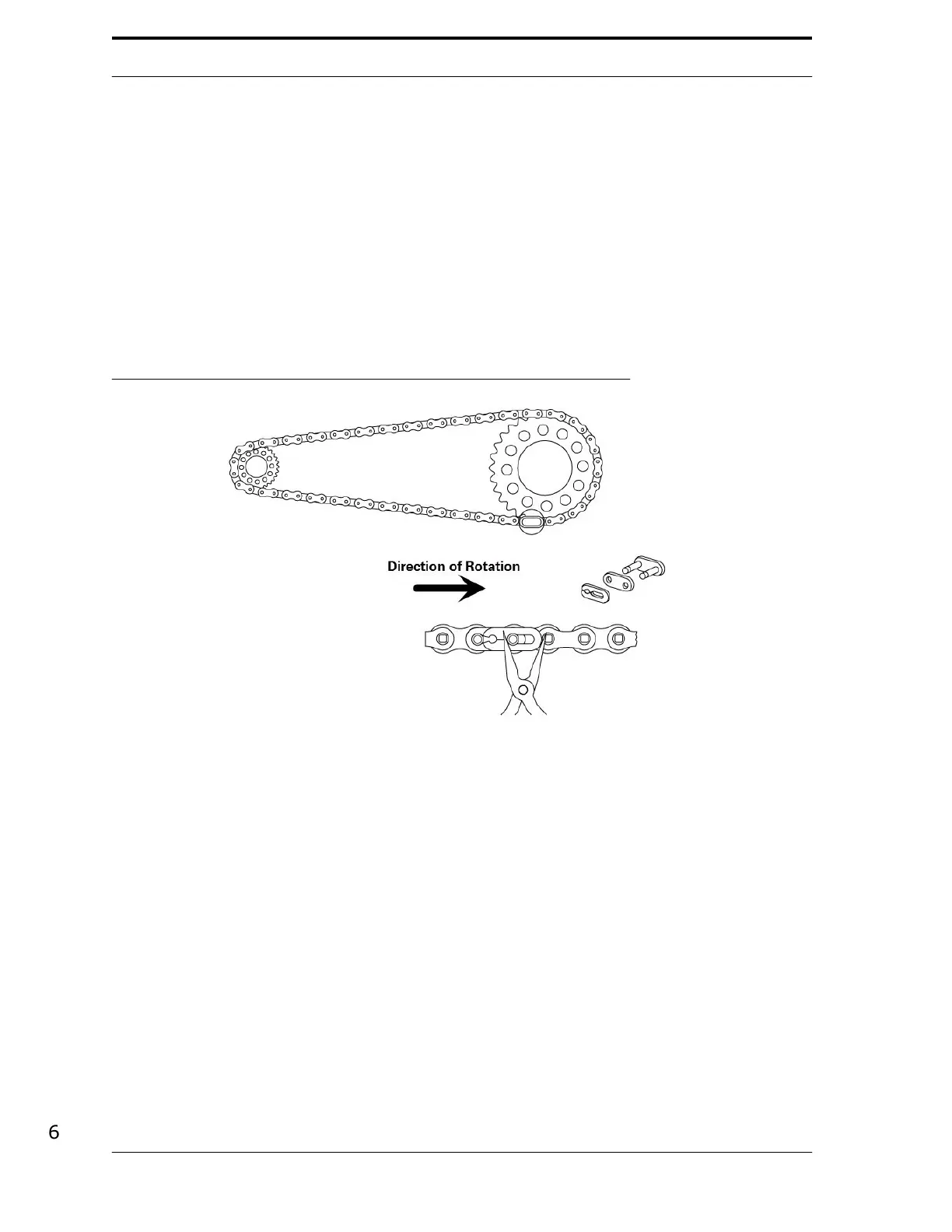
Install the master link, making sure that you place the clip in the proper
position according
to
the
chain’s
direction
of
rotation.
See
Figure
6-5.
FIGURE 6-5. Master Link Clip Placement
6.5.3.
Sensor Replacement
Certain sensors need to be configured when you install them into the
FLEX
. Refer to the following
sections when you replace sensors.
Wenglor Clear Material Sensor (K1R87NCT2)
The Wenglor clear material sensor is factory set for
NC
(normally closed) operation. It must be set
for
NO
(normally open) to operate in the Sensor Scanner Display. When configured for
NO
operation, the indicator light goes off when blocked. To set the sensor for
NO
operation:
1.
Install the new sensor in the Sensor Scanner Display.
2.
Align the sensor to the center of the retro-reflector.
6-8



 To Next Page