EPS NEXUS Manual V1.5.2 EN WWW.EPSBV.EU 11
3.2.4 Hayward VSTD
Configuration on Nexus: Zodiac FloProVS
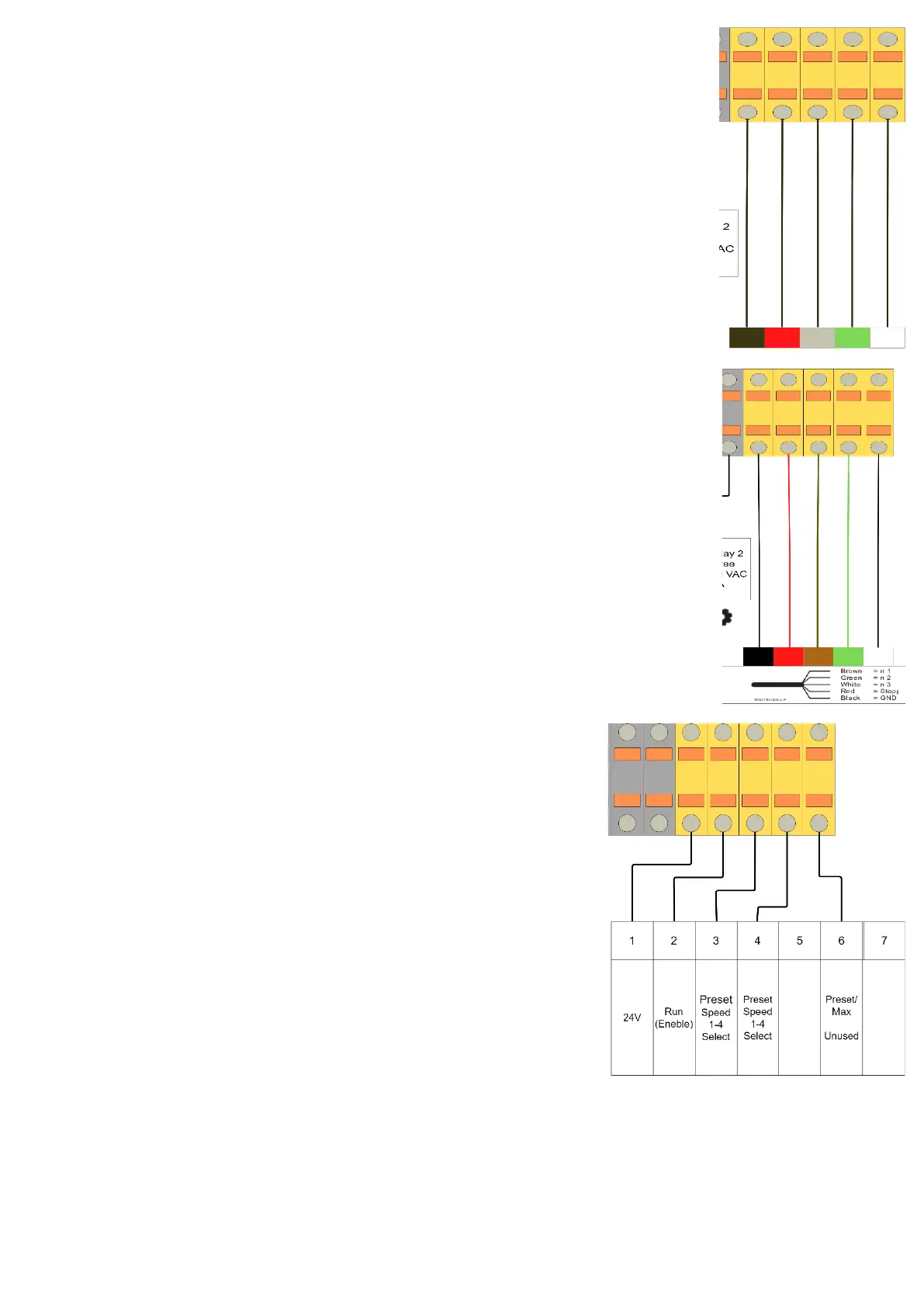
In addition to the power supply as described 'electrical overview', the communication cable needs to be
connected. The connection blocks are on the right and are visualized below.
Turn off prime mode!
The digital inputs can be used in manual or timer mode. They are at the highest priority level: they are
MASTER of all functions used. Only the Run/Stop and DISP/FUNC buttons remain active. When a digital input
is used, the LED associated with the corresponding LED flashes rapidly (DI1 = V1, DI2 = V2 or DI3 = V3).
3.2.5 Speck BADU Eco Touch & ECO VS
Configuration: STL-1
In addition to the power supply as described 'electrical overview', the communication cable needs to be
connected. The connection blocks are on the right and are visualized below.
Switch off prime mode!
1. Press the S button for 3 seconds.
2. Press info button until you see setting 't'
3. Set this setting to 0 (t oFF) and press 's'
4. Use the info button to go to setting E
5. Change the setting to dI (digital input).
6. Press 's'
3.2.6 Optidrive e2
Terminal mode P-12=0, P-15=2 (See Invertek manual H7.1)


 To Next Page