EPS NEXUS Manual V1.5.2 EN WWW.EPSBV.EU 52
5.13 Setting up and operating Hulprelais
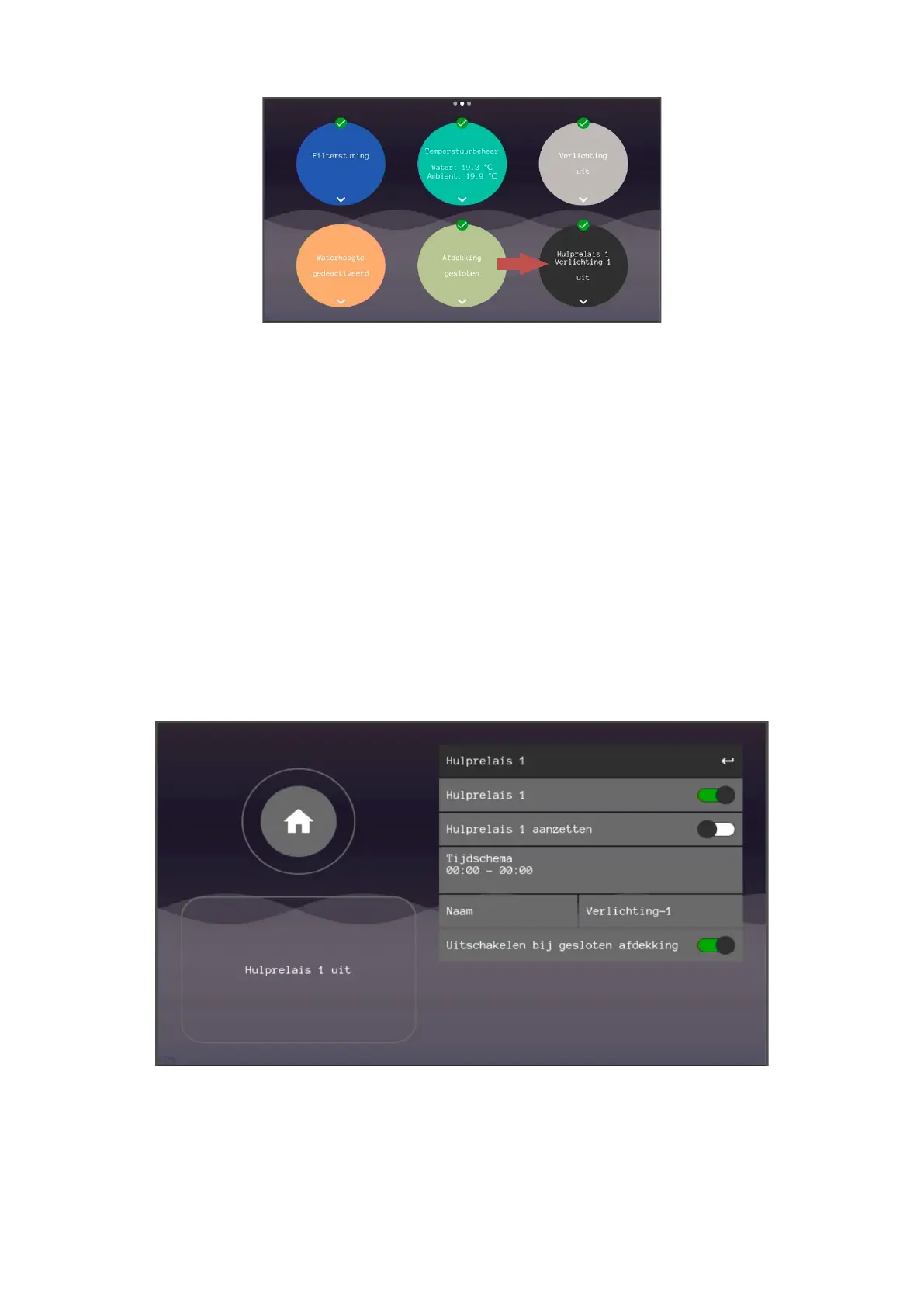
The auxiliary relays can be operated by going to the respective controller on the touchscreen. Each auxiliary relay has its own menu. There
are a total of four auxiliary relays and up to four additional devices can be switched.
1. Enabling auxiliary relays
This allows the entire control to be switched on and off. Regardless of the status of the relay, the control stops when this component is
turned off.
2. Active button
With the active button, the respective relay can always switch on and off, regardless of the set schedule.
3. Timetable
With a timetable you can fully organize a week from 00:00 to 23:59. After pressing 'confirm' you will be given the choice to enter the desired
days. After your choice, press 'confirm'.
4. Name
You can choose from a selection of names to remind you which auxiliary relay does what.
5. Switch off when the cover is closed
This function gives the possibility to block or switch off the relay when the deck is closed. This is, for example, for a countercurrent machine.
1. If the installation does not require an auxiliary relay or not all auxiliary relays, the user can completely switch off the
respective auxiliary relay by means of the on/off slider "Hulprelais x".


 To Next Page