EPS NEXUS Manual V1.5.2 EN WWW.EPSBV.EU 26
4 Activate online web app
Make sure the system is connected to the Internet.
Network connection:
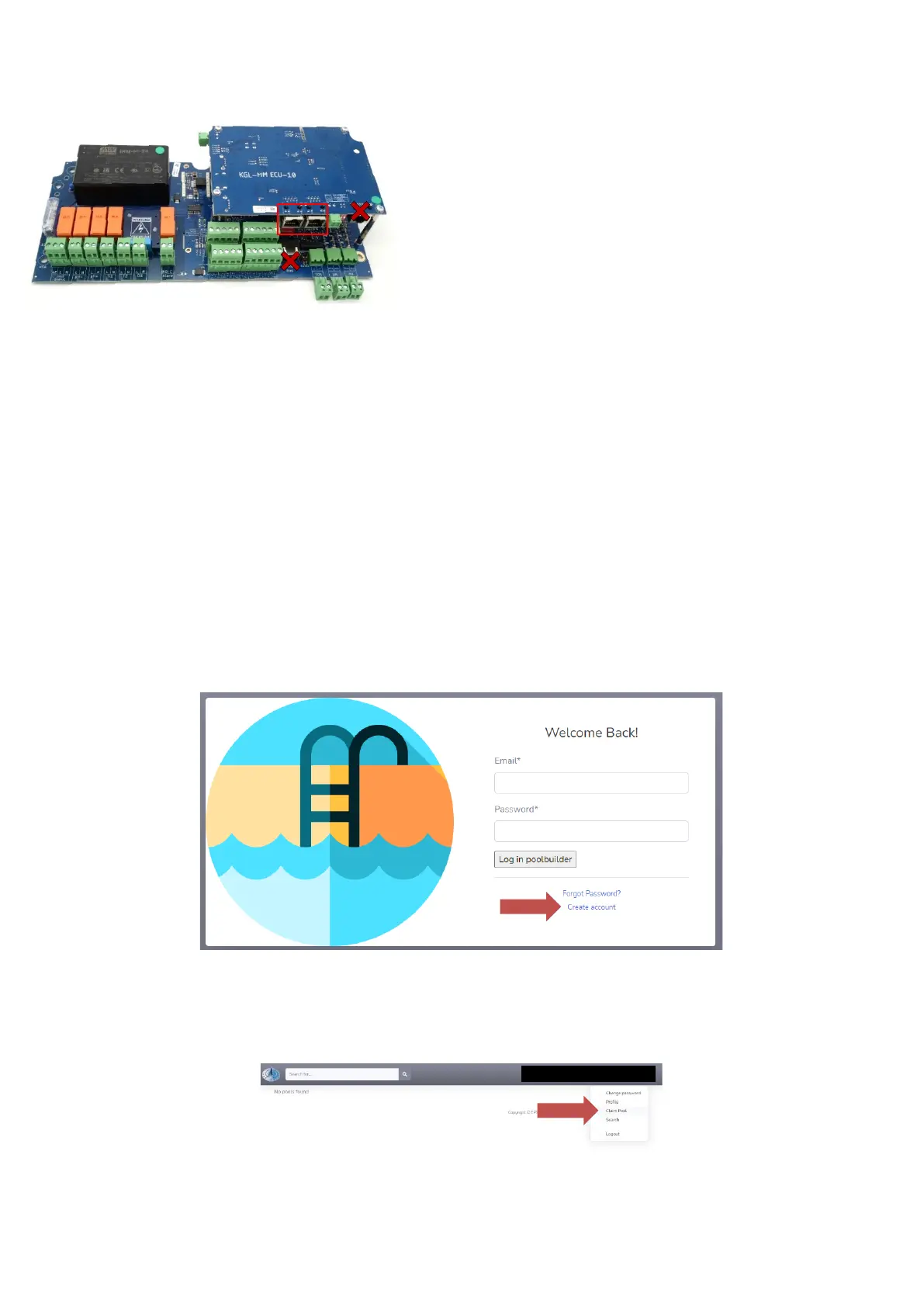
Network: To provide the system with the Internet to use the online environment, a UTP cable -connected to the Internet- must be
connected. Refer to the network input framed in red.
• Internet can be offered via:
• Network router;
• Power network adapter;
• 3G/4G/5G receiver;
• Wi-Fi amplifier;
Network switch
Then check the connection status (#10) on the touch screen.
4.1 For pool builders/installers/maintainers/managers
• Go to http://poolbuilder.smartpoolcontrol.eu/
• If you do not have an account, you can create one by pressing the create account button.
o Enter the required information.
o After your account is created, your account request must be approved by the manufacturer of your system.
• After your account is approved-or you already had an account-you can log in.
• Make sure your system is Internet-enabled and "on.
• Press claim pool and enter the mac address, complete with ':' characters.
So for example : 00:14:2D:A4:AA:AE:F1 and then press safe. The mac address can be found in the checklist. Always make sure that a mac
address is already added before the end customer creates an account. A pool MUST first be claimed by an installer/pool builder.


 To Next Page