EPS NEXUS Manual V1.5.2 EN WWW.EPSBV.EU 30
5.2 Status of control and indications
5.2.1 Scaling and setpoint
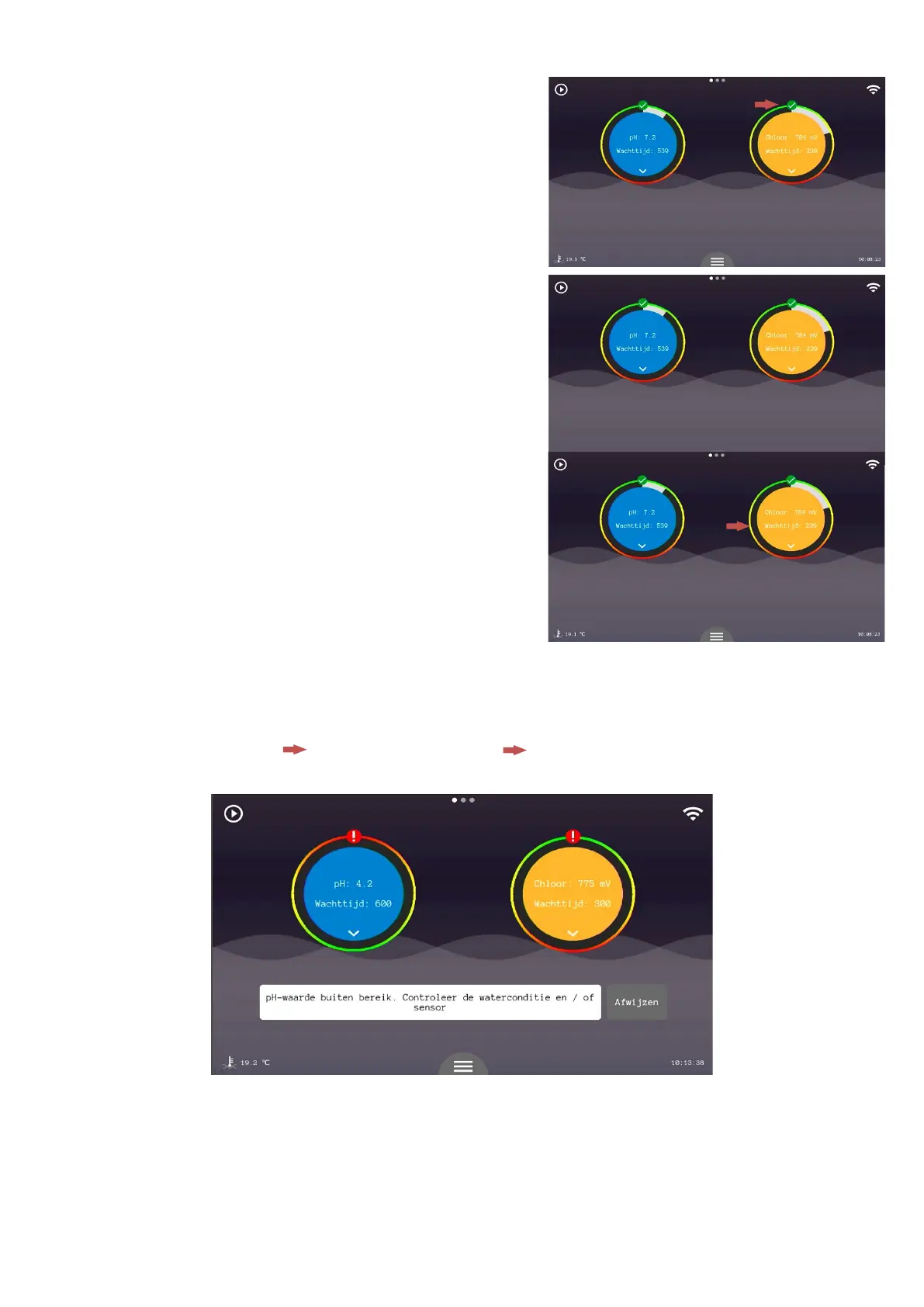
In the display screen there is always a scale to see here it is easy to see if the
measured value is also good. If the outer ring with the green part is at the top it
means that the measured value is good in relation to the entered setpoint.
If the value is low compared to the entered setpoint then the outer ring will
rotate. The green part will go down and the red part will go up. This shows that
the measured value is not ideal.
BWhen the value is too high, the same thing happens as when the value is too
low. The outer ring will then turn counterclockwise. The further the measured
value is away from the setpoint the further the red part of the ring turns up.
When a value is outside the working range of the system the automation will stop. Action must be taken. Read the message and check the
water condition and the sensor for possible defects.
Both controls will receive a '!' above the control while only the pH has gone outside the working range. In fact, both controls will stop when
one of the controls detects an abnormal value.


 To Next Page