EPS NEXUS Manual V1.5.2 EN WWW.EPSBV.EU 45
5.8.2 Timer and start backwash
In the backwash menu you can select a timer. Here you can enter how many weeks you want to have between two rewind actions. One
week is the minimum. For more frequent backwashing you can use the 'start backwash' button.
With automatic backwash systems, you don't have to do anything. The backwash procedure will be carried out according to the set speed
and duration. Semi-automatic backwash installations cannot be handled fully automatically. The system displays a pop-up alerting you that a
backwash procedure needs to be performed. Then press 'OK', go to the backwash menu, press 'start backwash' and follow the on-screen
instructions.
1. ATTENTION! A backwash procedure can never be closed early. In case of emergency, turn off the system via the on/off
switches on the housing. Always use both switches to stop the system immediately.
5.9 Temperature management
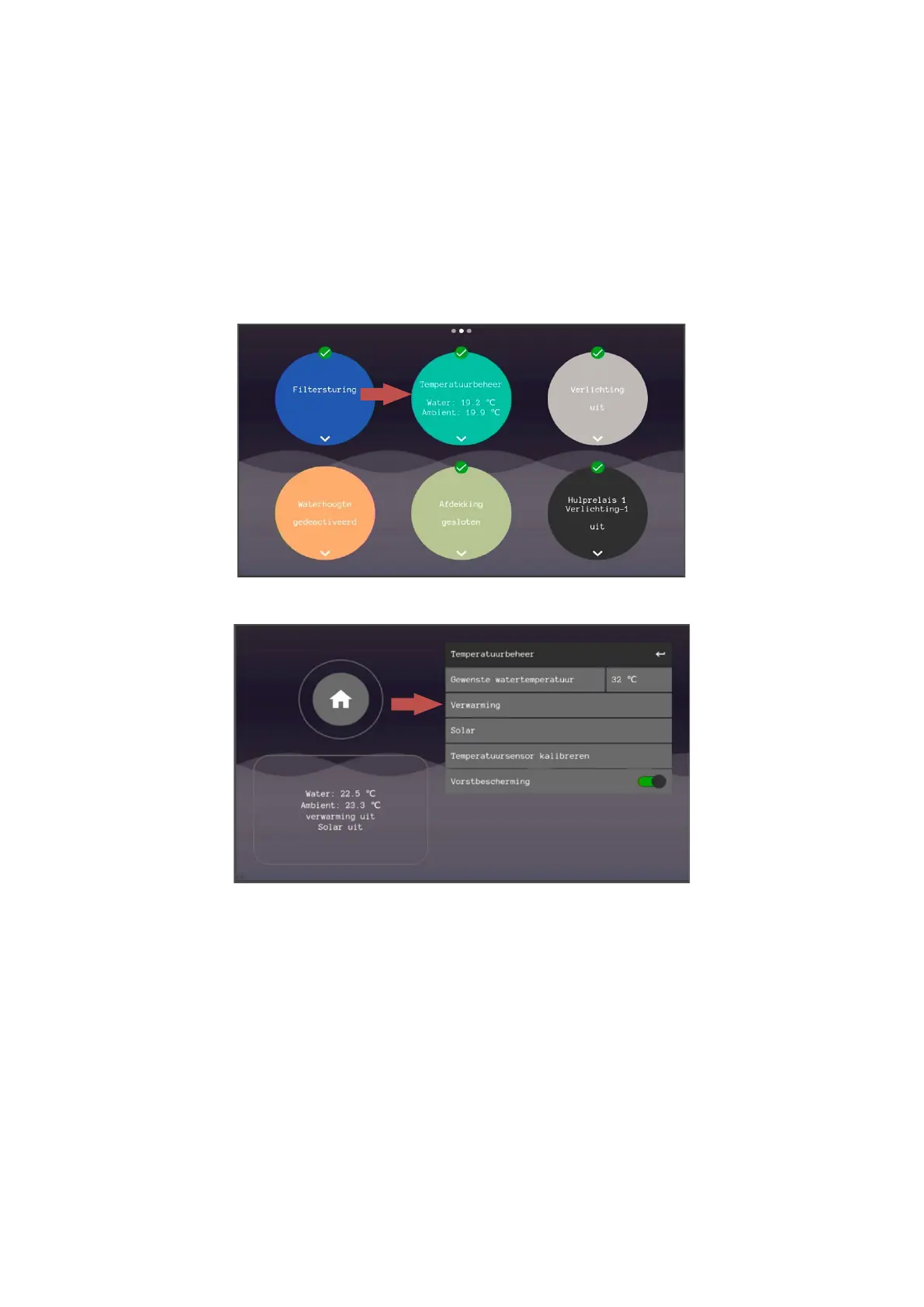
Under the sphere 'Temperature management' the desired pool temperature can be set.
Under the heading 'heating' the heating control can be activated and set.
After turning on the heating, the heating can therefore turn on if the set point has not yet been reached. This only happens during the set
filter hours.
1.
Heating control – This allows the entire control to be switched on and off.
2. Interval – Minimum power-on time when the set point is not reached. This is intended to prevent commuting.
3. Heating priority – This ensures that the heating can also be switched on outside the set filter hours. This is intended to
achieve the set point as quickly as possible.
4. Cooldown period – This is intended to allow heating units to cool down when it needs to turn off. The flow will be
maintained for the specified time.
5. Frost protection – From an air temperature of 3 °C, the pump is switched on, regardless of the settings in the filter
schemes.
1. Make sure the air temperature sensor is connected and placed outside, at hip height (1meter from the ground)
and in the shade. This is the only way to achieve a correct outdoor temperature measurement.
6. If the installation does not have heating, the user can switch off this control completely by means of the on/off slider
"Heating control".


 To Next Page