EPS NEXUS Manual V1.5.2 EN WWW.EPSBV.EU 34
5.6 Algemene instellingen
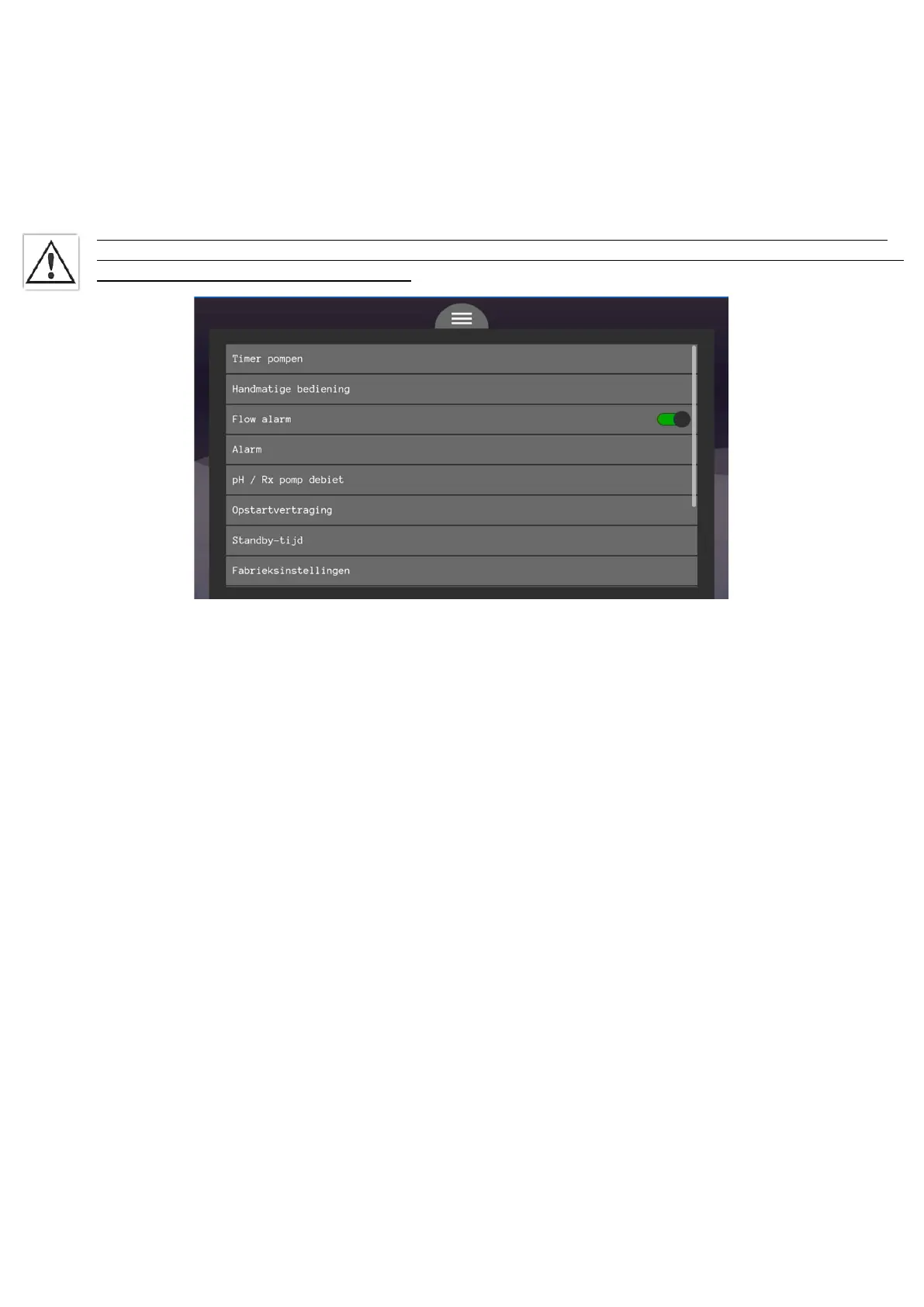
• Timer pump 1 and 2
A timer pump is a function that causes a dose to be performed every x hours. These can also be third-party devices.
Waiting time: a timer pump will activate the pump every time -if the waiting time is past the set dosing time. This allows a dose to be
performed every x hours.
Dosing time: the dosing time determines the size of each dose. You can calculate this by looking at the pump flow rate of the respective
device.
• Manual control
In manual mode, all actuators can be activated without any control/restriction. Caution! This menu is intended for authorized
personnel only. If you are incompetent or unsure of its operation, do not use this menu! The menu is protected with a PIN code.
The code can be found at the back of this manual.
• Flow alarm
This button allows you to disable the flow alarm. Do this only when additional safety measures have been taken for heating, dosing and
other components that require a certain flow rate.
• Alarm
In this menu you can switch the alarm contact N/O or N/C. The alarm contact is intended to alert external devices to errors and/or alarms.
• pH/Rx pump flow rate
In this menu you can select the pump flow rate of your connected pump. This affects your shock treatment.
• Start-up delay
This parameter ensures that dosing of correction fluids does not take place until this start-up delay time has elapsed. The time should be
selected to allow the system to reach a steady state before it is allowed to start correcting. 1 minute is usually sufficient, but should this not
be the case this can be adjusted.
• Standby time
Here you can set after how much time the display goes into 'sleep mode'. This means that the display is no longer illuminated, but you can
still read the display. Press any button to make the display light up again.
• Factory Settings
Here you can do a complete reset of the system. The system then goes all the way back to factory settings. This can be used, for example, to
get an excessive offset out of the system.
• Date
Adjust the date here if necessary.
• Time
Adjust the time here if needed.
• Language
Here you can choose the language, consisting of NL-FR-DE-EN.


 To Next Page