EPS NEXUS Manual V1.5.2 EN WWW.EPSBV.EU 37
5.7.2 Filter schedules.
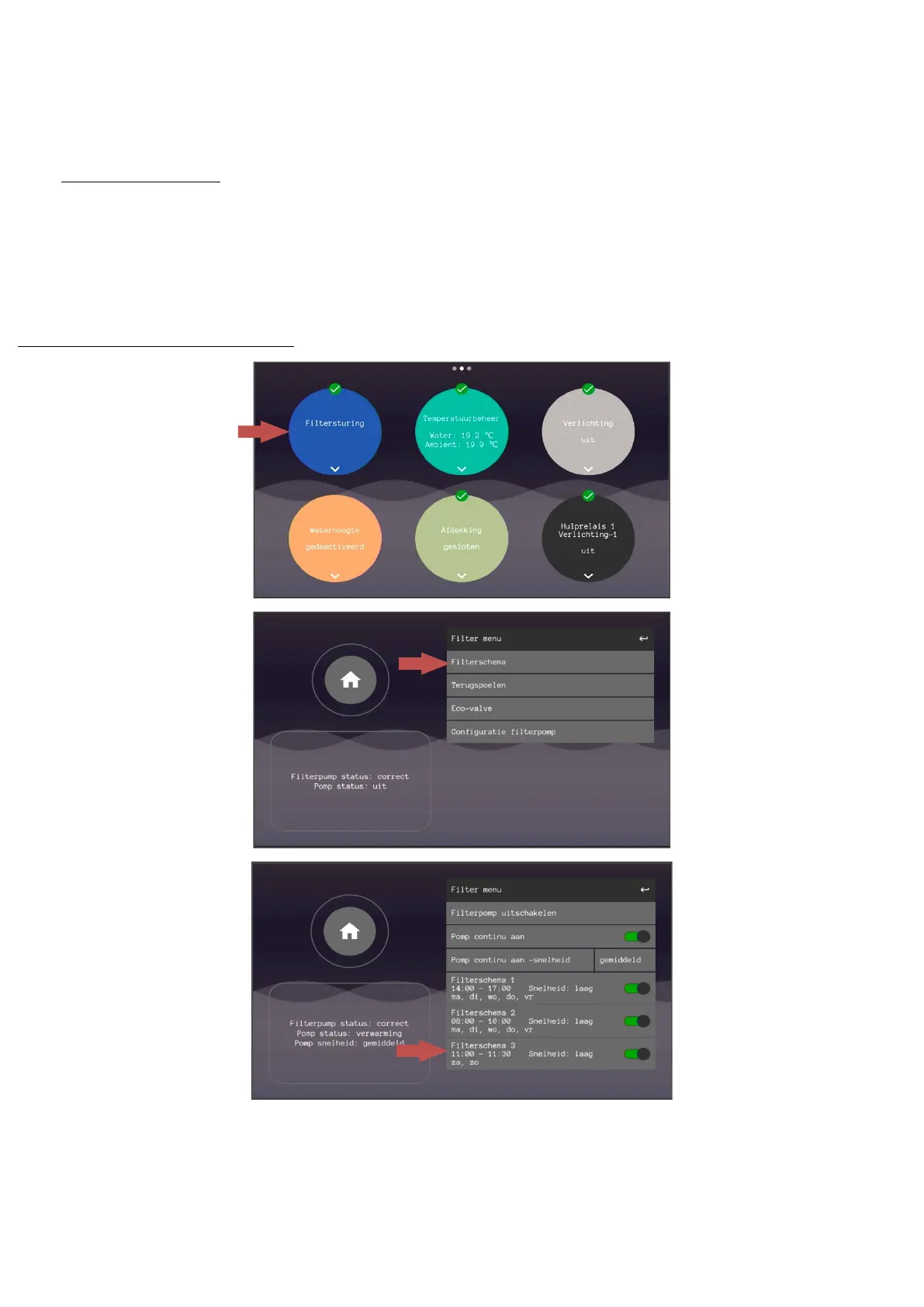
To run the pump at the desired time, at least one of the three filter schedules must be set. A schedule is always per 24 hours, days are selected
separately. Filter schedule 3 is already set by default and can be enabled directly by tapping the slider. For an adjustment to the control, the
rule itself can be tapped.
To set a filter scheme go to 'filter control', 'filter scheme' and select one of the schemes. Step by step you can set all the parameters there. By
pressing confirm, you confirm the selection and proceed to the next step. When all steps have been completed you will return to the filter
menu. So always press confirm.
Different schedule may overlap and this is not a problem. The priority of the filter schedules is as follows:
1: Filter schedule 1 (highest priority)
2: Filter scheme 2
3: Filter schedule 3 (lowest priority, so set the main filter period here)
The set speed has no effect on the priority.


 To Next Page