Setup & Operation 14. Option Slots
RC700 / RC700-A Rev.23 91
14.4 RS-232C Board
14.4.1 About the RS-232C Board
One standard RS-232C port is not available with the Controller.
You need to mount the RS-232C board in the Option Slot to communicate with external
equipment using two or more port RS-232C.
The RS-232C board accepts two ports expansion per board. A maximum of two
boards/four ports expansion is available for RS-232C board.
When using the Force Sensor I/F board, a maximum of one board/two ports expansion is
available for RS-232C board.
Port Number
Port numbers are assigned as follows.
#2, #3 First RS-232C board
#4, #5 Second RS-232C board
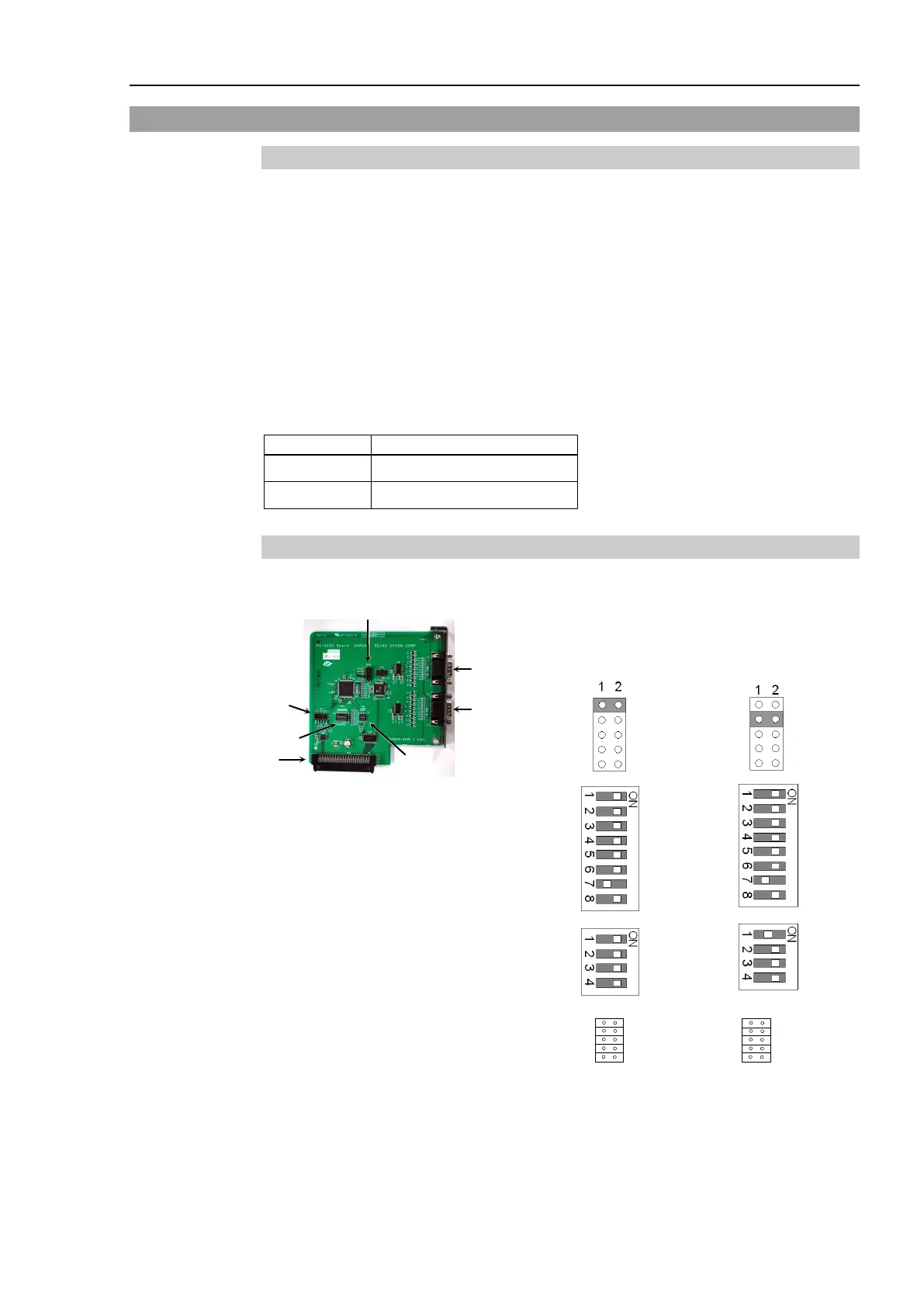
14.4.2 Board Setup (RS-232C)
Switch and Jumper Configuration
Set DSW1, DSW2 and JMP1.
CN3 is all open.
SW1
SW2
SW3
SW4
SW5
SW6
SW7
SW8
IRQ5
IRQ
7
IRQ10
IRQ11
IRQ15
SW1
SW2
SW3
SW4
SW5
SW6
SW7
SW8
IRQ5
IRQ7
IRQ10
IRQ11
IRQ15



 To Next Page