Chapter 2 Setup
49
2
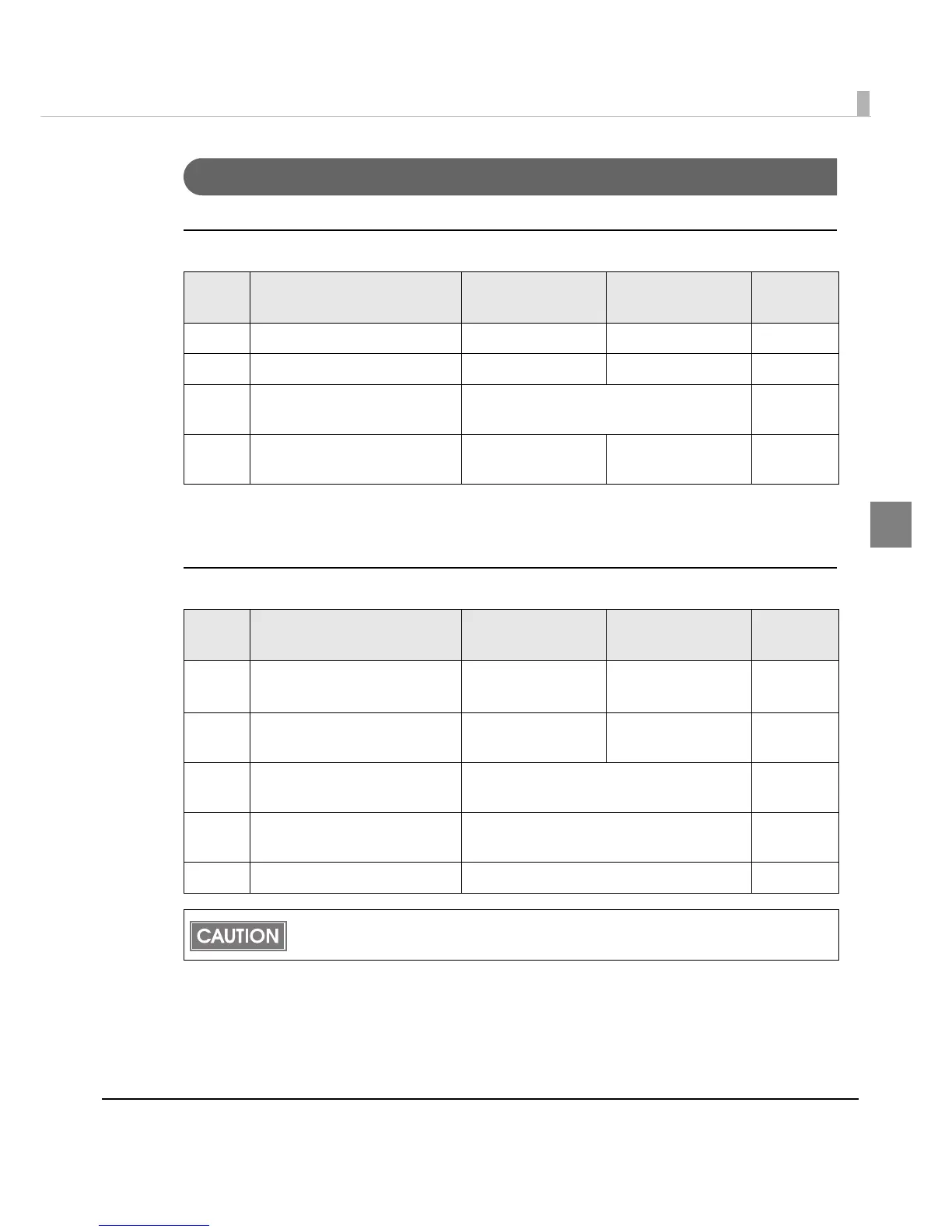
For Built-in USB Interface
DIP Switch Bank 1
*: Valid only when the system configuration is set so that the USB driver can support the USB power-saving
function.
DIP Switch Bank 2
SW Function ON OFF
Factory
setting
1-1 Auto line feed Always enabled Always disabled OFF
1-2 Receive buffer capacity 45 bytes 4 KB OFF
1-3 ∼
1-7
Reserved Fixed to OFF OFF
1-8
Setting of USB power-saving
function*
Disabled Enabled OFF
SW Function ON OFF
Factory
setting
2-1 Handshaking (BUSY condition) Receive buffer full
• Offline
• Receive buffer full
OFF
2-2
Customer display (DM-D)
connection
Connected Not connected OFF
2-3 ∼
2-4
Selects print density
See "Selecting the Print Density (DIP
Switches 2-3/2-4)" on page 51.
OFF
2-5 ∼
2-7
Reserved Fixed to OFF OFF
2-8 Reserved Fixed to ON ON
For DIP switch 2-1 (BUSY condition), see also "Selecting the BUSY Status" on page 52.


 To Next Page
 Loading...