Rectifying faults
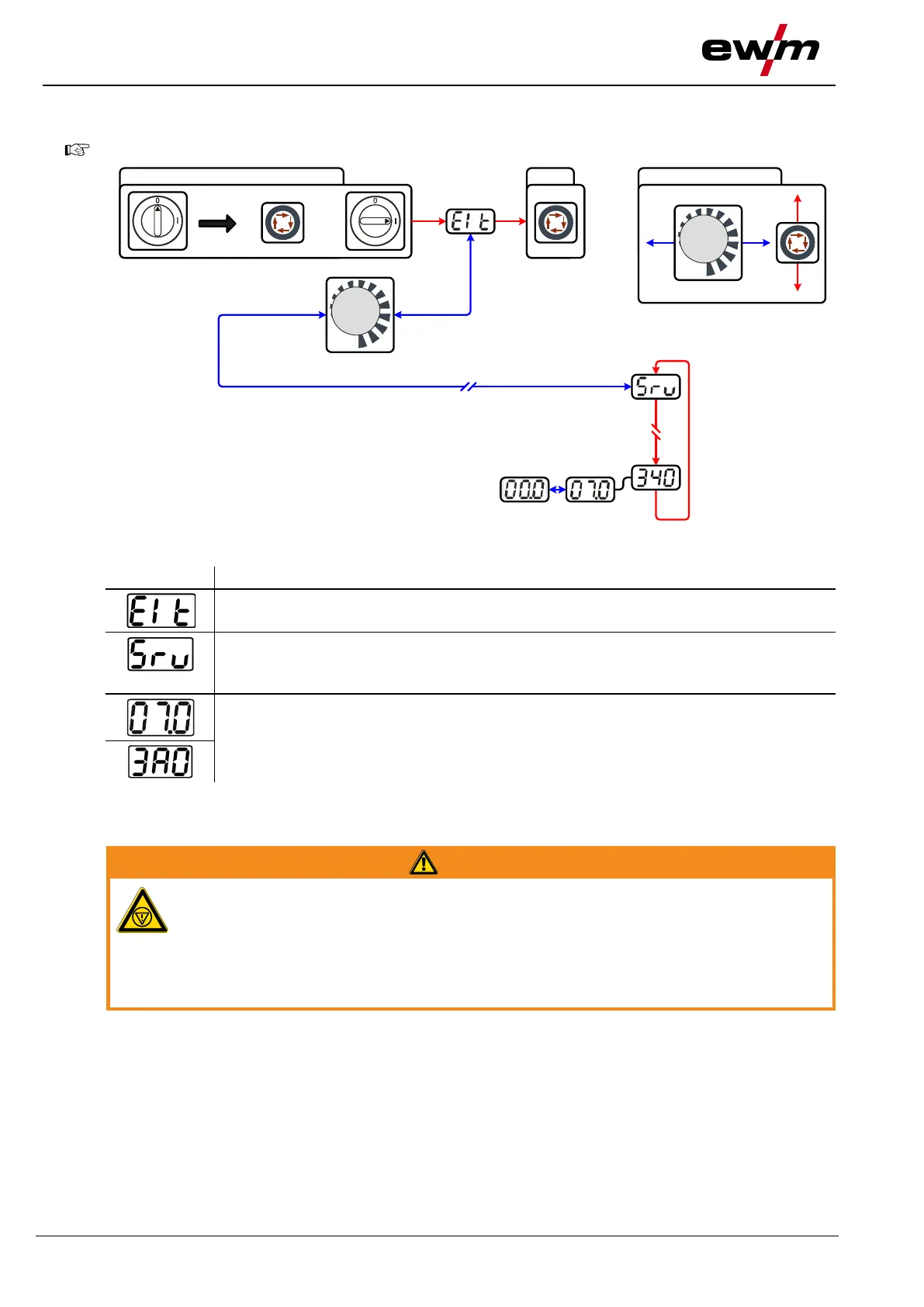
Display machine control software version
099-000121-EW501
29.06.2015
7.5 Display machine control software version
The query of the software versions only serves to inform the authorised service staff!
Figure 7-2
Service menu
Modifications to the service menu may only be carried out by authorised maintenance
staff!
Software version query (example)
07= System bus ID
03A0= Version number
System bus ID and version number are separated by a dot.
7.6 General operating problems
7.6.1 Interface for automated welding
No function of the external interrupt equipment (emergency stop switch)!
If the emergency stop circuit has been realised using an external interrupt equipment
via the interface for automated welding, the machine must be configured for this setup.
If this is not observed, the power source will ignore the external interrupt equipment
and will not shut down!
• Disconnect jumper 1 on PCB T320/1 (Tetrix / forceTig) or M320/1 (Phoenix / alpha Q)!








 To Next Page