EasyManua.ls Logo

EWM Tetrix 300 - Set the Operating Principle (Conventional;Synergic)

EWM Tetrix 300
109 pages
Print Icon
To Next Page IconTo Next Page
To Previous Page IconTo Previous Page
Loading...
Design and function
TIG welding
38
099-000121-EW501
29.06.2015
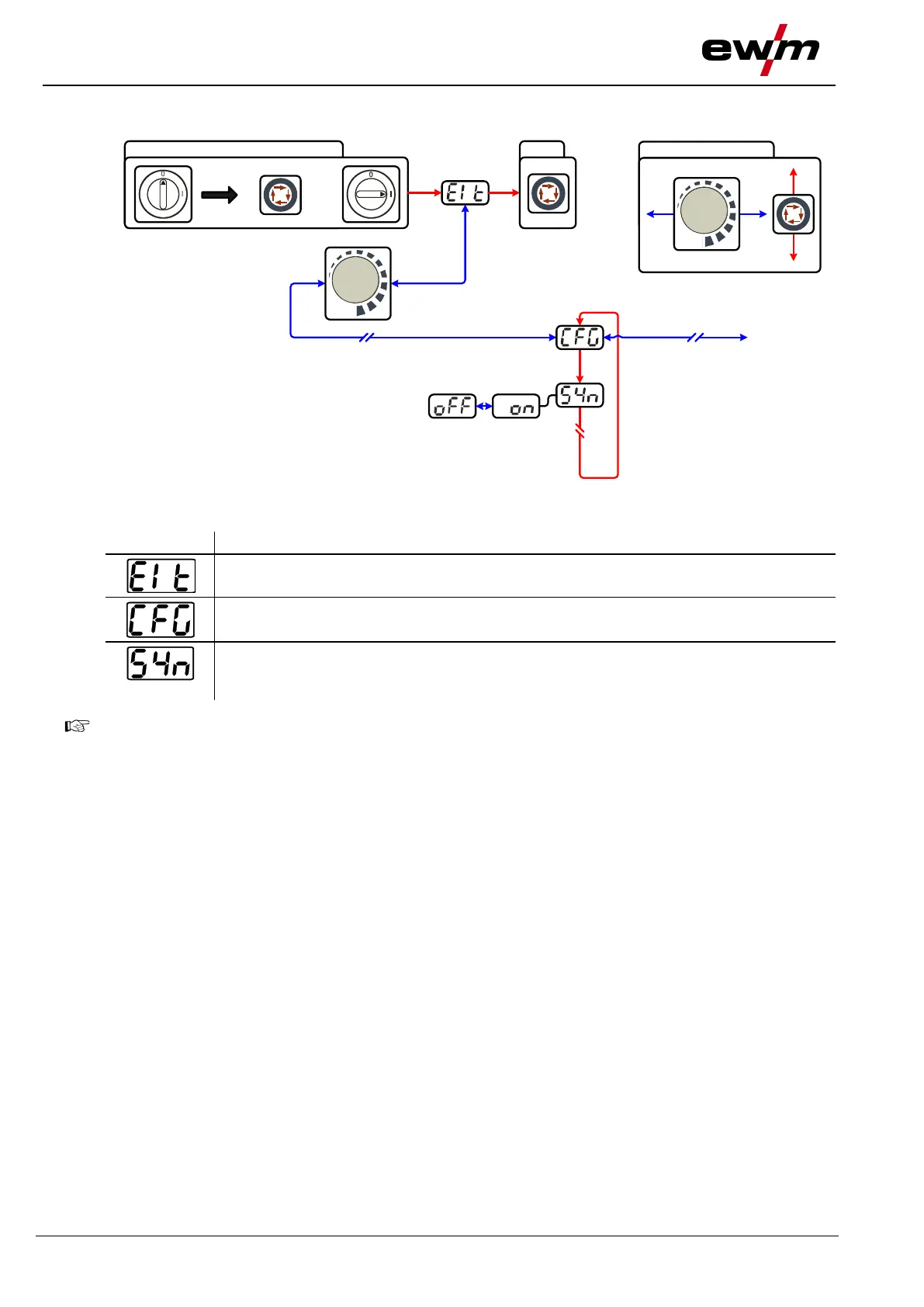
5.9.4.1 Set the operating principle (conventional/synergic)
NAVIGATION
ENTER
+
EXIT
l
0
Figure 5-13
Display
Setting/selection
Exit the menu
Exit
Machine configuration
Settings for machine functions and parameter display
Operating principle
on = synergic parameter setting (factory setting)
off = conventional parameter setting
ENTER (enter the menu)
Switch off machine at the main switch
Press and hold the "welding parameters" button and switch the machine on again at the same
time.
NAVIGATION (navigating in the menu)
Parameters are selected by pressing the "welding parameters" button.
Set or change the parameters by turning the "welding parameter setting" rotary dial.
EXIT (leave the menu)
Select the "Elt" menu item.
Press the "welding parameters" button (settings will be applied, machine changes to the
ready-to-operate status).


Table of Contents

Related product manuals