Design and function
TIG welding
099-000121-EW501
29.06.2015
5.9.5 Select welding task
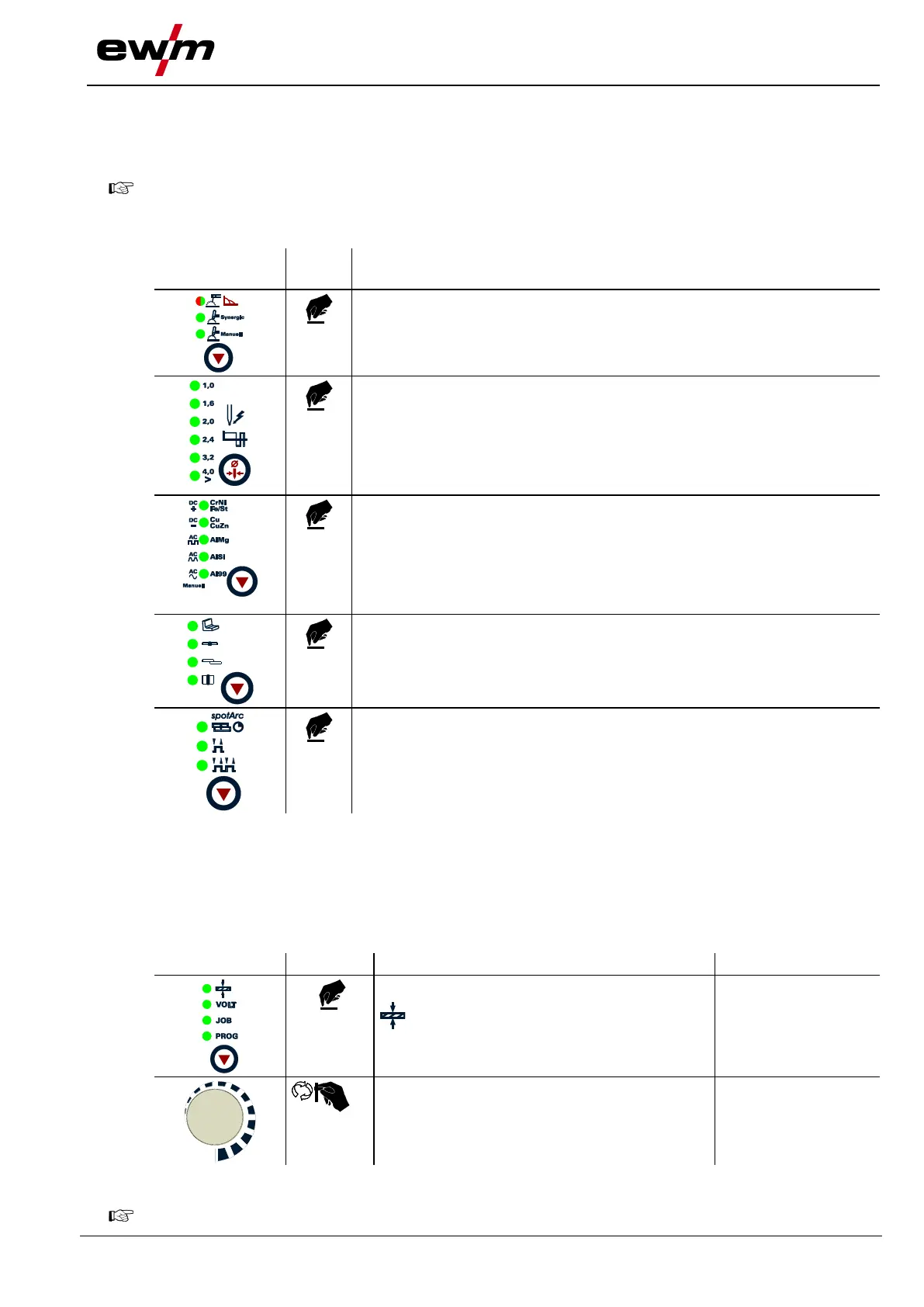
The welding task is selected using the buttons on the machine control on the welding machine.
Signal lights (LED) display the welding parameter selection.
It is only possible to change the basic welding parameters if:
No welding current is flowing and
The key switch (option) is set to position “1”.
Select and display welding process.
Select and display electrode diameter / ignition optimisation.
• TIG - Synergic:
Select electrode diameter (ignition optimisation is determined
automatically).
• TIG - Manual:
Select ignition optimisation.
Select and display material type or welding current polarity.
• TIG - Synergic:
Select material type (welding current polarity is determined
automatically).
• TIG - Manual:
Select welding current polarity.
Select and display seam type.
Select and display operating mode.
5.9.6 Select welding current
The user has two options for setting the required welding current:
• Using the sheet metal thickness
• Directly as welding current
The welding current is displayed in the left-hand display. The “Material thickness” parameter can
be selected in the right-hand display.
Press button until signal light
Material Thickness comes on.
Material thickness in
mm is displayed.
Set welding current or sheet metal thickness.
Welding current and
sheet metal thickness
are displayed
5.9.7 Expert menu (TIG)








 To Next Page