Getting Started with Your Unit
Fiber Inspection Scope 21
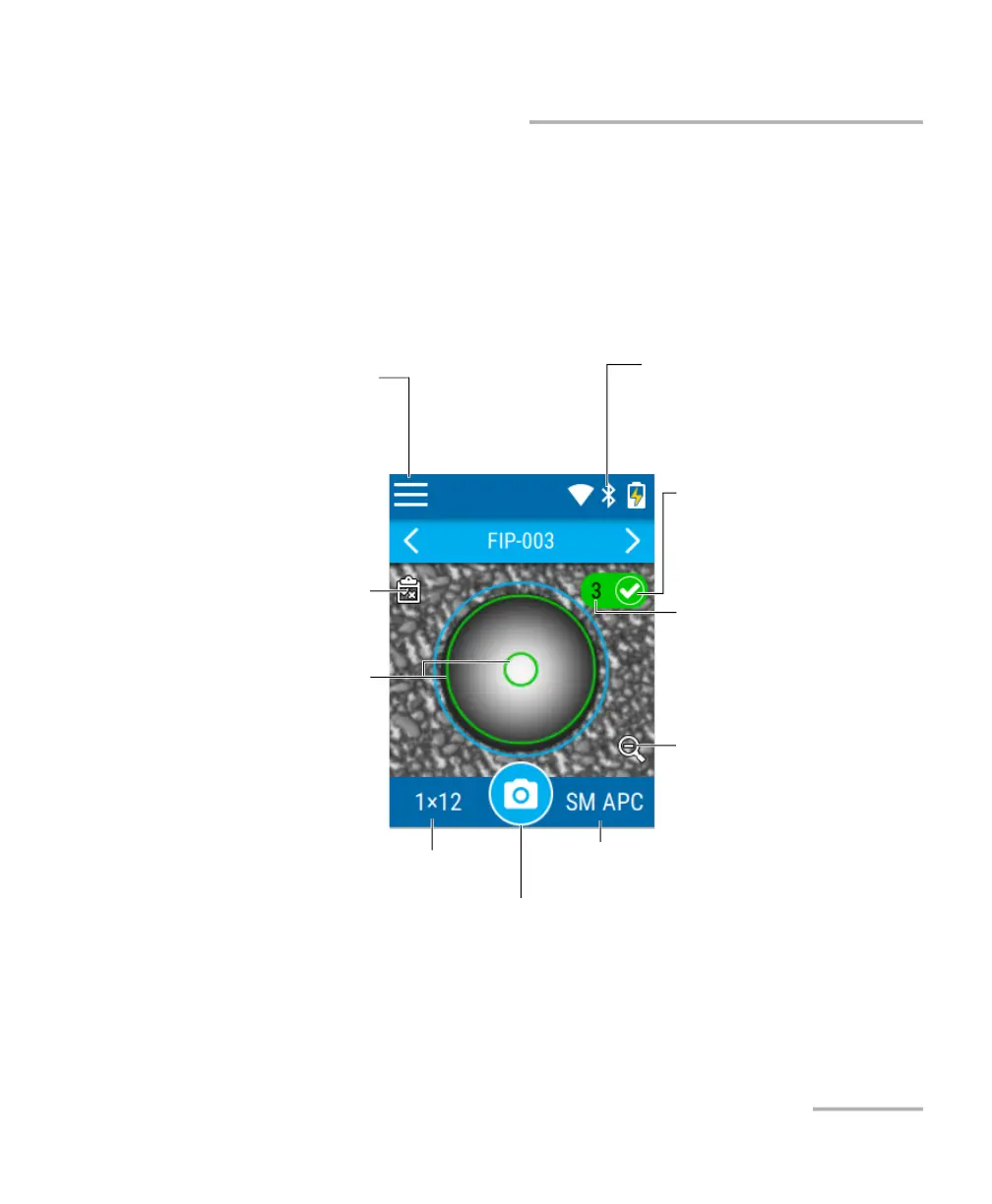
Understanding the Inspection Screen
Understanding the Inspection Screen
From the inspection screen, you can take captures of connectors under
inspection and view these captures. The inspection screen also shows the
title bar, which provides information on many elements such as the
Bluetooth connection, Wi-Fi connection and signal strength, as well as
battery level.
Note: You can also show or hide the overlay by tapping anywhere in the
non-active area (gray background) of the image or directly on the image of
the fiber when you view a specific fiber.
Title bar indicating the status
information of elements such as
Bluetooth, Wi-Fi, and battery
Main menu to access
other options
To show or hide the overlay
The icon and color in the
background indicate the global
pass/fail status of the connector.
To take a capture
To zoom out and view the overall
connector end-face image
Connector type (single-fiber–SF or
multi-fiber layout)
Fiber type
Number of the displayed fiber
(multi-fiber connector). The
background color indicates the
status of the inspection for this
fiber.
Overlay shown



 To Next Page