FTB-500 285
13 Troubleshooting
Solving Common Problems
Before calling EXFO’s technical support, you may want to consider the
following solutions to problems that could occur.
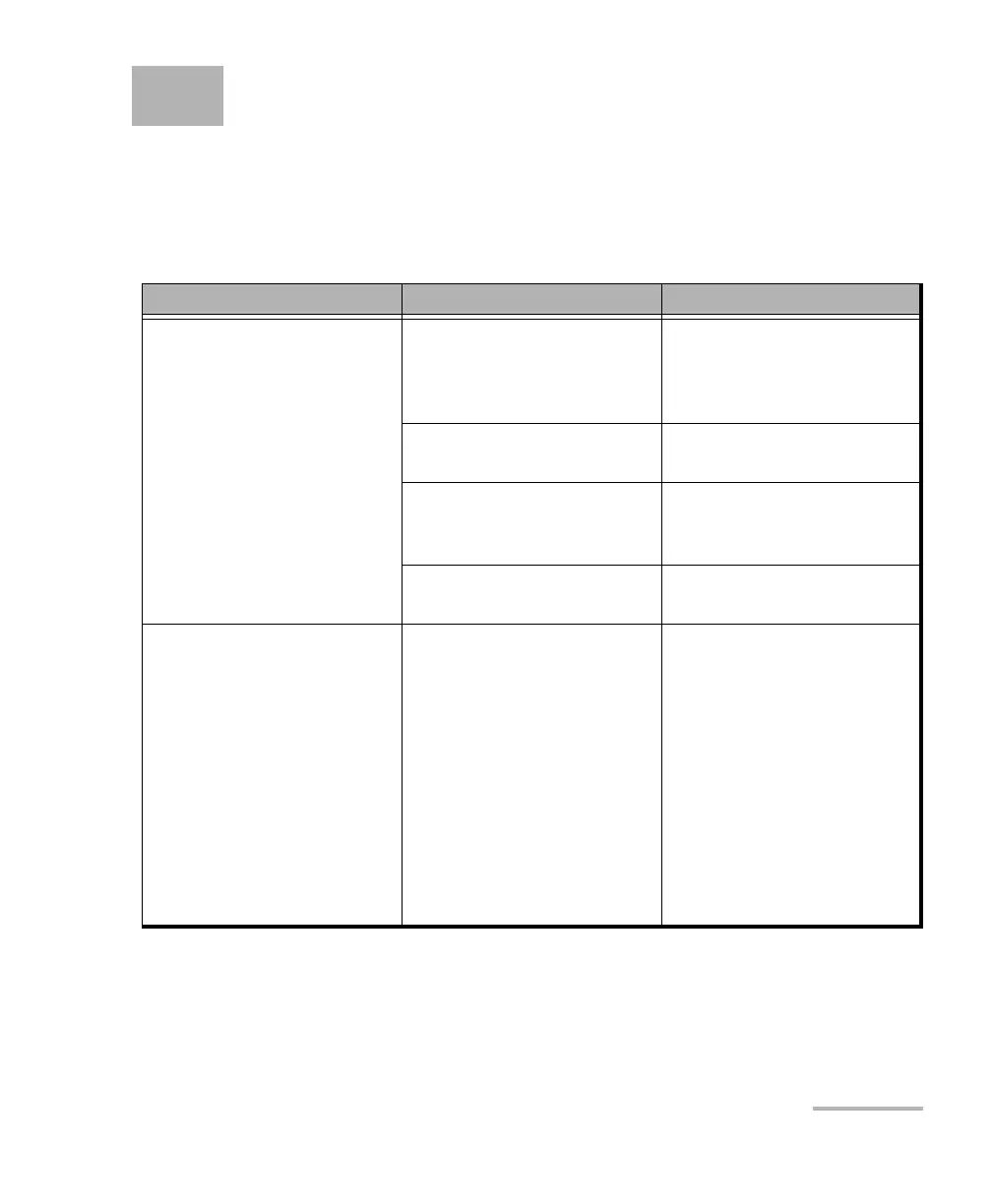
Problem Possible Cause Solution
My unit does not start. It is not connected to a
power source.
Ensure that the power cord
or the AC adpter/charger is
connected to both the unit
and the power outlet.
Batteries are completely
discharged.
Change or recharge the
batteries.
The system has
encountered a problem.
Press the On/Off button for
ten seconds to force a
hardware reset on the unit.
Windows startup files have
been corrupted.
Contact EXFO.
My unit is running slower
than expected.
The configuration of some
of the Windows
components is underway in
the background.
The first few times that you
start your unit, after a reset
operation, or after certain
updates, you may notice
that the performance of your
unit is not optimum.
If this is the case, you may
want to leave your unit idle
for about an hour to give
Windows the time to
complete its configuration
tasks.



 To Next Page