Home
EXFO
Measuring Instruments
FTB-500
Page 341 (B IEEE 488.2 and Specific Command Reference)
EXFO FTB-500 - B IEEE 488.2 and Specific Command Reference; IEEE 488.2 Commands-Quick Reference
449 pages
Manual
Save Page as PDF
To Next Page
To Next Page
To Previous Page
To Previous Page
Loading...
Data Types
FTB-
500
333
Applicable Data T
ypes for Output —IEEE 488.2
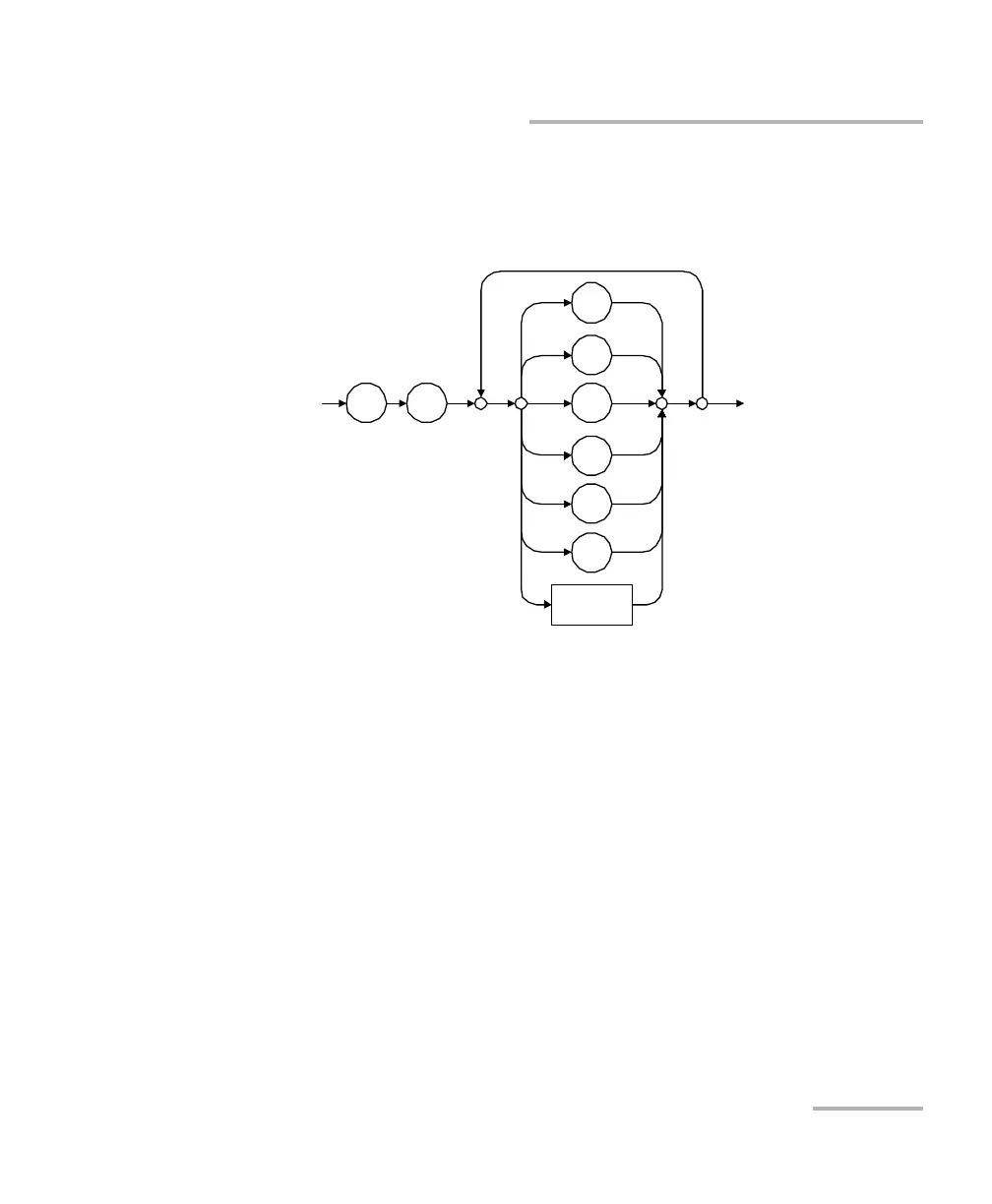
<HEXADECIMAL NUMERIC RESPONSE
DA
T
A>
This data type will be used by a dev
ice to return integer representatio
ns
in hexadecimal (base 16).
Examples: #HA3C5, #H0123C, #H010F
#
H
C
B
A
D
E
<dig
it
>
F
340
342
Table of Contents
Main Page
Default Chapter
3
Table of Contents
3
Certification Information
7
1 Introducing the FTB-500
9
Main Features
10
LED Indicators Description
16
Function Buttons Description
19
Power Sources
20
Automatic Fan Speed Management
21
Product Registration
22
Technical Specifications
22
Conventions
23
2 Safety Information
25
Other Safety Symbols on Your Unit
26
Laser Safety Information
27
Electrical Safety Information
28
3 Getting Started with Your Unit
31
Grounding Your Unit
31
Positioning Your Unit
33
Inserting and Removing Test Modules
34
Turning on Your Unit
40
Turning off Your Unit
40
Configuring Your Unit at First Startup
46
Accessing and Exiting Toolbox
48
Starting Module Applications
49
Using the On-Screen (Virtual) Keyboard
50
Working with Windows 8.1 Pro
50
Right-Clicking with the Touchscreen
52
Installing or Upgrading the Applications
53
Installing EXFO Labview Drivers
56
Activating Software Options
59
Installing Third-Party Software on Your Unit
62
Protecting Your Unit with an Antivirus Software
62
Securing Your Unit Using the Kensington Lock
63
Using a Keyboard, Mouse or Other USB Devices
64
Configuring an External Monitor
66
4 Setting up Your FTB-500
69
Adjusting Brightness
69
Adjusting Microphone and Speaker Volume
70
Recalibrating the Touchscreen
75
Customizing the Right-Click Feature
79
Enabling or Disabling the Automatic Logon
83
Selecting the Startup Applications
87
Configuring Network Printers
89
Selecting the Language of Operation
91
Setting Date and Time Formats
100
Adjusting the Date, Time and Time Zone
102
Configuring the Power Management Options
103
Setting Toolbox Behavior
113
Configuring the Internet Options
115
Configuring Parameters Via Windows Mobility Center
117
Setting Communication Parameters
118
Setting Other Parameters
118
5 Working with Your Unit
119
Printing Documents
119
Viewing PDF Files
120
Taking Screen Captures
121
Browsing the Web
123
Accessing the Internet with a 3G USB Modem Key
124
Retrieving the GPS Location of Your Unit
128
Managing Favorites
130
Using the Calculator
138
Using the Text Editor
138
Accessing Other Tools
139
6 Using the Optional Built-In Power Meter and VFL
141
7 Inspecting Fibers with a Probe
143
8 Managing Data
145
Viewing Disk Space and Managing Files
146
Transferring Data Via Bluetooth
147
Connecting to a Wireless Network
154
Using the USB to RS-232 Adapter
156
Freeing up Disk Space with the Disk Cleanup Utility
162
Connecting to a VPN from Your Unit
166
Using Your Unit as an FTP Server
172
9 Accessing Your Unit Remotely
175
Working with Remote Desktop
176
Working with Tightvnc
186
Adding Exceptions to the Firewall
192
10 Preparing for Automation
197
Linking Units with the Ethernet Port
199
Linking Units with the Serial Port
200
Getting Optimum Performance from Your Unit
201
Changing Communication Settings
203
Configuring DCOM Access to Your Unit
207
Preparing to Control Modules with a Dedicated Application
230
11 Using FTB Products in an Automated Test Environment
235
Standard Status Data Structure
236
SCPI Command Structure
240
Consulting Data Types
243
Writing Remote Control Code
244
Error Message Format
246
Working with EXFO Labview Drivers
247
Using the EXFO Getting Started Applications
249
Building and Using Custom Vis
254
Monitoring Remote Commands
261
12 Maintenance
265
Cleaning Detector Ports
266
Cleaning VFL-Type Connectors
267
Cleaning the Touchscreen
268
Recharging the Batteries
269
Replacing Batteries
272
Viewing Battery Status
278
Recalibrating the Batteries
280
Installing or Removing the Power Meter and VFL
282
Managing Windows Updates
289
Replacing Fuses (Eight-Slot Model Only)
291
Recycling and Disposal (Applies to European Union Only)
292
13 Troubleshooting
293
Solving Common Problems
293
Restoring Your Unit to Normal Operation
299
Accessing the Online Documentation
314
Contacting the Technical Support Group
315
Viewing System Information
316
Retrieving Network Interfaces Information
319
Transportation
322
14 Warranty
323
General Information
323
Liability
324
Exclusions
324
Certification
324
Service and Repairs
325
EXFO Service Centers Worldwide
326
A Data Types
327
Applicable Data Types for Input-IEEE 488.2
328
Applicable Data Types for Output -IEEE 488.2
337
Applicable Data Types for Input-SCPI
347
Special Numeric Values Received on Output
348
BIEEE 488.2 and Specific Command Reference
349
IEEE 488.2 Commands-Quick Reference
349
IEEE 488.2 Required Commands
350
Specific Commands-Quick Reference
370
Specific Commands
371
CSCPI-Based Errors
389
DCOM Properties and Events
405
Activex (COM/DCOM)-Quick Reference
406
Properties
407
Events
414
E Communicating through TCP/IP over Telnet
415
Introducing TCP/IP over Telnet
415
Features
416
Configuring Your Unit and Modules to Work with TCP/IP over Telnet
417
Executing SCPI Commands over Telnet
423
Releasing Modules
429
Internal Commands of the TCP/IP over Telnet Protocol
430
Related product manuals
EXFO FTB-5800
103 pages
EXFO FTB-2
509 pages
EXFO FTB-1v2
497 pages
EXFO FTB-2 Pro
509 pages
EXFO FTB-4 Pro
509 pages
EXFO FTB-1v2 Pro
497 pages
EXFO FPM-600
59 pages
EXFO FPM-300
40 pages
EXFO FIP-500
131 pages
EXFO FOT-600
79 pages
EXFO PX1-S
93 pages
EXFO EPM-50 Series
23 pages



 To Next Page