MLC 62 Series • Hardware Setup
2-17
Electrical
Box
Decora
Wallplate
VOLUME
DISPLAY
OFF
ON
MUTE
LAPTOP
VIDEO
PC
MLC 62 RS D
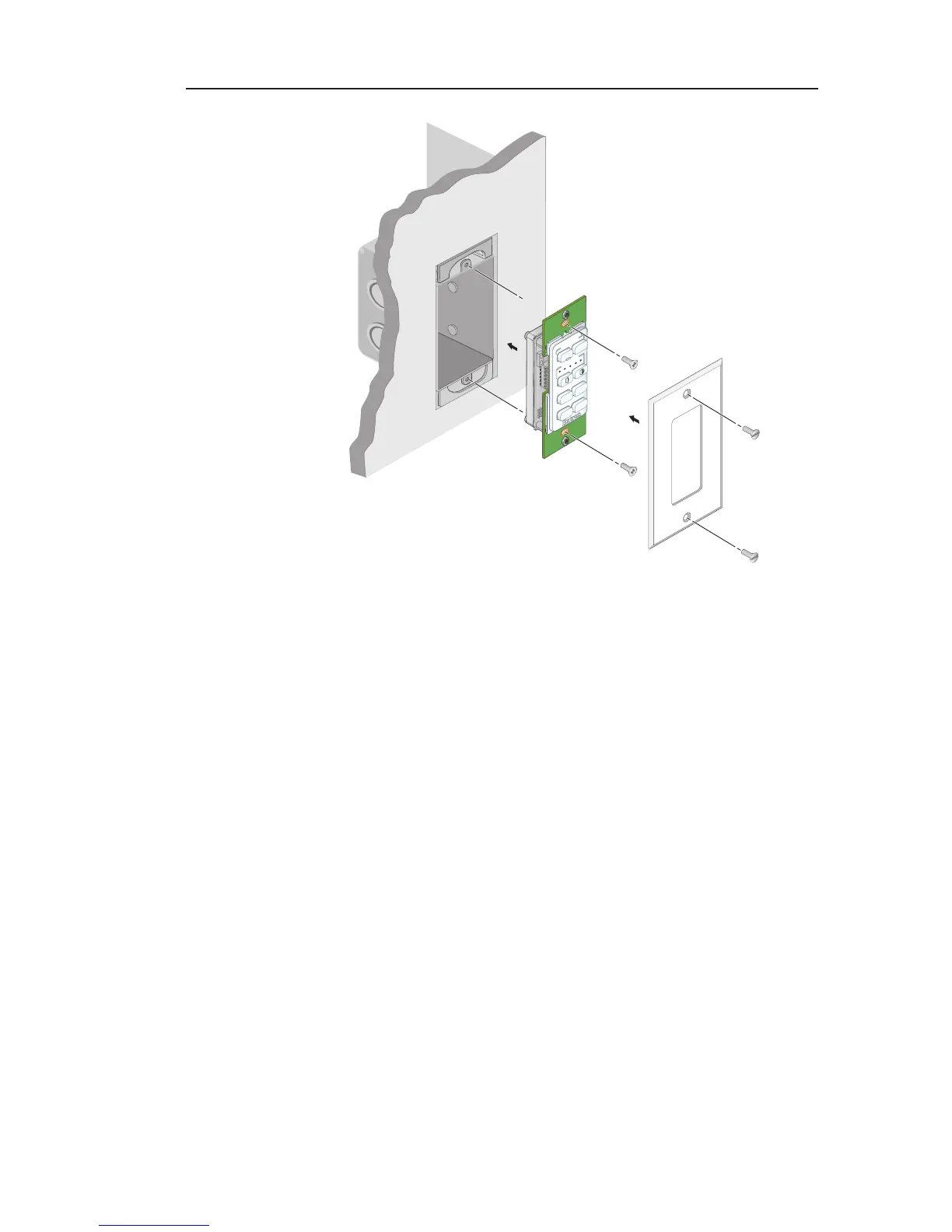
Mounting the MLC 62 D in an electrical junction box
Mounting to a Decora style mounting bracket (mud ring)
A one-gang, Decora style mounting bracket (mud ring) is
provided with the MLC 62 D models. If desired, you can mount
the MLC to this type of bracket instead of an electrical box.
To mount the controller to a Decora style mounting bracket,
follow these steps and refer to the illustration on the next page.
1. Cut a hole in the mounting surface large enough to
accommodate the provided one-gang Decora mounting
bracket.
2. Insert the mounting bracket into the hole.
3. Turn the two screws on the bracket so that the doglegs
rotate behind the mounting surface until they clamp
securely to it. Do not overtighten.
4. Place the MLC 62 D onto the mounting bracket so that the
oval screw holes at the top and bottom of the MLC line up
with the oval holes at the top and bottom of the bracket.
5. Attach the MLC to the bracket using two of the provided
screws in the holes at the top and bottom.



 To Next Page