Ch2. Connections | 15
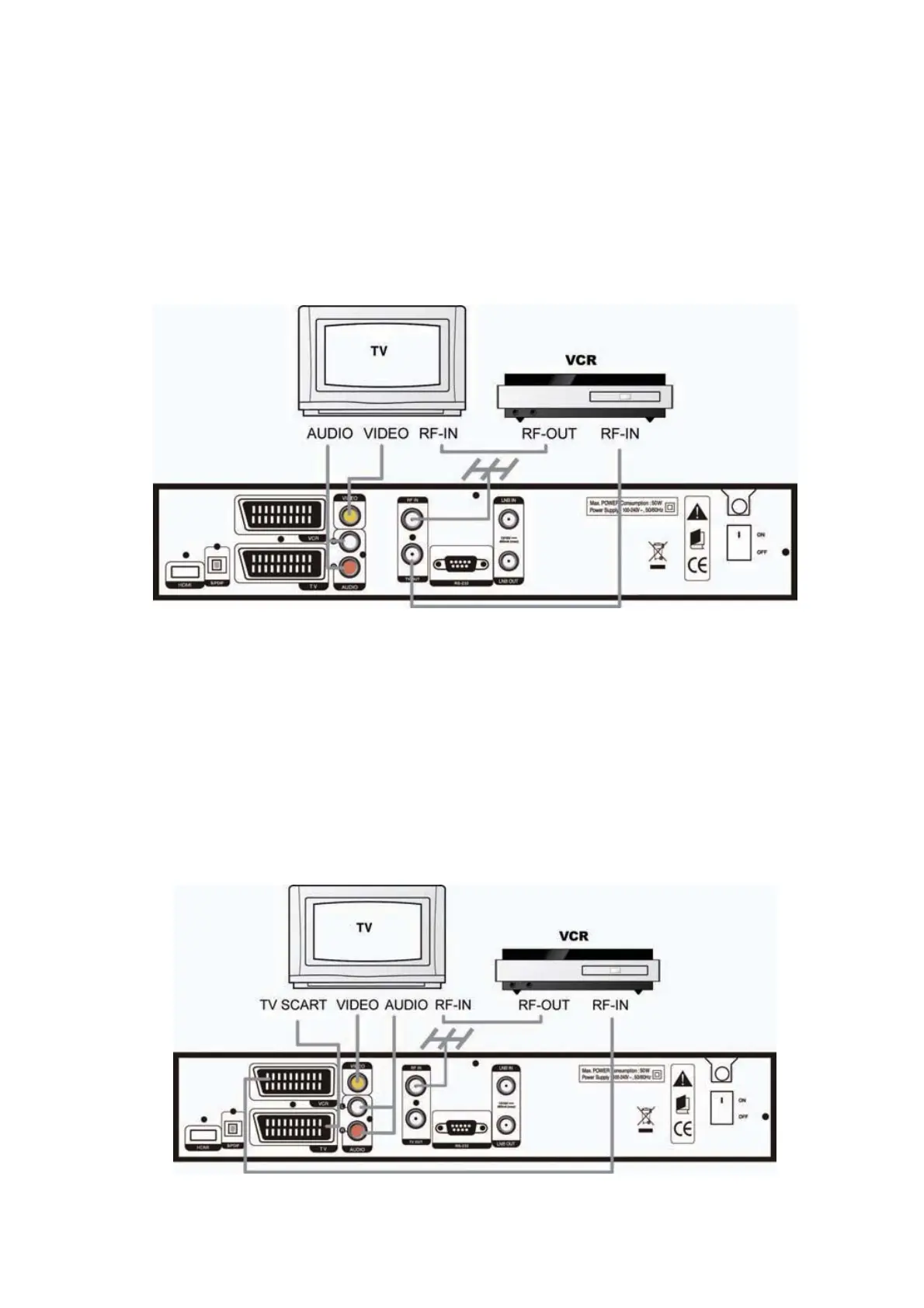
3. Connecting to TV and VCR with RF
1) Connect the TV antenna to the RF-IN of the receiver.
2) Connect the RF-IN of VCR to the RF-OUT of the receiver.
3) Connect the
{}
-OUT of VCR to the RF-IN of TV.
4) Connect the Video and Audio of TV to the VIDEO and AUDIO L/R of the receiver.
5) Go to section
2.2 Connecting to Dish, and
then connect your dish.
4. Connecting TV and VCR with Scart Cable
1) Connect the TV antenna to RF-IN of the receiver.
2) Connect the RF-IN of VCR to the RF-OUT of the receiver.
3) Connect the RF-OUT of VCR to the RF-IN of TV.
4) Connect the Video and Audio of TV to the VIDEO and AUDIO L/R of the receiver.
5) Connect the TV Scart of TV to TV SCART with fully featured Scart cable.
6) Go to section
2.2 Connecting to Dish, and
then connect your dish.



 To Next Page