66
(MT12 - Gb2004)
CT1 CT2
CT3
1
2
9
3
6
5
7
P1
P2
P3
1
2
9
3
6
5
7
P1
P2
P3
1
2
9
3
6
5
7
P1
P2
P3
CT4
2
3
7
P1
P2
P3
1
2
9
3
6
5
PT520+
PT501+
SR40
PT520+
PT501+
SR40
PT520+
PT501+
SR40
PT520+
PT501+
SR40
SR40
1
CT1 CT2
CT3
1
2
9
3
6
5
7
P1
P2
1
2
9
3
6
5
7
P1
P2
2
7
P1
P2
1
2
9
3
6
5
PT520+
PT501+
SR40
PT520+
PT501+
SR40
PT520+
PT501+
SR40
SR40
1
CT1
CT2
1
2
9
3
6
5
7
P1
7
P1
1
2
9
3
6
5
PT520+
SR40
PT520+
SR40
1
SR40
I
NTERCOMS *
V
IDEOINTERCOMS *
T
ELECOMMUNICATION
Application diagrams
3 INTERCOMMUNICATING INTERCOMS
4 INTERCOMMUNICATING INTERCOMS
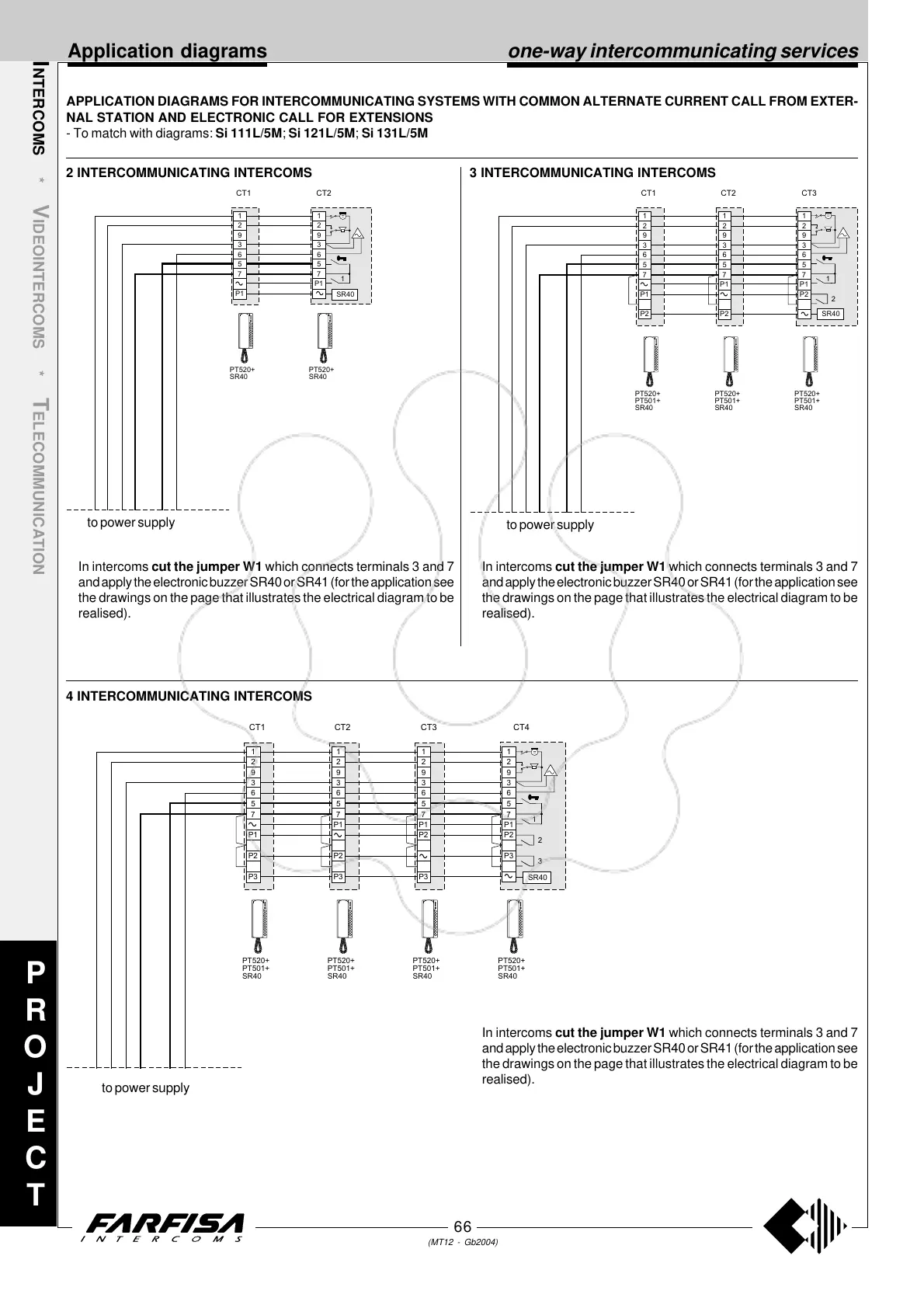
2 INTERCOMMUNICATING INTERCOMS
APPLICATION DIAGRAMS FOR INTERCOMMUNICATING SYSTEMS WITH COMMON ALTERNATE CURRENT CALL FROM EXTER-
NAL STATION AND ELECTRONIC CALL FOR EXTENSIONS
- To match with diagrams: Si 111L/5M; Si 121L/5M; Si 131L/5M
to power supply
to power supply
to power supply
P
R
O
J
E
C
T
one-way intercommunicating services
In intercoms cut the jumper W1 which connects terminals 3 and 7
and apply the electronic buzzer SR40 or SR41 (for the application see
the drawings on the page that illustrates the electrical diagram to be
realised).
In intercoms cut the jumper W1 which connects terminals 3 and 7
and apply the electronic buzzer SR40 or SR41 (for the application see
the drawings on the page that illustrates the electrical diagram to be
realised).
In intercoms cut the jumper W1 which connects terminals 3 and 7
and apply the electronic buzzer SR40 or SR41 (for the application see
the drawings on the page that illustrates the electrical diagram to be
realised).



 To Next Page