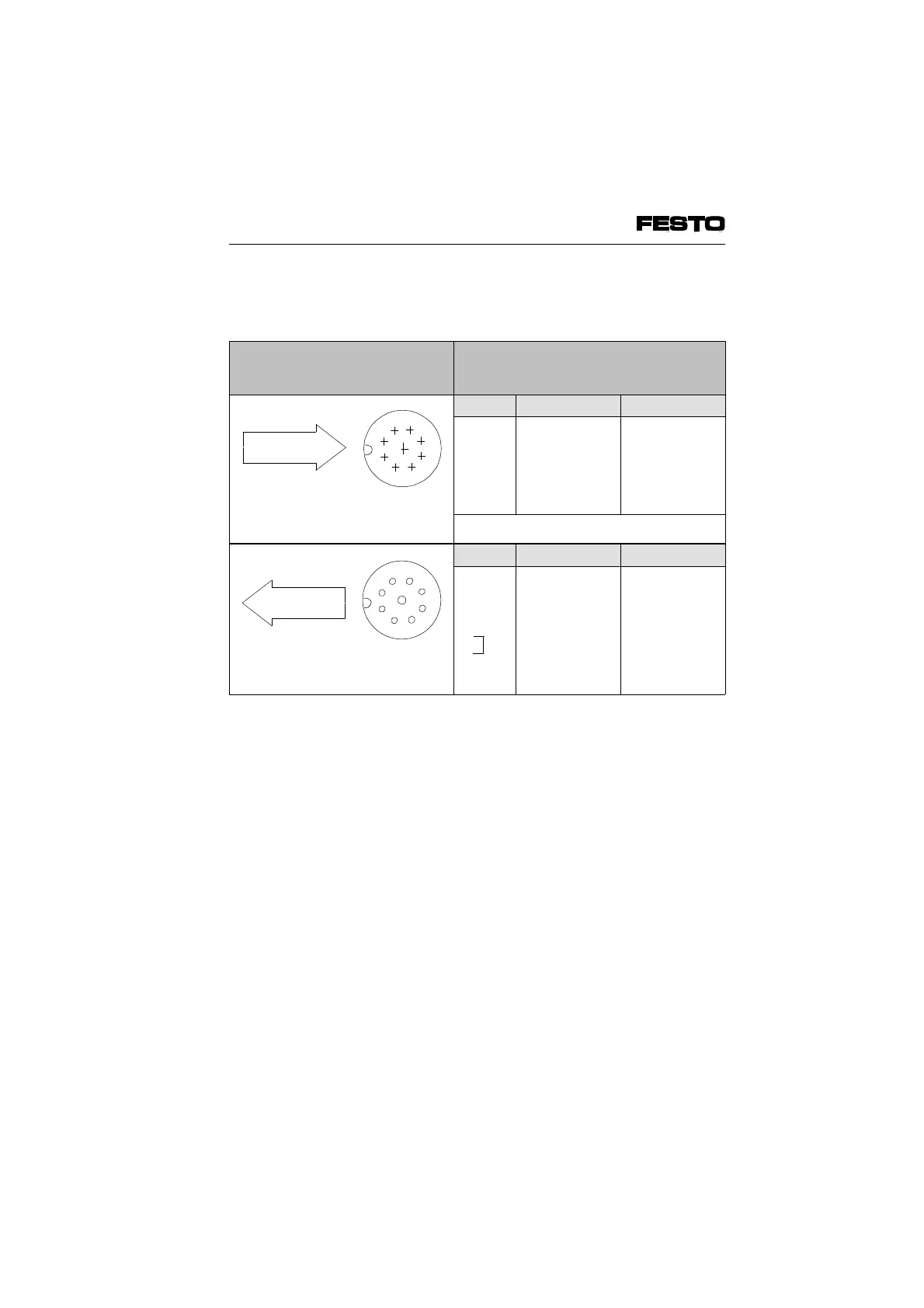
Connecting the remote bus for non-floating
operation
Plugs/sockets to be connected
(view of INTERBUS interface of
node)
Pin-assignment*)
Top view
Pin-no. Designation Meaning
1
2
3
4
5
Sleeve
DO
/DO
DI
/DI
Earth
Screen
Data out
Data out invers
Data in
Data in invers
Ref. conductor
Screening
*) Pins not listed must not be connected
Top view
Pin-no. Designation Meaning
1
2
3
4
5
9
Sleeve
DO
/DO
DI
/DI
Earth
RBST
Screen
Data out
Data out invers
Data in
Data in invers
Ref. conductor
Make bridge
to pin 5
Screening
Fig. 3/18a: Connecting the remote bus for non-floating operation
9
1
2
3
4
5
6
7
8
Remote bus
incoming
9
8
7
6
5
4
3
2
1
Remote bus
outgoing
VIFB6 - 03/05 3. Installation
3-42
9809c








 To Next Page