A. Technical appendix
A-9
Festo P.BE-CB-COMP-EN en 1102d
A.2 Status displays on the control panel
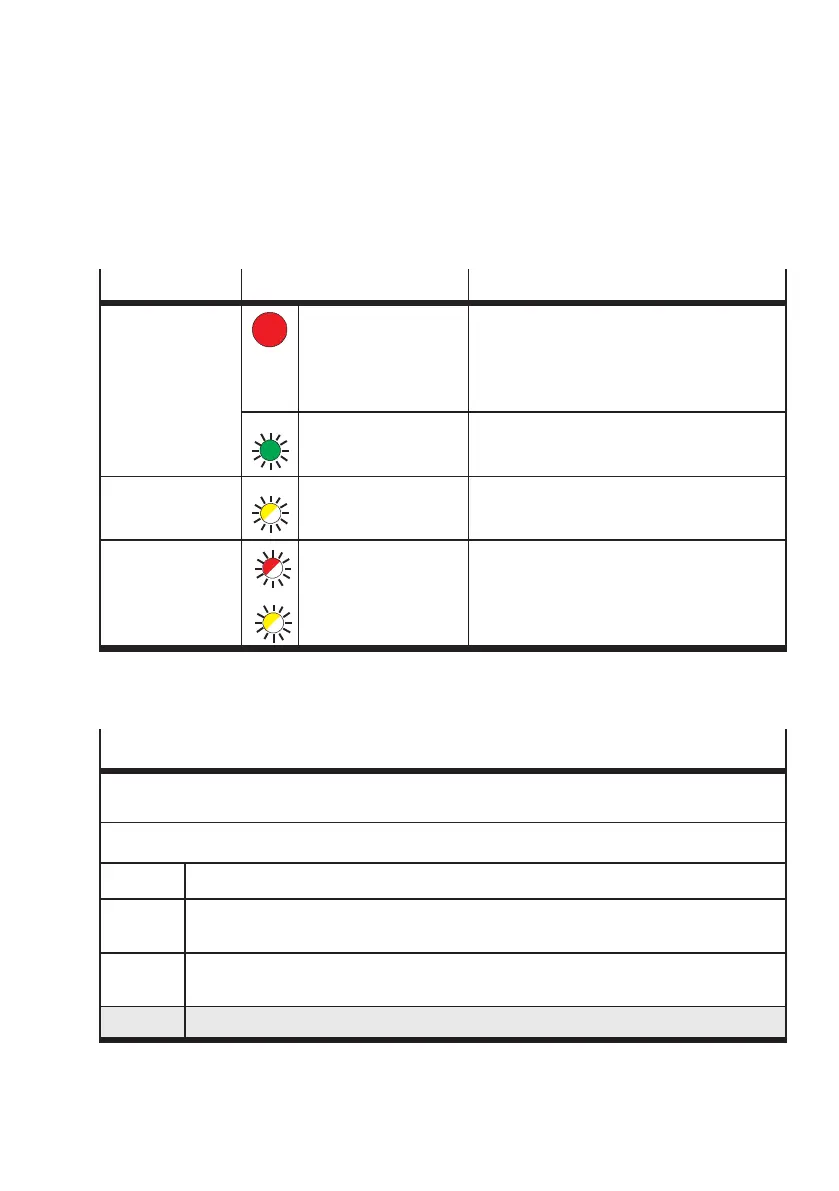
Push-button Status Significance
START/STOP Continuous red light Checkbox is in the
–AUTOmode
(Display e.g.: 1 5) or
–TEACHmode
(Display e.g.: = 1 o1)
Continuous green light Checkbox is ready to operate (Stop status)
(display: Stop)
STATUS/TEACH Flashes yellow New part passes the camera
START/STOP
STATUS/TEACH
Flashes red
Flashes yellow
Malfunction
Display fault code E... or warning F...,
see A ppendix A. 1.2
Tab. A/4: Illuminated push-button
Operating status displays
Tables on a grey background indicate continuous displays; the remaining displays last only a shor t
time as a result of an event or an operating status.
Display when the device is switched on
CC30
Identification code and version status of the operating system
4..E
Number of memory modules for parts types and additionally the letter E with system
setting “with encoder”. Example: 4 memory modules, encoder.
2048
System setting of the c amera resolution
Example: 2048 pixels
Stop
The Checkbox is in the Stop status



 To Next Page