MS-9200UDLS/E/C Manual — P/N 52750:F 7/26/2010 59
Optional Module Installation Installation
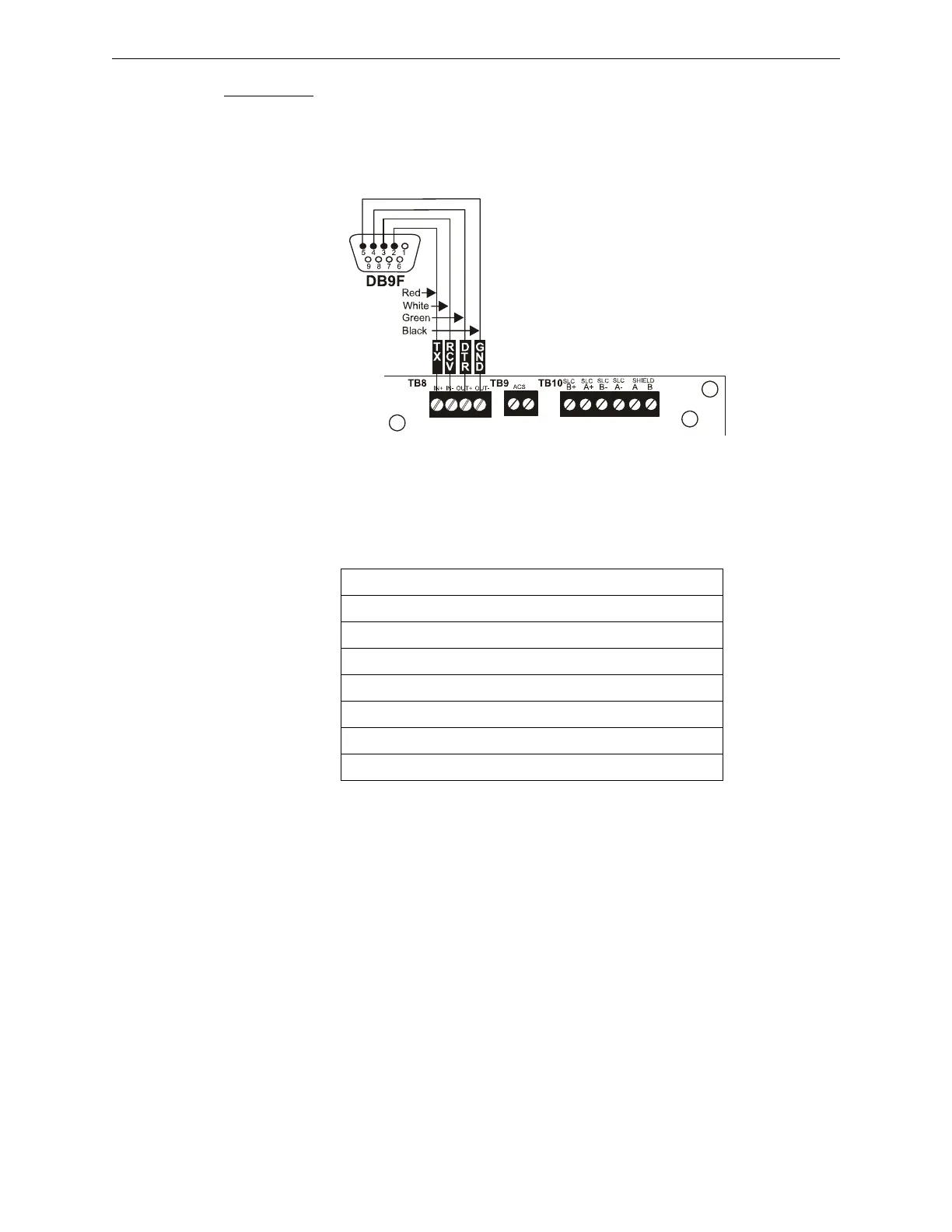
Receive lines. Apply power to the FACP and printer or PC. Note that a ground fault (zero imped-
ance to ground) may occur on the FACP, dependent on the printer or PC being used, due to this
connection. For this reason, it is important that there be no preexisting ground fault on the panel.
Note that the printer may or may not be supervised as determined by user programming. Refer
to“Printer/PC” on page 144.
Printer Configuration
Refer to the documentation supplied with the printer for pertinent information about printer setup.
Set the printer’s options as listed in the following table:
COMMUNICATION SETUP
BUFFER: LARGE
DATA BITS: 7
PARITY: EVEN
STOP BIT: 1 STOP
BAUD RATE: 2400/4800/9600
AUTOMATIC LINE FEED NO
AUTOMATIC CARRIAGE RETURN NO
Table 2.1 Printer Options
PRT/PK-CABLE
9
2
u
d
l
s
t
b
8
.
c
d
r
Figure 2.17 Serial Printer and Computer Connections














 To Next Page