58 MS-9200UDLS/E/C Manual — P/N 52750:F 7/26/2010
Installation Optional Module Installation
2.9.2 Printer
A serial printer may be connected to TB8 Terminals 1 - 4 on the FACP when TB8 is not being used
for annunciators or a local PC connection. The printer can be used to provide a hard-copy printout
of real-time events, history file and walktest data. Installation the device requires panel program-
ming to allow the FACP to communicate with the device.
A parallel printer may also be connected to the FACP using the optional ANN-S/PG Serial/Parallel
Interface Module. Refer to “ANN-S/PG Serial/Parallel Interface Installation” on page 30 for
installation details. Refer to “ANN-BUS Options” on page 120 for programming information.
Installation
Serial printers and PCs require separate primary power. Also required is the serial
PRT/PK-CABLE which is an interface cable prewired to a DB9F connector. Wire the PRT/PK-
CABLE to TB8 Terminals 1 - 4 as illustrated in the following figure. Connect the DB9F connector
to the printer or PC serial EIA-232 port. If a nine-pin serial connector is not available on the printer
or PC, use a DB25 adapter. Make certain that the DB25 adapter does not swap the Transmit and
NO NC C NC NO C
TB5
TB9
TB8TB6
TB10
PH15
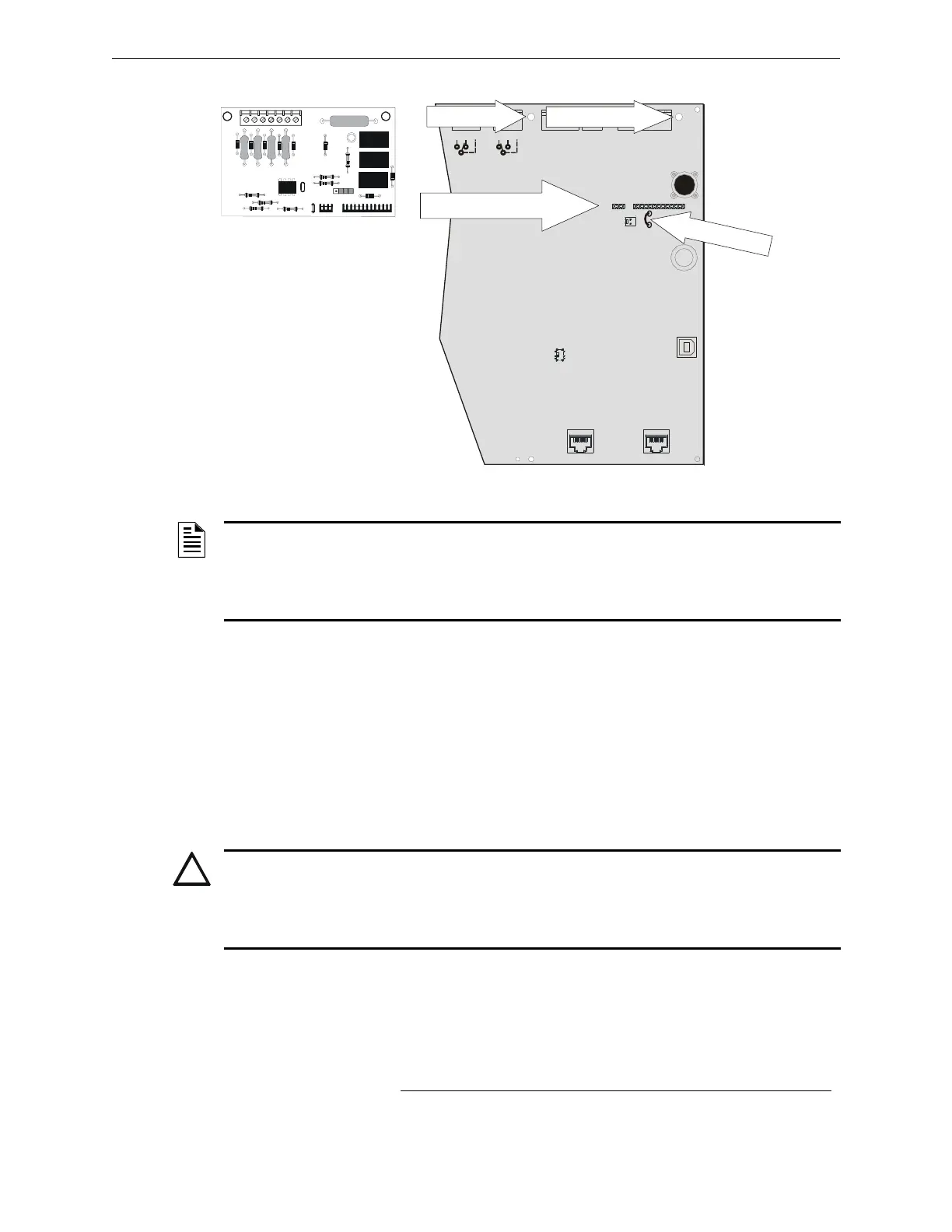
Figure 2.16 4XTMF Connectors to MS-9200UDLS Connectors
J5 & J6 Connectors
C
u
t
Ju
m
p
e
r
JP
3
Standoff Standoff
4XTMF
FACP main circuit board
9
2
u
d
l
s
c
4
x
t
m
.
w
m
f
NOTE: Jumper JP2 on the FACP main circuit board can be used to configure the FACP
supervisory relay for operation with the 4XTMF module. Relay 3 at TB5 must be programmed as
a supervisory relay.
Cutting JP2 will allow the 4XTMF to generate a trouble if the supervisory contact opens
Leaving JP2 in will prevent generation of a trouble if the supervisory contact opens.
CAUTION: POSSIBLE EQUIPMENT DAMAGE
DO NOT CONNECT A PRINTER OR PC TO THE MS-9200UDLS FACP IF A GROUND FAULT
(ZERO IMPEDANCE TO GROUND) EXISTS ON THE CONTROL PANEL. CIRCUIT DAMAGE
MAY RESULT. REMOVE ALL POWER (PRIMARY AND SECONDARY) BEFORE INSTALLING OR
REMOVING ANY WIRING.














 To Next Page